云计算 阅读材料 7 Introduction and Motivation for Virtualizing Resources
本页目录
In the last unit, we delved into depth about data centers, the components as well as design decisions for data centers. To build a cloud though, creating a data center is not enough. We need some mechanism to manage and share data center resources over multiple clients (or tenants). This sharing of resources must be done in a safe, efficient and isolated manner. This is where resource sharing technologies come in.
In this unit, we will go into some depth about various resource sharing techniques, but we will focus on the big one: Virtualization. Recall in Unit 1, you learnt about the evolution of cloud computing and surprising fact that the ideas of utility computing date actually back to the 1960s. You learnt also the evolution and combination of multiple technologies led to the emergence of the cloud today. Virtualization is arguably one of the most important of those technologies, acting like a kind of glue that holds everything together.
You will find this unit to be more systems focused than the previous units, but a thorough understanding of virtualization will help those who intend on taking systems-focused roles in the industry and will help those with research inclinations in this space.
In this module of this unit, we will look at virtualization in general and understand some of the key motivations behind virtual machines, the limitations of general purpose operating systems that led to the emergence of virtualization, and a whirlwind tour of the interfaces and abstractions in a modern computer system. We will then look at the bigger picture of resource sharing and what it means to share a resource in time and space.
The material presented in this Unit should contain sufficient detail for the course, but interested readers can refer to this popular book on virtual machines [1] to be a fairly comprehensive reference for all virtualization-related concepts.
References
- JE Smith and Nair (2005). "Virtual Machines: Versatile Platforms For Systems and Processes." Morgan Kaufmann.
Background and Motivation
Virtualization
Virtualization is at the core of the cloud computing paradigm. It lies on top of the cloud infrastructure (or the data center) whereby virtual resources (e.g., virtual CPUs, memories, disks, networks) are constructed from the underlying physical resources and act as proxies to them. As is the case with the idea of cloud computing, which was first introduced in the 1960s, virtualization can be traced back to the 1970s. Forty years ago, the mainframe computer systems were extremely large and expensive. To address expanding user needs and costly machine ownerships, the IBM 370 architecture, announced in 1970, offered complete virtual machines (VMs) (virtual hardware images) to different programs running on the same computer hardware. Over time, computer hardware became less expensive, and users started migrating to low-priced desktop machines. This migration drove the adoption of the virtualization technology to fade for a period of time. Today, virtualization is enjoying a resurgence in popularity, with a number of research projects and commercial systems providing virtualization solutions for commodity PCs, servers, and the cloud. The following video (Video 3.1) is a brief introduction to virtualization.
Video 3.1: Introduction to Virtualization.
In this unit, we study various ingredients of the virtualization technology and the crucial role it plays in enabling cloud computing. First, we identify major reasons for why virtualization is becoming essential, especially for the cloud. Second, we learn how multiple hardware and software images can run side-by-side on a single resource while provided with security, resource, and failure isolation, which are critical requirements for cloud computing. Prior to delving into more details about virtualization, we present a brief background requisite for understanding how physical resources can be virtualized. In particular, we indicate how system complexity can be managed in terms of levels of abstractions and well-defined interfaces. Next, we describe resource sharing, in space and in time, as a general technique for improving system utilization. To this end, we formally define virtualization and examine two main VM types: process and system VMs.
After introducing and motivating virtualization for the cloud, we describe in detail CPU, memory, and I/O virtualization. Specifically, we first identify conditions for virtualizing CPUs, recognize the difference between virtualization and paravirtualization, explain emulation as a major technique for CPU virtualization, and examine Xen's virtual CPU scheduling. Xen is a popular virtualization platform that Amazon utilizes in its AWS public cloud. Next, we outline the difference between conventional operating system's virtual memory and system memory virtualization, explain the multiple levels of page mapping as imposed by memory virtualization, define memory overcommitment, and illustrate memory ballooning, a reclamation technique for memory overcommitment in VMware, which is another common virtualization platform. Finally, we explain how CPU and I/O devices can communicate with and without virtualization, identify the three main interfaces (system call, device driver, and operation level interfaces at which I/O virtualization can be applied), and study I/O virtualization pertaining to Xen. We close with two main case studies, Amazon EC2, which applies virtualization to provide IaaS, and Google App Engine, which also applies virtualization to deliver PaaS.
References
- Barham et al. (2003). "Xen and The Art of Virtualization." In Proceedings of the nineteenth ACM symposium on operating systems principles (SOSP '03). ACM, New York, NY, USA.
- Michelle Bailey (2009). "The Economics of Virtualization: Moving Toward an Application-Based Cost Model." VMware Sponsored Whitepaper.
- Chen and Noble (2001). "When Virtual Is Better Than Real." IEEE Computer Society, Washington, DC, USA.
- JE Smith and Nair (2005). "Virtual Machines: Versatile Platforms For Systems and Processes." Morgan Kaufmann.
- A. Beloglazov and R. Buyya (2010). "Energy Efficient Allocation of Virtual Machines in Cloud Data Centers." CCGrid.
- A. Beloglazov, J. Abawajy, and R. Buyya (2012). "Energy-Aware Resource Allocation Heuristics for Efficient Management of Data Centers for Cloud Computing." Future Generation Computer Systems.
- Y. Jin, Y. Wen, and Q. Chen (2012). "Energy Efficiency and Server Virtualization in Data Centers: An Empirical Investigation." Computer Communications Workshops (INFOCOM WKSHPS).
- Silicon Valley Leadership Group (2008). "Accenture, Data Centre Energy Forecast Report." Technical Report.
Virtualization and Cloud Computing
Why Virtualization?
Virtualization is predominantly used by programmers to ease software development and testing. It is used by IT data centers to consolidate dedicated servers into more cost effective hardware and by the cloud (e.g., Amazon EC2) to isolate users sharing a single hardware layer and offer elasticity, among others. Next, we discuss six areas that virtualization enables on the cloud.
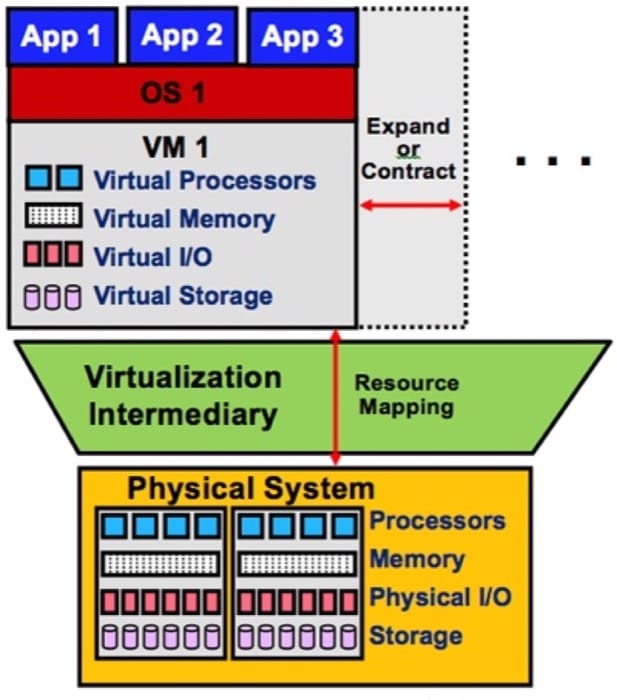
1.Enabling the cloud computing system model: A major use case of virtualization is cloud computing. As discussed in Unit 1, cloud computing adopts a model whereby software, computation, and storage are offered as services. These services range from arbitrary applications (called software as a service, or SaaS) such as Google Apps through platforms (called platform as a service, or PaaS) such as Google App Engine to physical infrastructures (called infrastructure as a service, or IaaS) such as Amazon EC2. For example, IaaS allows cloud users to provision VMs for their own use. As shown in Figure 3.1, provisioning a VM entails obtaining virtual versions of every physical machine component, including CPU, memory, I/O, and storage. Virtualization makes this possible via a virtualization intermediary called the hypervisor or the virtual machine monitor (VMM). Examples of leading hypervisors are Xen [1] and VMware. Amazon EC2 uses Xen for provisioning VMs to users.
2.Elasticity: A major property of the cloud is elasticity, or the ability to respond quickly to user demands by including or excluding resources for SaaS, PaaS, and/or IaaS, either manually or automatically. As shown in Figure 3.1, virtualization enhances elasticity by allowing providers/users to expand or contract services on the cloud. For instance, Google App Engine automatically expands servers during demand spikes and contracts them during demand lulls. On the other hand, Amazon EC2 allows users to expand and contract their own virtual clusters either manually (by default) or automatically (by using Amazon Auto Scaling). In short, virtualization is the key technology to attain elasticity on the cloud.
3.Resource sandboxing: A system VM provides a sandbox that can isolate one environment from others, ensuring a level of security that may not be applicable with conventional operating systems (OSs). First, a user running an application on a private machine might be reluctant to move her or his applications to the cloud unless guarantees are provided that her or his applications and activities cannot be accessed and monitored by any other user on the cloud. Virtualization can serve in offering a safe environment for every user by making it impossible for one user to observe or alter another's data and/or activity. Second, because the cloud can also execute user applications concurrently, a software failure of one application cannot generally propagate to others, if all are running on different VMs. Such a property usually is called fault containment. Clearly, this protection increases the robustness of the system. In a nonvirtualized environment, however, erratic behavior of one application can bring down the whole system.
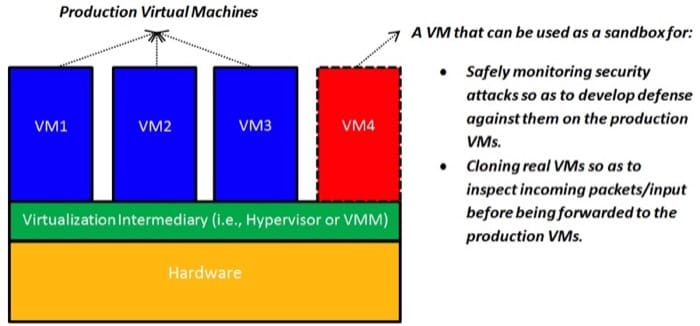
Sandboxing, as provided by virtualization, opens up interesting possibilities as well. As illustrated in Figure 3.2, a specific VM can be used as a sandbox whereby security attacks (e.g., denial-of-service attacks and inserting a malicious packet into a legitimate IP communication stream) can be safely permitted and monitored. This can allow the inspecting of the effects of such attacks, gathering information on their specific behaviors, and replaying them if necessary to design a defense against future attacks (by learning how to detect and quarantine them before they can cause any harm). Furthermore, suspicious network packets or input can be sent to a clone (a specific VM) before it is forwarded to the intended VM to preclude any potential ill effect. A VM can be thrown away after it has served its purpose.
4.Improved system utilization and reduced costs and energy consumption: It was observed very early that computer hardware resources are typically underutilized. The concept of resource sharing has been successfully applied in multiprogramming OSs to improve system utilization. Resource sharing in multiprogramming OSs, however, provides only process abstractions (not systems) that can access resources in parallel. Virtualization takes this step forward by creating an illusion of complete systems whereby multiple VMs can be supported simultaneously, each running its own system image (e.g., OS) and associated applications. For instance, in virtualized data centers (e.g., Amazon EC2), seven or more VMs can be provisioned on a single server, providing resource utilization of approximately 60% to 80%. [2] In contrast, approximately only 5% to 10% average resource utilization is accomplished in nonvirtualized data centers. [2] By enabling multiple VMs on a single physical server, virtualization allows consolidating physical servers into virtual servers that run on many fewer physical servers (a concept called server consolidation). Clearly, this consolidation can lead not only to improved system utilization but to reduced costs.
Server consolidation as provided by virtualization leads not only to improved system utilization and reduced costs but to optimized energy consumption in cloud data centers. Data centers hosting cloud applications consume tremendous amounts of energy, resulting in high operational costs and carbon dioxide emissions. [5] Server consolidation is considered an effective way to improve the energy efficiency of data centers by consolidating applications running on multiple physical servers into fewer virtual servers. Idle physical servers can subsequently be switched off to decrease energy consumption. Studies show that server consolidation can save up to 20% of data center energy consumption. [7] [8] A large body of research work illustrates the promise of virtualization in reducing energy consumption in cloud data centers. [5] [6] [7] Indeed, mitigating the explosive energy consumption of cloud data centers is currently deemed as one of the key challenges in cloud computing.
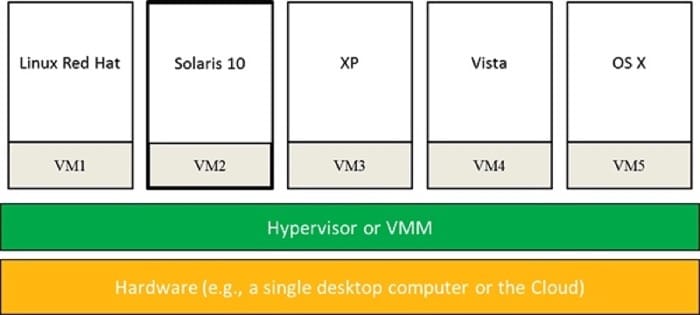
5.Mixed-OS environment: As shown in Figure 3.3 and pointed out in the previous subsection, a single hardware platform can support multiple OSs simultaneously. This provides great flexibility for users in which they can install their own OSs, libraries, and applications. For instance, a user can install one OS for office productivity tools and another OS for application development and testing, all on a single desktop computer or on the cloud (e.g., Amazon EC2).
6.Facilitating research: Running an OS on a VM allows the hypervisor to instrument accesses to hardware resources and count specific event types (e.g., page faults) or even log detailed information about events' nature, events' origins, and how operations are satisfied. Moreover, traces of executions and dumps of machine states at points of interests can be taken at the VM level, an action that cannot be performed on native systems. Last, system execution can be replayed on VMs from some saved state for analyzing system behavior under various scenarios. Indeed, the complete state of a VM can be saved, cloned, encrypted, moved, and/or restored; actions that are not so easy to perform with physical machines. [3] As such, it has become common for OS researchers to conduct most of their experiments using VMs rather than native hardware platforms. [4]
References
- Barham et al. (2003). "Xen and The Art of Virtualization." In Proceedings of the nineteenth ACM symposium on operating systems principles (SOSP '03). ACM, New York, NY, USA.
- Michelle Bailey (2009). "The Economics of Virtualization: Moving Toward an Application-Based Cost Model." VMware Sponsored Whitepaper.
- Chen and Noble (2001). "When Virtual Is Better Than Real." IEEE Computer Society, Washington, DC, USA.
- JE Smith and Nair (2005). "Virtual Machines: Versatile Platforms For Systems and Processes." Morgan Kaufmann.
- A. Beloglazov and R. Buyya (2010). "Energy Efficient Allocation of Virtual Machines in Cloud Data Centers." CCGrid.
- A. Beloglazov, J. Abawajy, and R. Buyya (2012). "Energy-Aware Resource Allocation Heuristics for Efficient Management of Data Centers for Cloud Computing." Future Generation Computer Systems.
- Y. Jin, Y. Wen, and Q. Chen (2012). "Energy Efficiency and Server Virtualization in Data Centers: An Empirical Investigation." Computer Communications Workshops (INFOCOM WKSHPS).
- Silicon Valley Leadership Group (2008). "Accenture, Data Centre Energy Forecast Report." Technical Report.
Limitations of General-Purpose Operating Systems
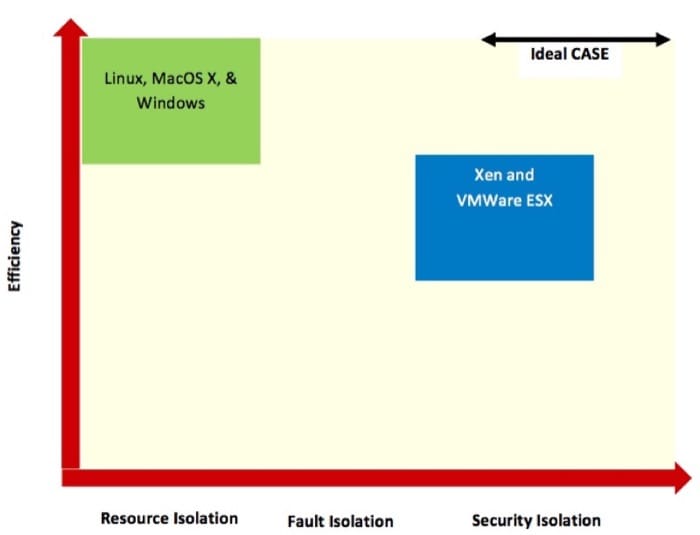
The operating system (OS) binds all hardware resources to a single entity, which limits the flexibility of the system, not only in terms of applications that can run concurrently and share resources, but also in terms of isolation. Isolation is crucial in cloud computing, with many users sharing cloud infrastructure. A system is considered to provide full isolation when it supports a combination of fault isolation, resource isolation, and security isolation. [1] Fault isolation reflects the ability to limit a buggy program from affecting another program. Complete fault isolation requires no sharing of code or data. Resource isolation corresponds to the ability of enforcing/controlling resource usages of programs. This requires careful allocation and scheduling of resources. Last, security isolation refers to the extent at which accesses to logical objects or information (e.g., files, memory addresses, port numbers) are limited. Security isolation promotes safety by which one application cannot reveal information (e.g., names of files or process IDs) to any other application. General-purpose OSs provide a weak form of isolation (only the process abstraction), not full isolation.
On the other hand, virtualization relaxes physical constraints and enables optimized system flexibility and isolation. Hypervisors allow running multiple OSs side by side yet provide full isolation (i.e., security, resource, and failure isolations). To mention a few, first, hypervisors can effectively authorize multiplex accesses to physical resources. Second, undesired interactions between VMs are sometimes called cross-talk, and hypervisors can incorporate sophisticated resource schedulers and allocators to circumvent cross-talk. Third, hypervisors offer no sharing among OS distributions. The only code and data shared among VMs is indeed the hypervisor itself. One exception is page-sharing mechanisms. Performance of VMs can be improved by sharing of memory pages between VMs in hypervisors such as VMware. However, this is done in a transparent, isolated fashion and only with data that is binary identical. This topic is covered in detail in the "Memory Virtualization" module.
Nonetheless, the unique benefits offered by virtualization have some side effects. For instance, the degree of isolation comes at the cost of efficiency. Efficiency can be measured in terms of overall execution time. In general, VMs provide inferior performance as opposed to equivalent physical machines. This is mainly due to: (1) the overhead of context switching between VMs and the hypervisor and (2) the duplication of efforts by the hypervisor and the OSs running in VMs (e.g., all might be running schedulers, managing virtual memories, and interpreting I/O requests).
Figure 3.4 demonstrates approximate logical locations of the two leading examples in virtualization, Xen and VMware ESX (more on these later in the module), vis-à-vis some traditional OSs along the efficiency and isolation dimensions. The x axis indicates the kind of isolation supported by the shown hypervisors and OSs, and the y axis exhibits qualitative efficiency. A basic observation is that, to date (March 2013), there is no VM technology that has reached the ideal case of maximizing both efficiency and isolation.
References
- Soltesz et al. (2007). "Container-Based Operating System Virtualization: A Scalable, High-Performance Alternative to Hypervisors." In ACM SIGOPS Operating Systems Review (Vol. 41, No. 3, pp. 275-287), ACM.
Managing System Complexity : Abstractions
Modern computers are among the most advanced human-engineered structures. These structures are typically very complex. Such complexity stems from incorporating various silicon chips, such as processors, memories, disks, displays, keyboards, mice, network interfaces, on which programs are operated and services are offered. The key to managing complexity in computer systems is dividing system components into levels of abstractions separated by well-defined interfaces.
Levels of Abstractions
The first aspect of managing computer complexity is by abstracting computer components. For instance, gates are built on electronic circuits, binary on gates, machine languages on binary, programming languages on machine languages, and operating systems along with associated applications on programming languages. Another abstraction that almost every computer user understands and uses is the file. Files are abstractions of disks. As demonstrated in Figure 3.5, the details of a hard disk are abstracted by the OS so that disk storage appears to applications as a set of variable-size files. Consequently, programmers need not worry about locations and sizes of cylinders, sectors, and tracks or bandwidth allocations at disk controllers. They can simply create, read, and write files without knowledge of the way the hard disk is constructed or organized.
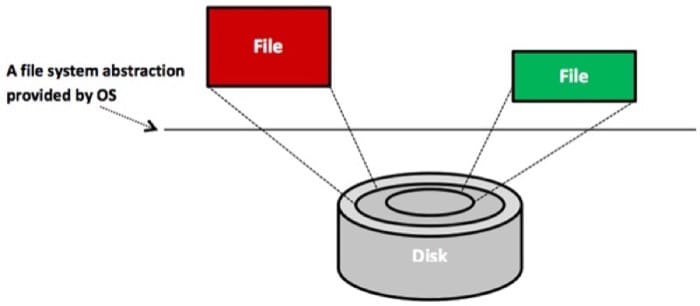
Another common example of abstraction is the process. Processes are abstractions of CPUs and memories. Hence, programmers need not worry whether their processes will monopolize CPUs or consume full memory capacities. The OS creates and manages all users' processes without any involvement from users. Abstractions for displays are also provided by drawing and windowing packages. Mouse clicks are abstracted as invocations to program functions. Keydown events at keyboards are abstracted as inputs of characters. Finally, abstractions for networks include layers/protocols, such as IP, UDP, and TCP. As shown in Figure 3.6, distributed systems (e.g., the cloud) build on network layers and involve extra layers, such as sockets, RMIs, and RPCs. In short, the ability of abstracting system components enables the simplified design, programming, and use of computer systems.
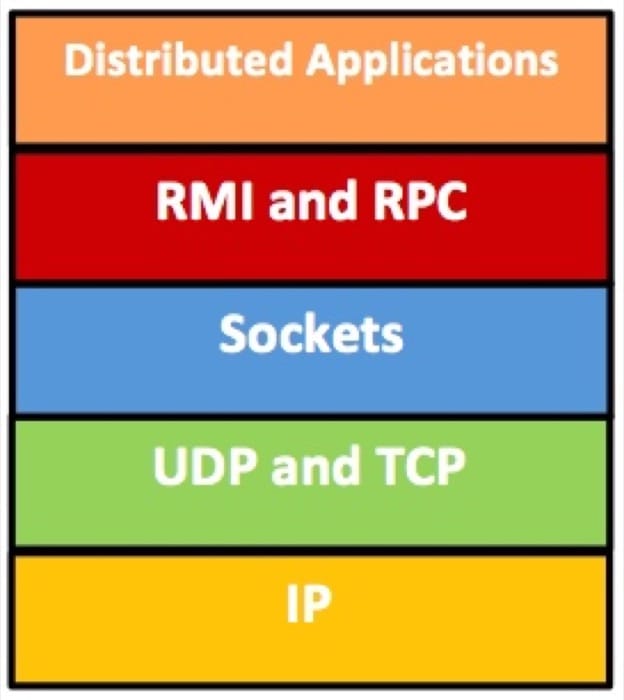
To this end, we note that abstractions can be applied at the hardware or software levels. At the hardware level, components are physical (e.g., CPU and RAM). Conversely, at the software level, components are logical (e.g., RMI and RPC). In this unit, we are most concerned with abstractions at the software or near the hardware/software levels.
Managing System Complexity : Interfaces
Well-Defined Interfaces
A system (or subsystem) interface is defined as a set of function calls that allow leveraging the underlying system's functionalities without needing to know any of its details. The two most popular interfaces in systems are the Application Programming Interface (API) and the Instruction Set Architecture (ISA) interface. Another interface that is less popular, yet important (especially in virtualization), is the Application Binary Interface (ABI). The following video (Video 3.2) describes API, ABI, and ISA.
Video 3.2: Computer System Architecture and Interfaces
As explained in Video 3.1, an API is used by high-level language (HLL) programmers to invoke some library or OS features. An API includes data types, data structures, functions, and object classes, to mention a few. An API enables compliant applications to be ported easily (via recompilation) to any system that supports the same API. Although the API deals with software source codes, the ABI is a binary interface. The ABI is essentially a compiled version of the API. Hence, it lies at the machine language level. With ABI, system functionalities are accessed through OS system calls. OS system calls provide a specific set of operations that the OS can perform on behalf of user programs. A source code compiled to a specific ABI can run unchanged only on a system with the same OS and ISA. Finally, the ISA defines a set of storage resources (e.g., registers and memory) and a set of instructions that perform arithmetic, control program execution, and allow manipulating data held at storage resources. ISA lies at the boundary between hardware and software. As discussed later in the unit, ABI and ISA are important in defining virtual machine types.
Platform as a service (PaaS) is at a higher level of abstraction than infrastructure as a service (IaaS).
Developers can build Web application developments using either IaaS (as provided by Amazon EC2) or PaaS (as provided by Google App Engine).
PaaS places restrictions on the libraries, the programming languages, and customized software that can be used for Web application development.
IaaS allows users to install any software necessary for Web application development.
FaceID, a Web services company, wants to offer a Web authentication tool as a service. FaceID has a legacy system for developing such tools. It cannot afford to develop its system from scratch.
Resource Sharing Basics
Effective Resource Sharing
The underlying infrastructure of the cloud (or the data center) might consist of thousands of processors connected to terabytes of memory and petabytes of disk capacity. Often, there is a mismatch between the ideal number of processors a certain application requires and the actual number of physical processors available. It is more frequently the case that an application cannot exploit more than a fraction of the processors available due to two main limitations:
- Availability of parallelism in the application
- Amenability of the application to scale well with more processors
These limitations led to the examination of techniques that can help utilize hardware resources more effectively. Among these techniques is resource sharing.
Resource Sharing in Space and in Time
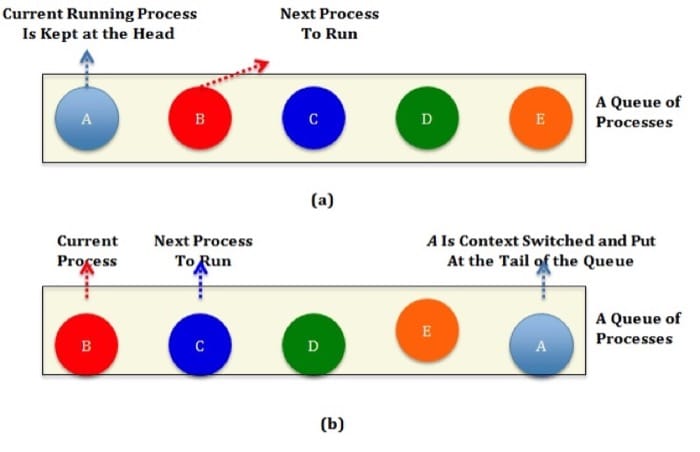
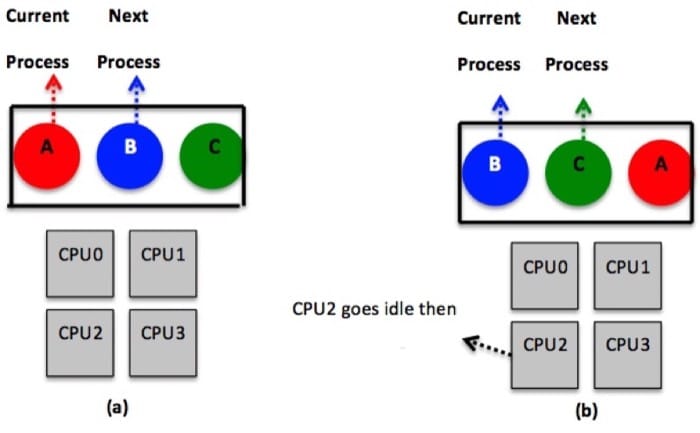
Resource sharing refers to multiplexing or partitioning system resources (e.g., CPUs, memory) among application processes. Resource sharing is not a new idea, and it has been applied traditionally to uniprocessor and multiprocessor systems via the operating system (OS). Typically, there are two ways to implement resource sharing, either in space or in time. Sharing in time (or timesharing) allows processes to take turns in using a resource component, while sharing in space enables each process to have exclusive access to a specific portion of a component. For instance, with a single CPU and multiple processes, the OS can allocate the CPU to each process for a certain time interval under the rule that only one process can run at a time on the CPU, which can be achieved by using a specific CPU scheduling mechanism. The part of the OS that performs scheduling, or more precisely decides which process runs next on the CPU, is called the scheduler. The strategy that the scheduler uses for multiplexing between processes is called the scheduling algorithm. One popular strategy for scheduling processes on a CPU is the round-robin algorithm (see Fig. 3.7). With round-robin, each process is assigned a time interval (or a quantum) during which it is allowed to execute. The OS can maintain a queue of processes, as shown in Figure 3.7 (a). When a process is scheduled on a CPU, and it completes execution for its time quantum, it gets preempted and added to the tail of waiting processes. The process at the head of the queue is then granted to run on the CPU, as depicted in Figure 3.7 (b). This is also called context switching.
As mentioned previously, resource sharing can be achieved in space as well. A common example of sharing in space is the sharing of the main memory. The main memory usually is partitioned into multiple partitions, each allocated to a process. Thus, the data of all processes will be resident in the same memory at the same time. Sharing memory in space makes the system more efficient than allocating the whole memory to a single process. In particular, it allows each process to take turns on the CPU in a much faster way (because it is faster to load the process state from the main memory than from disk). Another common example of sharing in space is the sharing of disk storage in which a disk can hold files from multiple users at the same time. Partitioning memory and disk spaces as well as keeping track of who is using which memory portion and/or which disk blocks are typical OS tasks. The OS abstracts system components, so resource sharing is eased. For instance, rather than having to worry about sharing the tracks, sectors, cylinders, and bandwidth of a disk drive, we simply deal with files.
References
- Raj Vaswani and John Zahorjan (1991). "The Implications of Cache Affinity on Processor Scheduling for Multiprogrammed, Shared Memory Multiprocessors." SIGOPS Oper. Syst. Rev. 25, 5.
Resource Sharing in Multiprocessor Systems
Sharing in Multiprocessor Systems
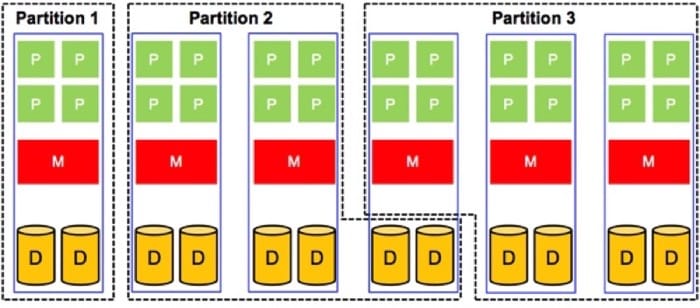
What we have discussed so far has to do with sharing in space and in time of a single system component (e.g., CPU, memory, and disk). In contrary, sharing a whole system is accomplished via sharing all of its components. In principle, this can be applied to uniprocessor and multiprocessor systems, with the caveat that sharing a multiprocessor system is always more involved. In this section, we focus mainly on sharing multiprocessor systems. Figure 3.8 depicts a multiprocessor system partitioned in space into three partitions. Each partition is assigned resources that are physically distinct from the resources used by the other partitions. Clearly, sharing in space allows a partition to own its resources physically. Hence, the number of partitions that can be supported in a multiprocessor system shared in space is limited to the number of available physical processors. In addition, it is often the case that each of the physical partitions is underutilized. Thus, sharing multiprocessor systems in space usually is a suboptimal solution for system utilization. Nonetheless, sharing multiprocessor systems in space has its own advantages. First, it protects each partition from the possibility of intentional or unintentional denial-of-service attacks by other partitions. It does not require sophisticated algorithms for scheduling and management of resources.
As compared to sharing in space, sharing multiprocessor systems in time makes it possible to partition an n-way system into a system with more than n partitions (i.e., we are no longer limited by the number of available physical processors). Figure 3.9 demonstrates a multiprocessor system with physical resources being shared in a time-multiplexed manner. Clearly, sharing in time allows better system utilization because it is permissible for two partitions to share the resources of a single system board. This, however, comes at the cost of requiring mechanisms to provide safe and efficient ways of sharing resources.
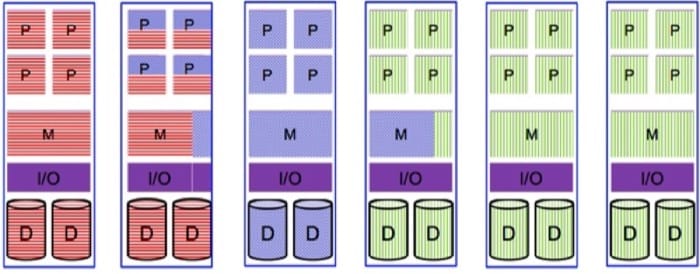
As pointed out previously, sharing resources in multiprocessor systems is more involved than in uniprocessor systems. For instance, in a uniprocessor system, scheduling is one dimensional. In particular, after the scheduler defines a specific quantum, it mainly decides which process should go next. In a multiprocessor system, however, after defining the quantum, the scheduler has to decide which process should go next and on which CPU. This latter extra dimension introduces some complexity, as illustrated in Figure 3.10. The figure reveals a way to deal with scheduling on multiprocessors in which a single, systemwide data structure (e.g., a list or a queue) is adopted. In Figure 3.10 (a), the four CPUs are busy, and multiple processes are waiting on a shared queue (i.e., seen and accessed by all CPUs), assuming a round-robin algorithm. In Figure 3.10 (b), CPU2 finishes its work and polls for the shared queue. When CPU2 gets access to the queue, it locks it and selects the next ready process as dictated by the round-robin algorithm. Locking the shared queue is done to avoid inconsistent accesses by multiple, idle CPUs.
Scheduling, as demonstrated by Figure 3.10, is easy to implement and provides some efficiency with respect to automatic load balancing. Specifically, load balancing is automatically offered because one CPU will never be idle while others are overloaded. In contrast, such a scheduling strategy exhibits a critical deficiency with regards to scalability. Particularly, as the number of CPUs is increased, contention on the queue as well as context switching overhead will increase.
Another complexity that has to do with scheduling on multiprocessor systems is the potential inefficiency of exploiting caching. Specifically, after process A in Figure 3.10 uses its quantum at CPU2, it gets context switched and later resumed (when its turn comes again), probably at a different CPU. When A has executed on CPU2, it is likely that the cache of CPU2 became full of A's cache blocks. Consequently, when A is resumed at a different CPU, it will suffer from a high cache miss rate that will affect its overall performance. Some multiprocessor systems address this problem by applying what is called affinity scheduling. The basic idea of affinity scheduling is to attempt to schedule a process on a CPU that it used in its previous quantum. More on affinity scheduling can be found in Vaswani and Zahorjan's "The Implications of Cache Affinity on Processor Scheduling for Multiprogrammed, Shared Memory Multiprocessors."
To this end, we note that resource sharing as described in this page (i.e., in the context of the OS) also applies to virtualization. Indeed, a core task of the hypervisor is to share/multiplex the underlying system components among various virtual machines. Similar to traditional OSs, the hypervisor can apply sharing strategies in space and in time. We discuss later in this unit how the hypervisor can pursue such sharing and provide examples of CPU scheduling algorithms from the Xen platform.
References
- Raj Vaswani and John Zahorjan (1991). "The Implications of Cache Affinity on Processor Scheduling for Multiprogrammed, Shared Memory Multiprocessors." SIGOPS Oper. Syst. Rev. 25, 5.
Introduction and Motivation Summary
- Virtualization is at the core of cloud computing. It allows the construction and provision of virtual hardware images (called virtual machines) from underlying physical machines.
- Virtualization enables the cloud computing model by making it possible to offer a range of cloud services, including IaaS, PaaS, and SaaS.
- Virtualization enhances the cloud elasticity by allowing providers/users to expand or contract services either manually or automatically.
- Virtualization provides resource sandboxing by making it difficult for one cloud user to observe or alter another's data and/or activity.
- Virtualization provides fault containment by preventing a software failure at one virtual machine (VM) to propagate to another VM, even if both exist at the same physical machine (PM).
- Virtualization provides server consolidation by allowing multiple VMs to run on a single PM, thereby improving system utilization and reducing costs.
- Although virtualization allows running multiple VMs side by side, it provides full isolation (i.e., security, resource, and failure isolations).
- Virtualized systems are complex. The key to managing complexity in virtualized systems is by dividing system components into levels of abstractions separated by well-defined interfaces.
- In general, system abstractions hide details and ease software development and manageability (e.g., files abstract disks, whereby programmers can simply create, read, and write files without worrying about locations and sizes of cylinders, sectors, and tracks or bandwidth allocations at disk controllers).
- Abstractions can be applied at the hardware and software levels.
- An interface of a system component is defined as set of function calls that allows leveraging the component's functionalities.
- The three most common system interfaces are the Application Programming Interface (API), the Instruction Set Architecture (ISA) interface, and the Application Binary Interface (ABI).
- ISA and ABI are of a special interest in virtualization, wherein they serve in defining VM types.
- A core task in virtualization is to share (or multiplex) the underlying system components (e.g., CPUs, memory) among various VMs.
- In general, resource sharing can be achieved in time (also called timesharing) and/or in space.
- Sharing in time allows VMs to take turns in using a resource component (e.g., sharing a physical CPU among the virtual CPUs of a VM), while sharing in space enables each VM to have an exclusive access to a specific portion of a component (e.g., sharing a physical memory among VMs).
- Timesharing and space sharing in multiprocessor systems are typically more involved than their counterparts in uniprocessor systems.
- Timesharing improves system utilization but requires sophisticated scheduling and management mechanisms.
- Space sharing is usually a sub-optimal solution for system utilization but a near-optimal solution for system complexity.