云计算 阅读材料 8 Virtualization
本页目录
Now that we have covered the motivation and benefits of virtualization, in this module, we will cover the formal definition of virtualization.
You may have also noticed that there are different types of virtual machines. For example, Java programs run inside a sandbox environment known as a Java Virtual Machine (JVM). You may also have seen or used virtualization software on your desktop or laptop, such as VirtualBox or Parallels, which allow you to run multiple Operating systems on your computer simultaneously. Also, you should have provisioned and used virtualized instances on a cloud provider in the programming projects for this course. Each of these virtualization systems are different; you will learn about the various virtualization types in detail in this module.
What Is Virtualization?
Virtualization
Formally, virtualization involves the construction of an isomorphism that maps a virtual guest system to a real host system. [1] Video 3.3 and Figure 3.11 illustrates the virtualization process.
Video 3.3: Definition of Virtualization.
The function V in the figure maps guest state to host state. For a sequence of operations, e, that modifies a guest state, there is a corresponding sequence of operations, e', in the host that performs equivalent modifications. Informally, virtualization creates virtual resources and maps them to physical resources. Virtual resources are created from physical resources and essentially act as proxies to them.
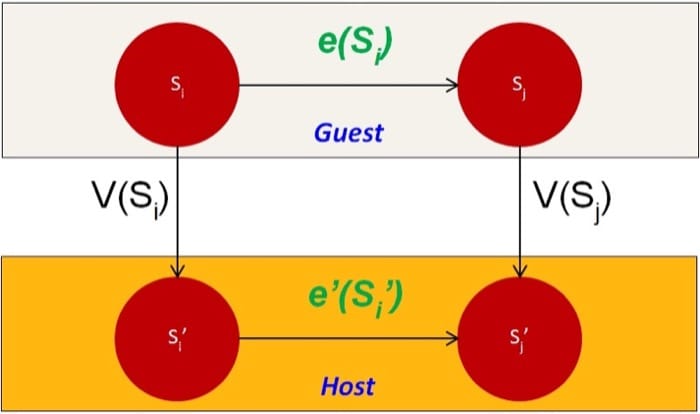
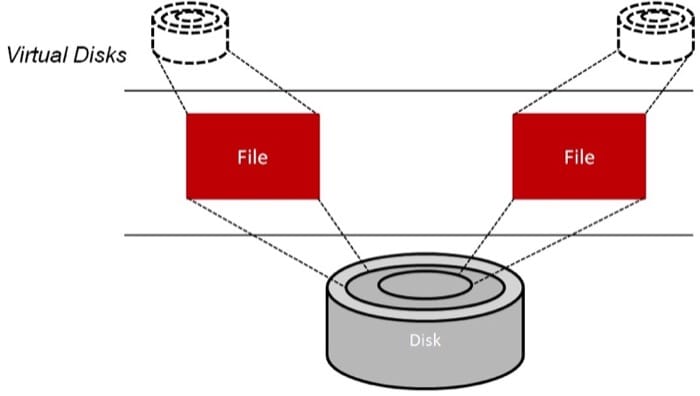
The concept of virtualization can be applied to either a system component or an entire machine. Traditionally, virtualization has been applied to only the memory component in general-purpose operating systems (OSs), providing what is known as the virtual memory. In a revisit to the hard disk example in Figure 3.5, some applications might desire multiple hard drives. To satisfy such a requirement, the physical hard drive can be partitioned into multiple virtual disks, as shown in Figure 3.12. Each virtual disk is offered logical cylinders, sectors, and tracks. This keeps the level of detail analogous to what is offered by general-purpose OSs, yet at a different interface and without being abstracted. The hypervisor can map (the function V in the isomorphism) a virtual disk to a single, large file on the physical disk. Afterward, to carry a read/write operation on a virtual disk (the function e in the isomorphism), the hypervisor reflects the operation as a file read/write followed by an actual disk read/write (the function e' in the isomorphism).
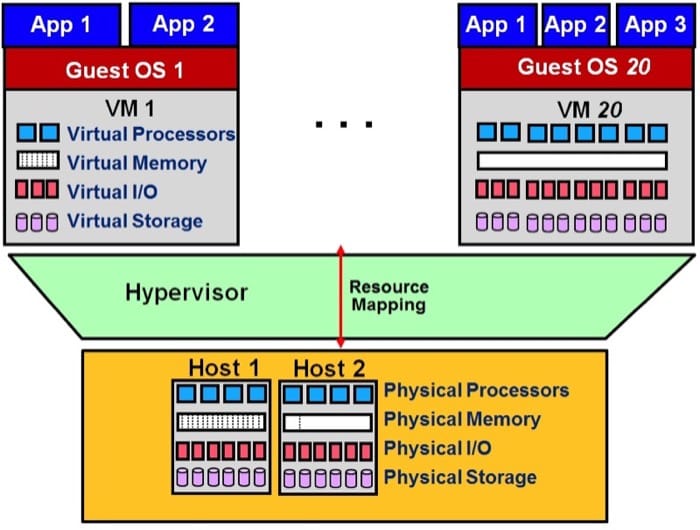
On the other hand, when virtualization is applied to an entire machine, it provides what is called a virtual machine (VM). Specifically, a full set of hardware resources, including processors, memory, and I/O devices, are virtualized to provide the VM. As shown in Figure 3.13, an underlying hardware machine usually is called a host, and an OS running on a VM is called a guest OS. A VM can run only at a single host at a time. As compared to a host, a VM can have resources different in quantity and in type. For instance, a VM can obtain more processors than what a host offers and can run an ISA that is different than that of the host. Last, every VM can be booted, shut down, and rebooted just like a regular host. Further details on VMs and their different types are provided on the next page.
References
- Popek, J., and Goldberg, R. (1974). "Formal Requirements for Virtualizable Third Generation Architectures." Commun. ACM, Vol. 17, No. 7.
Virtual Machine Types
There are two main implementations of virtual machines (VMs): process VMs and system VMs. The following video (Video 3.4) covers the taxonomy of Virtual Machine Types:
Video 3.4: Virtual Machine Types.
We first cover process VMs and then system VMs.
Process Virtual Machines
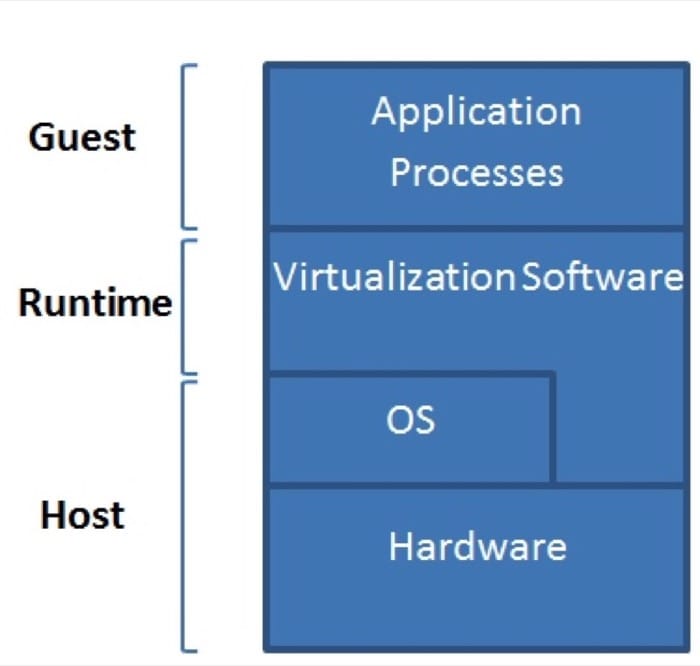
A process VM is a VM capable of supporting an individual process as long as the process is alive. Figure 3.14 demonstrates process VMs. A process VM terminates when the hosted process ceases. From a process VM perspective, a machine consists of a virtual memory address space, user-level registers, and instructions assigned to a process to execute a user program. According to this definition, a process in a general-purpose OS can also be called a machine. However, a regular process in an OS can only support user program binaries compiled for the ISA of the host machine. That is, executing binaries compiled for an ISA different than that of the host machine is not supported by regular processes. Conversely, a process VM allows that to happen. Process VMs can support ISAs that differ from host ISAs via emulation. As shown in Figure 3.15, emulation is the process of allowing the interfaces and functionalities of one system (the source) to be implemented on a system with different interfaces and functionalities (the target). Emulation is discussed in detail later. The abstraction of the process VM is provided by a piece of virtualizing software called the runtime (see Fig. 3.14). The runtime is placed at the Application Binary Interface (ABI) on top of the host OS and the underlying hardware. It is this runtime that emulates the VM instructions and/or system calls when guest and host ISAs are different.
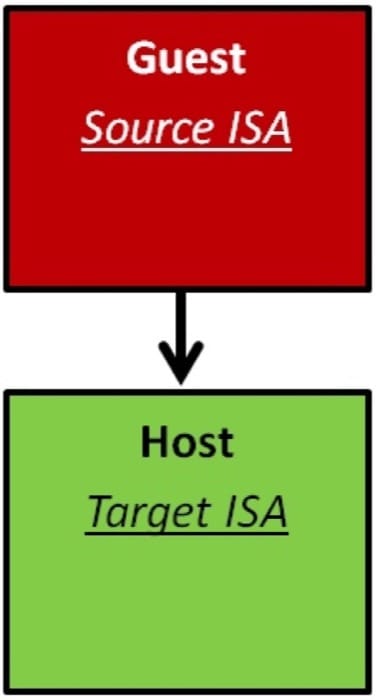
Finally, a process VM may not directly correspond to any physical platform; it is employed mainly to offer cross-platform portability. Such kinds of process VMs are called high-level language VMs (HLL VMs). An HLL VM abstracts away details of the underlying hardware resources and the OS and allows programs to run the same way on any platform. Java VM (JVM) and Microsoft Common Language Infrastructure (CLI) are examples of HLL VMs. In summary, a process VM is similar to a regular process running on an OS. However, a process VM allows, via emulation, the execution of an application compiled for an ISA different than that of the host machine.
System Virtual Machines
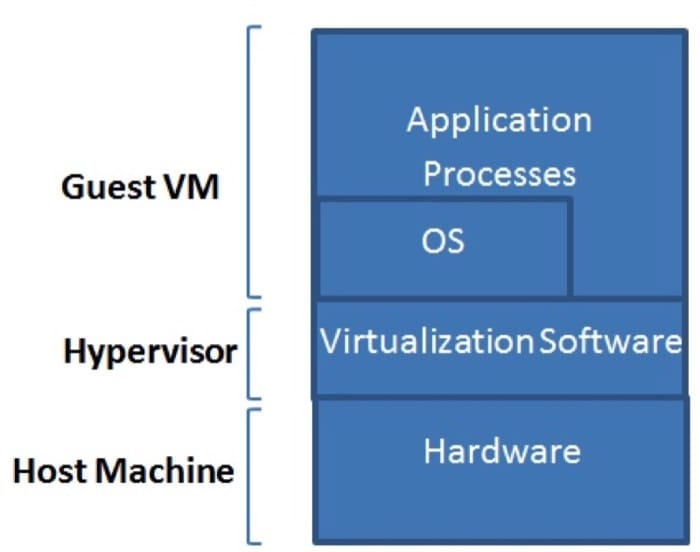
Contrary to process VMs, a system VM is a VM capable of virtualizing a full set of hardware resources, including processors, memories, and I/O devices, thus providing a complete system environment. A system VM can support an OS along with its associated processes as long as the system environment is alive. Figure 3.16 illustrates system VMs. As defined previously, the hypervisor (or the VM monitor [VMM]) is a piece of software that provides abstraction for the system VM. It can be placed at the ISA level directly on top of the raw hardware and below system images (e.g., OSs). The hardware resources of the host platform can be shared among multiple guest VMs. The hypervisor manages the allocation of and access to the hardware resources by the guest VMs. In practice, the hypervisor provides an elegant way to logically isolate multiple guest VMs sharing a single physical system. Each guest VM is given the illusion of acquiring all of the underlying hardware resources.
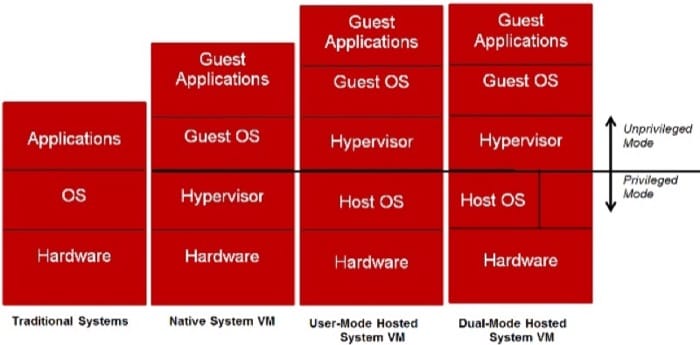
There are different classes of system VMs. Figure 3.17 exhibits three of these classes as well as traditional systems. In a conventional time-shared system, the OS runs in a privileged mode (system mode), while the applications associated with it run in unprivileged mode (user mode) (more details on system privileges are discussed later). With system virtualization, however, the guest OS(s) might run in unprivileged mode, while the hypervisor operates in a privileged mode. Such a system is called a native system VM. In a native system VM, every privileged instruction issued by a user program at any guest OS has to trap to the hypervisor. In addition, the hypervisor needs to specify and implement every function required for managing hardware resources. In contrary, if the hypervisor operates in unprivileged mode on top of a host OS, the guest OS(s) will also operate in unprivileged mode. This system is called a user-mode hosted system VM. In this case, privileged instructions from guest OS(s) still need to trap to the hypervisor. In return, the hypervisor needs also to trap to the host OS. Clearly, this requirement increases the overhead by adding one more trap per every privileged instruction. Nonetheless, the hypervisor can utilize the functions already available on the host OS to manage hardware resources. Finally, the hypervisor can operate partly in privileged mode and partly in user mode in a system called a dual-mode hosted system VM. This way, the hypervisor can make use of the host OS's resource-management functions and preclude the one more trap per each privileged instruction imposed in user-mode hosted system VMs.
Virtualization Summary
- Virtualization involves the construction of an isomorphism that maps a virtual guest system to a real (or physical) host system.
- An underlying physical machine (PM) usually is called a host, and an OS running on a VM is called a guest OS.
- As compared to a host PM, a VM can have resources different in quantity and in type (e.g., a host can contain one Intel IA-32 physical CPU, while a VM can include eight PowerPC virtual CPUs that all map to the single physical CPU).
- A VM can run only at a single host at a certain point in time, yet can be migrated to a different host (and run at that host) at a different point in time.
- There are two types of VMs, process VMs and system VMs.
- A process VM (e.g., JVM) consists of a virtual memory address space, user-level registers, and instructions assigned to an OS process to execute a user program (i.e., no OS can run within a process VM).
- Process VMs can support ISAs that differ from host ISAs.
- The abstraction of a process VM is provided by a piece of virtualizing software denoted as the runtime.
- The runtime of a process VM is placed at the ABI interface, on top of a host OS.
- As opposed to process VMs, a system VM provides a complete system environment (i.e., an OS image can be run in a system VM).
- System VMs can support ISAs that differ from host ISAs.
- The abstraction of a system VM is provided by a piece of a virtualizing software called the hypervisor (or the virtual machine monitor [VMM]).
- There are three main classes of system VMs, which are defined according to where in the system the hypervisor is placed.
- A system VM is called a native system VM when its hypervisor is placed on bare metal (i.e., the raw hardware).
- In native system VMs, the hypervisor is run in system mode, and the VMs (alongside their associated OSs) are run in user mode.
- Hypervisors in native system VMs should specify and implement every function required for managing hardware resources.
- With native system VMs, every privileged instruction issued by a user program at any guest OS has to trap to the hypervisor.
- A system VM is called a user-mode hosted VM when its hypervisor is placed on top of a host OS.
- In user-mode hosted VMs, the hypervisor and all its managed VMs run in user mode, while the underlying host OS runs in system mode.
- With user-mode hosted VMs, privileged instructions from guest OS(s) need to trap to the hypervisor, but the hypervisor needs not implement every function required for managing hardware resources.
- A system VM is called a dual-mode hosted VM when its hypervisor is placed partly on bare metal and partly on a host OS.
- In dual-mode hosted VMs, the hypervisor can partly operate in system mode and partly in user mode, hence, using the best of native system VMs and user-mode hosted VMs.