云计算 阅读材料 3 Data Center Trends
本页目录
In this unit we will present and discuss the data center which is a collection of physical computing resources that are provisioned and shared within the cloud computing paradigm. Innovations in data center efficiency and management are important enablers of the economics behind the cloud computing model. Recall in the previous unit, we discussed some of the benefits of cloud computing as well as the economics behind it. Major advances in data center design play a fundamental role in being able to make this possible. Large-scale data centers can house and run infrastructure more efficiently at scale than what most organizations can manage at small scale with their own infrastructure. Understanding data centers will enable you to be more informed, in terms of performance, cost and potential sources of failure, as you attempt to deploy robust applications and services on the cloud.
This module will serve as a starting step in understanding a few data center fundamentals. We will start with the definition and origins of a data center, followed by a discussion of the current trends in data center technologies: namely the increase in power and resource densities of data centers, as well as the focus on power and efficiency in data centers.
Introduction to Data Centers
Data Centers
Data centers include a room or building, IT equipment, and facilities to securely house, power, and cool that equipment. Over the years, data centers have evolved from a location of concentrated IT equipment to modular, agile, and highly virtualized compute centers. With growing use of Web-based services, explosion of mobile devices, and ever-increasing rates of data generation (and consumption), the demand for new data centers continues to grow. One of the main contributors to this growth has been the advent of the cloud computing paradigm, in which cost effectiveness is directly linked to economies of scale and the efficiencies gained with new data center design. All layers of cloud software and services run on top of physical resources, largely servers, storage, and networking equipment, and all of these require power. This equipment also generates heat and so requires cooling. A small data center might fit in one specialized room, while a large installation might be a dedicated, warehouse-sized facility (see Video 2.1).
Data center design requirements depend on its size and use. Cloud-centric data centers could come in two varieties. An infrastructure as a service (IaaS) cloud provider offers a variety of machine types, and the customers pick and choose to build their own applications. Software as a service (SaaS) and Platform as a service (PaaS) providers typically use large-scale (many thousands) homogenous compute nodes with custom applications that are presented to end users directly. Other types of data centers include enterprise/traditional IT, which houses computers to support functions for day-to-day business operations, and high-performance computing (HPC) data centers, which house large clusters for scientific applications.
In the last 5 years, specific attention has been paid to the efficiency of data centers, dramatically decreasing their operational costs and carbon footprint. This increase in efficiency has led to a fast evolution of data center design, and these trends are likely to continue.
Effective use of cloud resources and development of large-scale, dynamic applications for the cloud require an understanding of the physical resources that make up the cloud. In this unit, we start with trends in data centers, present components that make up a data center, and discuss data center design considerations and requirements.
Why Study Data Centers?
If you think of the cloud as a massive computer, [1] you can still break it down into its constituent parts—processors, memory, and switch. [2] When you are programming for the cloud, you are writing programs that solve a problem or provide a service but with the ability to scale.
A few decades ago, to be a computer user meant to be a programmer. Early programmers knew the instruction set architecture (ISA) well and, because hardware resources were scarce, had to optimize in assembly language. With the advent of high-level languages, such as C/C++, Java, and Python, why do students still have to learn computer organization, caching, and assembly language? When you know what the compiler is doing for you, it makes you a better programmer because you understand what is going on behind the scenes. Similarly, you become better at debugging.
Fast forward to today, when you are developing applications on the cloud, there does not yet exist a compiler that allocates massive virtualized resources automatically to solve your specific problem. It is up to you, the cloud programmer, to do the management and to make your applications cost efficient at scale. Analogous to understanding the components within a single computer, knowing the underlying components of a data center will improve your abilities to program and debug your cloud-based applications.
Most of you will never go on to design and build your own large-scale data center, but understanding what goes into implementing the underlying infrastructure will help you appreciate all of things that cloud providers are doing for you.
References
- Barroso, Luiz André, and Urs Hölzle (2009). "The datacenter as a computer: An introduction to the design of warehouse-scale machines." Synthesis Lectures on Computer Architecture.
- Gordon Bell and Allen Newell (1970). "The PMS and ISP descriptive systems for computer structures." Joint Computer Conference.
Definition and Origins
Defining Data centers
Formally, a data center can be defined as follows:
Data center(definition) Infrastructure dedicated to housing computer and networking equipment, including power, cooling, and networking.
The term data center became popular in 1990s, referring to large rooms dedicated to housing computer and networking equipment, though computer rooms themselves date back much further. Early computers (mainframes) were massive—the size of many refrigerators. They also generated a lot of heat and required clean air filtration to increase reliability. For these reasons, early computers could not be placed into a regular office, so custom rooms were built. A lot of these same ideas go into server rooms today. The only difference is that instead of housing one computer, they hold from dozens to hundreds to even tens of thousands of servers in a single facility.
Modularity is important for data centers because it allows an organization to expand as needed. One of the enablers of a modular data center has been standardized racks onto which IT equipment is mounted. Historically, server racks have evolved from early relay racks found in railroad signaling. It is unclear why the railroad companies chose the original 19-inch, post-to-post width, but the same form factor made its way into early telecommunications and then audiovisual equipment at radio and television stations. Figure 2.1 shows early equipment racks in a radio operators room.
Did you know?
The width of early railroad relays dictated the width of a modern 19-in. rack. But the standard gauge of modern railroad tracks (4 ft, 8½ in.) dates back to ancient Greek stone pathways, which the Romans adopted and brought to Europe during the age of the Roman Empire (Wikipedia, 2014).
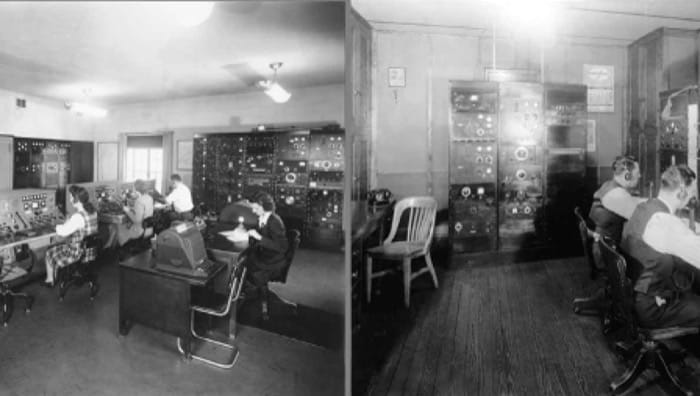
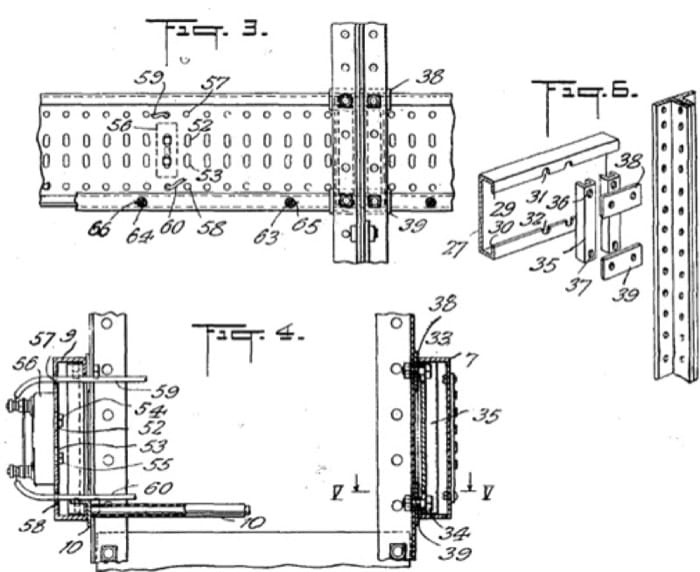
A 1933 U.S. patent, F.C. Lavarack, 1,919,166, is an example of a standardized equipment rack for relays. In Figure 2.2, you can see some of the original drawings in the patent.
Some of the advantages of Lavarack's design over common predecessors include:
- Fire safety: Rack posts and other fittings were cast out of iron (and later steel), this became superior to earlier wooden enclosures that could possibly ignite and damage all equipment inside.
- Field assembly: Racks could be assembled using common hand tools and low-skill workers.
- Regularly spaced holes: Support a wide variety of equipment.
- Vertical mounting surface: Easier installation, maintenance, and wiring.
Many of today's standard, 19-inch equipment racks have evolved from Lavarack's design.
Size, Density and Efficiency Growth
Growth of Data Centers
Over the past few decades, data centers have grown both in size (in terms of the number of racks and cabinets) and in density. Figure 2.3 is a view of a data center that is owned by Google.
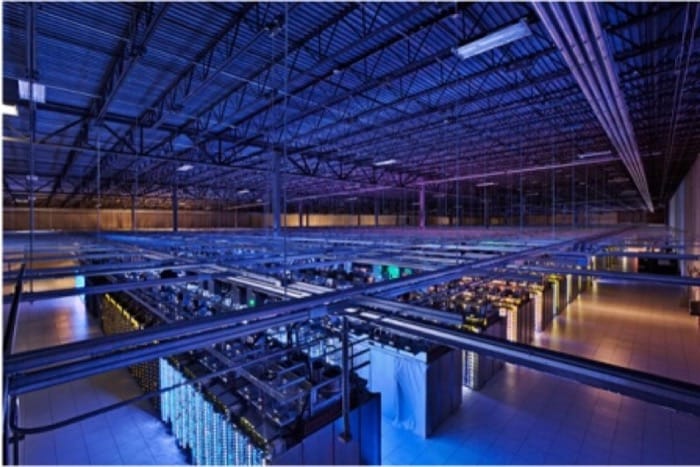
Greater density has become possible because of advances in CPUs, integrated circuits (ICs), and printed circuit board (PCB) design. This leads to faster and more powerful computers within the same area.
The minimum size of an element on an integrated circuit (called the feature size) has become smaller by orders of magnitude over the last four decades. Individual transistors have reduced in size from about 10 microns in 1971 to about 0.022 microns in 2014. As individual transistors get smaller, more can fit on the same silicon, so each transistor consumes less power.
Within the same thermal constraints, CPUs have gone from single core to 16core, with transistor counts going from millions to billions. Additionally, accelerators/coprocessors have emerged that provide hundreds of additional floating point units (FPUs) each, with increasing floating point operations per second (FLOPs), per Watt. Also, recent storage arrays have gone from supporting three or four mechanical hard drives per rack unit to 15 to 21 drives per rack unit.
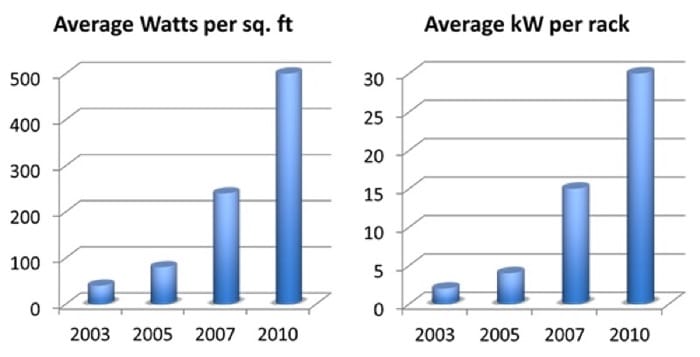
Hence, although the power efficiency of individual components has improved over the years, computers themselves have become more dense, packing in more processing cores, memory, and storage per square foot. This density caused the overall power consumption per rack and per square foot to rise dramatically over the last few years (Figure 2.4). This trend means that both power and cooling requirements also increase per data center.
A large data center now consumes several megawatts of power, which is roughly the same power requirements of a small town.
Data Center Efficiency
Information and communications technology (ICT) now accounts for approximately 2% of the global carbon footprint. [1] Within that amount, data centers currently account for approximately 15% (or 0.3% of total global emissions). With the proliferation of ICT worldwide, as more people gain access, the energy footprint of ICT is set to grow considerably for the foreseeable future.
Over the past decade or so, there has been an increased focus on "green" IT, or power-efficient computing. Later in this module, we discuss various methods available in the industry to reduce power consumption and carbon footprint.
Efforts in improving power efficiency in IT exist across many parts of the data center:
- Servers: Entire servers attempt to reduce power consumption by going into idle states, in which they temporarily power down or reduce the power consumption of components when the system is underutilized. For example, a typical server that typically consumes 650W when busy can scale down to about 200W when idle. In addition, virtualization enables better management of IT resources and allows organizations to consolidate individual servers onto fewer physical servers.
- Server components: Within individual servers, CPUs and other integrated circuits have gained in performance while maintaining or reducing power consumption. Efforts have also been made to reduce idle power consumption (time periods of low CPU utilization). In addition, dynamic clocking techniques for multicore CPUs enable these CPUs to lower the clock rate of individual cores based on usage and can significantly reduce idle power consumption.
- Power: Systems that distribute and manage electrical power, as well as those providing backup supplies, have recently become targets in the drive for efficiency. Where individual data center racks were previously fed from 110 to 220 volts alternating current (VAC), high voltage (277 to 480VAC) is now becoming more popular because that configuration requires fewer step-down transformers.
- The efficiency of a power supply is the ratio of its output power divided by its input power. For instance, a fully loaded, 800W power supply at 80% efficiency would consume 1000W of power, with the remaining 200W lost as heat. These power supplies have gained efficiency recently, with some of them reaching 95%. An alternate design feeds DC to servers directly, instead of converting AC to DC on each rack. Delivering high-voltage, direct current (HVDC) to each server allows using more efficient, DC/DC supplies within the rack.
- Large, centralized, uninterruptable power supply (UPS) systems also incur AC/DC conversion losses. To minimize these losses, Google has adopted a decentralized UPS plan, and for several years, its custom-built servers have each had dedicated battery backup. Some manufacturers now offer this server-based UPS configuration for data centers.
- Cooling: Significant advances have also been made in the area of cooling. Eventually, all of the electricity used to power the IT equipment turns into heat (and some noise). This heat has to be dissipated away from the equipment. Traditional server room cooling uses the raised floor plenum with computer room air conditioners (CRACs), but this has limited cooling density. Newer approaches, which improve efficiency and capacity, include hot-aisle containment, in-row cooling, liquid cooling to the rack, and even completely submerging the equipment in mineral oil. Evaporative cooling techniques, as part of the facility, are more energy efficient than chillers and compressors. In colder climates, many server rooms are designed to mix colder outside air as well as reclaim the heat generated by servers for use elsewhere in the building.
- The leading driver of increasing power efficiency in the data center is to decrease operating cost. Any power that is drawn from the electric company is billed, but only what is getting to the IT equipment is considered useful, while the rest of the losses eventually become heat. Similarly, the more efficient your cooling system is, the lower your monthly costs.
Techniques to calculate and improve power efficiency in data centers are covered in a later module in this Unit.
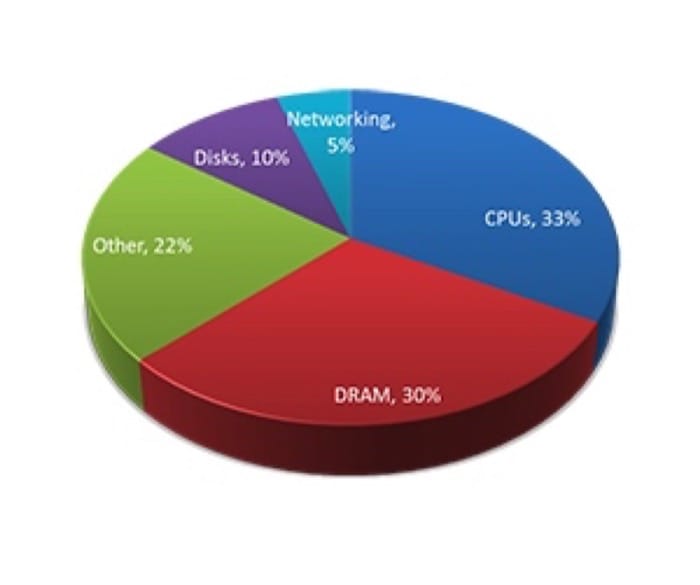
Did you know? Each time you convert from AC to DC, or vice-versa, energy is lost. Similarly, conversions between voltage levels are never 100% efficient.
References
- GeSI (2008). "SMART 2020: Enabling the low-carbon economy in the information age." Global e-Sustainability Initiative Report.
Challenges in Cloud Data Centers
Challenges and Requirements for Cloud Data Center Design
With the advent of cloud computing, it becomes critical for data center designers to address the cloud's current and evolving needs. In this paradigm, data centers physically host all the cloud services that are delivered to users. In turn, the cloud services are abstracted from the underlying physical resources on varying scales (over a private IP network [i.e., a private cloud] or over the Internet [i.e., a public cloud]), on demand, and for potentially millions of subscribers. Data center design requirements vary according to use, size, and desired functionalities. The cloud model redefines the way data center assets are designed and consumed. Cloud-based services and scale impose new requirements on data centers whereby traffic flows vary, I/O bandwidth and performance demands are significantly increased, and new security concerns are induced. We describe some of the challenges that cloud computing puts on data centers and identify associated requirements for designing cloud-centric data centers.
Scalability
With cloud computing, there is an ever-growing need for expansion and high capacity. For that sake, cloud data centers are typically designed around virtual machines (or instances), which are the units of computing in the cloud paradigm. In contrast to enterprise data centers, cloud data centers offer services to potentially millions of users. To address increasing user demands for services on the cloud, virtualization techniques are usually adopted. With virtualization, data center operators can automatically provision and deprovision virtual machines (VMs) as required, without adding or reconfiguring physical devices. Today. it is not uncommon to provision 20 or more VMs per rack-mount or blade server. Clearly, this load can greatly stress server's resources (e.g., CPU, RAM, and network cards). In addition, this can dramatically increase the number of logical servers that operate over the physical data center network. For instance, with a rack of 64 servers and 20 VMs per a server, a cloud provider would require as many as 1200 IP subnets and VLANs (in networking, a LAN can be segmented into different broadcast domains, each referred to as a VLAN). Furthermore, with only 10 racks, 12,000 IP subnets and VLANs will be needed. This demand creates a major problem because it exceeds the limit (i.e., 4094) of usable VLANs specified by IEEE 802.1Q standard, let alone straining physical switches/routers. Cloud data center providers need to find solutions for such problems.
On the other hand, even with maximal use of virtualization techniques, at a point in time it will be necessary to add physical capacity to support growth. As such, cloud data centers need to be based on modular designs in order to support the easy addition of physical capacity without disrupting applications and services. Designers should specify chassis capacity to support long-term growth so that data center operators can include additional components to the chassis as necessary.
Network Topologies
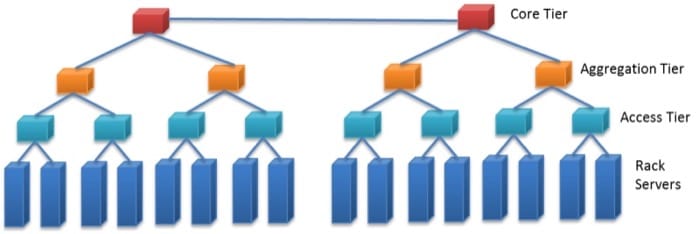
Most of today's data center networks are based on hierarchical, tree-style designs consisting of three main tiers: an access tier, an aggregation tier, and a core tier. Figure 2.5 shows a sample of a traditional tree-style network topology. First, the access tier is made up of cost-effective Ethernet switches connecting rack servers and IP-based storage devices (typically 10/100Mbps or 1GbE connections). Second, multiple access switches are connected via Ethernet (typically 1/10GbE connections) to a single aggregation switch. Third, a set of aggregation switches are connected to a layer of core switches. Because layer 2 VLANs do not involve IP routing, they are typically implemented across access and aggregation tiers. Conversely, layer 3 routing is implemented at core switches that forward traffic between aggregation switches, to an intranet, and to the Internet. A salient point is that the bandwidth between two servers is dependent on their relative locations in the network topology. For instance, nodes that are on the same rack have higher bandwidth between them as opposed to nodes that are off rack.
Indeed, the network is a key component in cloud data centers. Hierarchical topologies as depicted in Figure 2.5 do not truly suit clouds because they enforce inter-server traffic to traverse multiple switch layers, each adding to latency. Latency in this context refers to the delays incurred by the number of switches traversed, required processing and buffering. Minimal delays in clouds can result in poor user performance perception and loss of productivity. Hence, flatter network topologies with fewer layers to accommodate delay- and volume-intensive traffic are typically required for cloud data centers.
Greater Utilization and Resiliency
Usually, contemporary tree-style data center networks rely on some variant of the Spanning Tree Protocol (STP) for resiliency. STP is a data link management protocol that ensures a loop-free topology when switches/bridges are interconnected via multiple paths. STP allows only one active path across two switches, with the rest being set inactive (assuming many paths are available). On an active path failure, STP automatically selects another available inactive path instead of the failed one. This selection might take STP several seconds, which could turn unsuitable for delay-sensitive cloud applications (e.g., Web conferencing). Furthermore, setting idle backup paths is not the best choice for cloud data centers, especially with the exponential increase in user demands. Cloud data centers require more streamlined and resilient network designs that make full use of network resources and recover from failures in milliseconds to meet demands speedily and utilize resources efficiently.
Secure Multitenant Environment
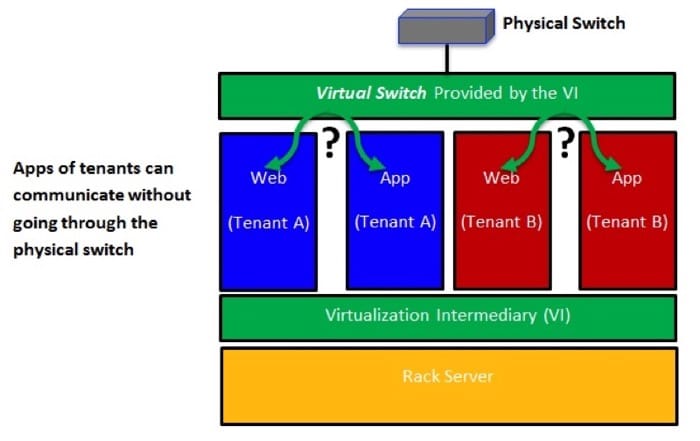
In modern data centers, workloads (e.g., databases, user applications, Web hosting) are typically deployed on distinct physical servers, with workload-to-workload communications occurring over physical connections. Accordingly, securing users can be achieved by conventional network-based intrusion detection/prevention systems. On the other hand, in cloud data centers, multiple VMs can be provisioned on a single rack server, with each belonging to a different user. Thus, workload-to-workload communications can occur within the same server over virtual connections in a manner completely transparent to existing security systems (see Fig. 2.6). Therefore, cloud data centers need to isolate users, protect virtual resources, and secure intra-server communications.
Virtual Machine Mobility
Cloud data centers can host user VMs at servers in one rack, across racks but in the same data center, or at servers across data centers. A cloud can encompass multiple data centers (e.g., Amazon allows users to provision virtualized instances across many data centers). For executing routine maintenance, balancing loads, and tolerating faults, clouds need to periodically and seamlessly migrate VMs between physical servers without impacting user services and applications. This migration does not only require expanding the layer three domain (the domain in which IP routing is required [e.g., WAN]) to move VMs across data centers, but it also requires extending the layer two domain (the domain in which no routing occurs and only broadcasting is employed [e.g., LAN]) in order to span multiple data centers.
Fast and Highly Available Storage Transport
Storage in a cloud data center must support VM mobility and be continually available. VMs that are migrated need to maintain communication with their storage systems. One way to get around this is to move VMs with pertaining storage/data. Clearly, this would require highly available, low-latency, and bandwidth-intensive cloud data center connectivity. Multiple storage models (e.g., Storage over IP [SoIP], Fiber Channel over Ethernet (FCoE), traditional Fiber Channel) are in use today and would further require high-performance and highly available cloud networks. We discuss cloud storage, its challenges, and protocols in the unit on cloud storage.
In summary, data centers tailored for clouds would require the following:
- Modular designs to support exponential growth and the easy addition of physical capacity without any service disruption.
- Flatter network topologies with fewer layers and less equipment and cabling to accommodate delay- and volume-intensive traffic.
- More efficient and resilient network designs that make full use of network resources and recover from failures in milliseconds.
- Capability to fully isolate cloud users, protect virtual resources, and secure intra-server communications.
- VM mobility to execute routine maintenance, achieve load balancing, and tolerate faults seamlessly and speedily.
- Twenty-four seven, 365 days a year service availability and ability to keep migratory VMs connected to their storage systems.
Addressing Requirements for Cloud Data Centers
Data center designers can address the previously discussed requirements at the infrastructure layer, the virtualization layer, or both. For instance, the scalability requirement needs to be addressed at both layers, whereas secure multitenancy can be mainly addressed at the virtualization layer. We study virtualization in detail in the unit "Resource Sharing and Virtualization." In this unit, we are concerned with the infrastructure layer. Accordingly, we present only some of the IT devices (e.g., switches, routers), platforms, and protocols that can contribute to satisfying the requirements for cloud data centers. Because this is a cloud computing course, we do not discuss how the devices, protocols, and platforms work but focus on the benefits they bring to cloud data centers.
To start, data center planners can consider Multiprotocol Label Switching (MPLS) to address cloud infrastructure requirements. MPLS is a highly scalable mechanism that directs data from one server to another based on short path labels rather than long network addresses. Specifically, MPLS labels data packets and enables packet forwarding without examining the contents of packets, which makes packet forwarding quite fast because it avoids routing table lookups and solely depends on packet labels. Consequently, MPLS allows creating end-to-end circuits across any type of transport medium, a key requirement for server-to-server communication across cloud data centers.
As previously discussed, in cloud computing, different types of traffic are imposed, and variant bandwidth requirements are induced. Without considering MPLS, separate layer two networks might be necessary to build, which clearly is not a scalable solution in cloud data centers and can greatly increase both capital and operational expenses. By contrast, with MPLS, networks can be shared via creating virtual network connections called label switched paths (LSPs). Furthermore, quality of traffic flows over the LSPs can be flexibly controlled. Such traffic control facilitates end-to-end quality of service (QoS) and provides fast network convergence (approximately 50ms) in case of link failures, a remarkable improvement over STP. As a result, the transparency of network failures can be highly improved, and service disruptions can be reduced, which are other key requirements for greater resiliency on cloud data centers.
MPLS also allows enabling virtual private LAN service (VPLS) to extend layer two connectivity across multiple data centers. VPLS is a virtual private network (VPN) technology. VPN is typically utilized to implement secure connections between LANs located at different sites (i.e., data centers) using public Internet links. VPLS allows different LANs at different data centers to communicate as if they are one LAN, a key requirement for streamlining VM mobility. VM mobility can also benefit from the aforementioned traffic controlling capability offered by MPLS.
Summary
Several vendors are now marketing cloud-centric networking and compute products to address several of the design goals stated earlier. Most of these products are variations on what you would find in a traditional data center, with a shifted focus on density and concurrent users. A data center designer who wants to support private or public clouds has a growing catalog of products from which to choose.
Data center design has evolved rapidly over the last 5 years; this trend is not slowing down. The data centers 5 or 10 years from now will most likely look very different than the data centers of today. Data center designers are addressing new requirements while improving efficiency and the TCO to deliver a cloud service. With the advent of pre-engineered modular data centers, soon the facilities will become interchangeable components, much like the IT equipment itself. To meet the growing consumer demand for new cloud-based services, as well as address IT infrastructure needs of existing enterprises, we will see more and more data centers, with each generation more efficient than its predecessor.
Summary
- A data center is a term that refers to infrastructure dedicated to housing computer and networking equipment, including power, cooling, and networking.
- Data centers have evolved from simple rooms housing mainframe computers to large warehouses that store thousands of individual servers.
- As an organization's IT needs continually increase, modularity in data center components allows an organization to expand its infrastructure as needed.
- Servers are getting more and more dense, packing more CPU, RAM, and storage into each square foot. This led to greater power consumption per rack. It is common for existing data centers to run out of power or cooling before running out of floor space.
- Industry aims to increase its focus on "green" IT, or power-efficient computing, both inside and outside the server. This efficiency reduces power consumption and carbon footprint, decreasing operating expenses and increasing profit.
- Data centers are becoming more efficient in the last few years through advances in virtualization, power-aware server hardware, efficient power distribution, and advanced cooling techniques, among others.