云计算 阅读材料 2 Economics, Benefits, Risks, Challenges and Solutions
本页目录
Now that we have covered the fundamental ideas behind cloud computing, it is important to explore some of the benefits, risks and ongoing challenges facing cloud computing. Since one of the main drivers of cloud adoption is reducing upfront costs and leveraging the economies of scale, we will then look at the economics behind the cloud from two perspectives- that of cloud users and service providers.
Since computing has migrated from a product to a service, there should be methods to define relationships between the users and service providers. The cloud has adopted traditional contractual guarantees like Service Level Agreements (SLAs) that meet a cloud user's Service Level Objectives (SLOs). We will see how Cloud Service Providers define SLAs and SLOs to ensure a level of service to their clients. We will also briefly introduce the concept of cloud service auditing to verify conformity with SLAs.
Apart from contractual concerns, security and privacy are the biggest challenges that are preventing sensitive applications from moving to the cloud. We will explore some of the unique security challenges raised by the cloud and the controls required to resolve them.
Although the cloud has benefited from rapid adoption, there is no one-size-fits-all solution that encompasses all IT requirements. Keep in mind that the cloud is an emerging and fast-evolving paradigm with many active research areas exploring its future.
Benefits, Risks, and Challenges of Cloud Computing
Benefits of the Cloud
The popularity of cloud computing is driven by its numerous benefits, including improved economics, simplified IT management, scalability, flexibility, improved utilization, and a reduced carbon footprint. The following video (Video 1.6) discusses these benefits.
Video 1.6: The benefits of cloud computing
Although presented earlier and in the video above, let us consider the cloud benefits individually:
- Economic model: Organizations typically estimate their IT requirements for a period of 1 to 5 years in advance in a process called capacity planning. Capacity planning leads organizations to estimate IT investments for peak loads, which could lead to either excess capacity at times (underutilized resources) or deficient capacity when loads exceed projections (which could lead to service degradation). With the pay-as-you-go economic model, organizations pay for the resources that they need. Organizations no longer have to pay upfront cost, invest in and procure expensive computing infrastructure, nor do they have to pay recurring costs to manage their infrastructure. This is particularly important for startups because by leasing compute resources they benefit from reduced upfront cost and reduced time to market when creating and making their offerings available to the general public.
- Simplified IT management: Users of cloud services need not allocate time and resources to setup, operate, and maintain their IT resources. The cloud provider, however, competes for clients and hence invests significant resources to manage and maintain their offerings with high reliability.
- Scalability: In a traditional, in-house computing environment, organizations can take anywhere from a few days to several months to procure, set up, and operate IT infrastructure. Cloud service providers provision rented computing resources for their clients in a matter of hours or even minutes. Clients not only can scale up resources on demand but can scale them down during lull periods to save money. Therefore, clouds enable the important property of elasticity, wherein resources can be both provisioned and deprovisioned in a dynamic or programmatic manner to adapt to workload changes. In order to support elasticity, many cloud service providers make automated scaling solutions available to dynamically alter resource provisioning as demand fluctuates.
- Flexibility: For certain cloud services, providers offer their users the flexibility to configure any software platform to run on any available operating system as a virtualized image on custom-provisioned, rented infrastructure. Cloud offers a shift from an organization's inflexible IT design decisions (that are tied to specific development platforms and infrastructure) to more flexible, elastic, and modular choices.
- Improved utilization: Resource utilization is significantly improved with cloud computing because physical resources are shared across users (multitenancy). Through virtualization, servers are now consolidated as operating system images that are sharing the same system resources. Hence, utilization is improved, which leads to overall savings in power and cooling and reduces the carbon footprint.
- Rapid and Global Deployment: By employing the services of cloud service providers that also have a global data center presence, startups can compete with established players by rapidly rolling out applications and services across a global audience. This is particularly important of social media startups which may see viral growth trends as services become popular across multiple countries.
Risks of Cloud Computing
By embracing cloud services, users and organizations can take advantage of the above benefits, however, using these services introduces several risks, such as:
- Vendor lock-in: Cloud computing is slowly becoming standardized. OpenStack is an open source cloud computing platform which aims to standardize the cloud-computing software stack but is not fully compatible with Amazon and is incompatible with current offerings from Microsoft, and Google. Lack of standardization can lead to the situation of vendor lock-in, such as when a client signs up for a nonstandard cloud service, develops applications, and deploys data on it. The lack of standardization makes it unlikely for the client to move to another vendor seamlessly. The client often requires a third-party cloud migration specialist or an additional service to move the application to a different platform.
- Security risks: Because cloud computing with public clouds can result in an organization's data being shipped beyond its four walls, security becomes a primary risk and concern. For certain domains, it is simply unacceptable for users or organizations to do so, in which case they may have to resort to building a private cloud or own resources with restricted access to meet their needs. However, certain markets that have tight security requirements have niche solutions. An example is Amazon GovCloud, which meets certain US federal government requirements for data security and integrity. GovCloud is physically distinct from other cloud infrastructures that Amazon makes available to the public, thereby reducing exposure.
- Privacy risks: The use of the cloud also raises many privacy-related concerns. Depending on the laws under which a cloud service provider operates, governments may have the power to search and seize data from the provider without the client's explicit consent or notification. Furthermore, clients cannot be fully assured of data confidentiality when using public clouds. We discuss some of security risks associated with cloud computing later in this module.
- Reliability risks: Clouds are also plagued with reliability issues. In December 2012, Netflix users experienced a service outage due to Amazon's "connectivity issues and degraded performance" from their servers in Virginia. Amazon EC2's Northern Virginia data center, one of the most popular public clouds, went down for a few days in 2011, affecting websites such as Reddit and Foursquare. Windows Azure also faced a similar problem, and their services went down for 2½ hours in Western Europe. Public clouds hence are a potential reliability risk that can affect organizations. Clients must design for failures and use features such as Amazon's multiple availability zones, in which clients can set up failover and redundant infrastructures to take over in case of failure, which comes at a price, of course. Cloud users attempt to mitigate the cloud reliability risk by signing Service Level Agreements (SLAs) that enable compensation when exposed to such events. Since cloud services can only be accessed over the network, any disruption of connectivity will cause the application to fail, leading to a loss of reputation and/or revenue.
Some of these risks are not specific only to cloud computing, but are typical for any service provider- be they banking or health services. As with any other service, cloud service providers must carefully consider the implications of these risks and design solutions to mitigate them as their credibility and reputation directly impacts their rate of adoption. Cloud adopters who offer their own services must also safeguard their reputation against these risks.
Challenges in Cloud Computing
Along with the benefits and risks, there are several challenges associated with the adoption of cloud computing:
- Application engineering and development: A cloud inherently offers the promise of on-demand, dynamically scalable infrastructure. Programming a cloud, however, is more complex than writing code for a single machine. New programming paradigms (such as MapReduce, Spark or GraphLab), coupled with provider APIs to manage infrastructure, help developers manage complexity but still present a steep learning curve. In addition, skilled developers with cloud experience are rare, and both costs and time for application development increase substantially with clouds. Finally, these new cloud programming models and APIs are continually evolving, which may add to recurring engineering and development costs.
- Movement of data: Use of public clouds typically requires connecting to the cloud over the Internet. Because of this requirement, movement of data to and from the cloud is significantly slower than in an organization's local area network (LAN). Although the cloud allows applications to target large amounts of data (big data), data movement can become a limiting factor for cloud adoption. For example, Amazon allows clients to upload large datasets for free or ship hard disks with data so that they can load them into the required cloud service.
- Quality of service (QoS): As mentioned earlier, cloud infrastructure is typically shared among many users. This sharing presents a challenge for cloud providers to offer QoS assurances to their clients. This challenge could disallow certain performance-sensitive applications from being migrated to the cloud. QoS in clouds is an important area in cloud research. For example, regulating I/O bandwidth to specific virtual machines could offer predictable performance for critical applications. I/O virtualization is covered in Unit 3.
Business Case for Cloud Computing (for Users)
Evolution of the IT Business Model
An organization’s IT costs are many-fold, which include expenses for hardware and software as well as expenses for support and management. Typically, these costs fall into two categories:
- Capital expenses (CapEx): The initial investment for a particular IT service or solution. For example, when an organization decides to implement a software solution to address a particular need, say, enterprise resource planning (ERP), CapEx would include all physical hardware and software purchases. CapEx investments are for the lifetime of the long-lived solution. CapEx are an upfront expense, which are either paid as a lump sum or financed with extra charges.
- Operational expenses (OpEx): The recurring costs incurred while operating a particular system. For the ERP case, that would include utility fees (such as power and cooling) to keep the infrastructure running, space leases if the facility is rented, personnel costs to support the system, and software support and license fees. OpEx are typically a monthly recurring charge.
The business model for IT software has evolved over the years into the following forms:
- Traditional model: An organization purchases licensed software, which it then owns and maintains.
- Open-source model: Software is essentially free, but the organization pays vendor support costs.
- Outsourcing model: An organization hires another company, possibly overseas, to manage and maintain the software.
- Hybrid model: A software vendor sells highly standardized software to many clients, along with software management and support, thereby amortizing costs of expertise, software management, and support over several clients.
- Cloud computing model: Software is developed and delivered over the Internet to many clients at lower costs.
The following video (Video 1.7) discusses the evolution of these models with examples:
Video 1.7: Economics of cloud computing, software service models, and costs
Reducing Capital Expenditure
Organizations choose to reduce their capital expenditures so that they limit the commitment of large investments for long-lived IT resources. Shifting expenses away from capital expenditures into operational expenditure enables organizations to stretch their IT budgets and limit upfront costs. Specifically, organizations opt to make investments that have a bigger return on investment in the short term rather than investing in long-lived, depreciating IT resources. Operating expenses are pay-as-you-go, meaning organizations pay by the month and get value every month. With cloud computing, they can simply rent the resources and incur little to no capital expenditures.
The Cloud Computing paradigm offers a transition of the IT Business Model from CapEx to OpEx. CapEx in IT systems is a long-term investment that freezes a large sum of money into a single investment. OpEx, on the other hand, is a recurring expense which could enable the company the agility to utilize the funds in other profit yielding investments.
Economics of Cloud Computing (for Providers)
Cloud Service Provider Economics
Since the cloud user has no longer needs to invest in Capital Expenditures, from a cloud service provider's perspective, long-term CapEx as well as recurring OpEx costs are unavoidable. An important challenge for cloud service providers is to satisfy the demands of their clients while achieving high-average utilization in order to make a profit, which depends on their ability to build data centers with high efficiency and reliability at manageable costs. Cloud service providers amortize their costs over a large number of users.
Cloud service providers build large and reliable data centers in order to attract a large number of users in order to improve their profitability. Just like other utility providers, cloud service providers can then procure and maintain hardware and software at significant savings per unit.
Economies of Scale
Cloud service providers organize their infrastructure into large data centers, which typically leverage three main areas:
- Supply-side savings: Large-scale data centers lower costs per server.
- Demand-side aggregation: Aggregating demand for computing allows server utilization rates to increase.
- Multitenancy efficiency: When changing to a multitenant application model, increasing the number of tenants (i.e., customers, or users) lowers the application management and server cost per tenant.
Cloud service providers undertake the difficult task of building and maintaining data centers for users. For this model to be feasible, cloud service providers will have to leverage economies of scale and bring in many users. Providers benefit from economies of scale in the following areas:
- Cost of power: Electricity is rapidly becoming the largest element of total cost of ownership (TCO) in a data center, contributing to approximately 15% to 20% of total costs. Large cloud service providers can place their data centers in locations with lower cost of power and sign bulk purchase agreements with electric providers to reduce electric costs significantly.
- Infrastructure labor costs: Cloud computing enables repetitive management tasks to be automated. In addition, in larger facilities, a single system administrator can service thousands of servers with the use of advanced management software.
- Buying power: Cloud service providers can purchase equipment in bulk from manufacturers, which can lead to major discounts over smaller buyers. In addition, cloud providers standardize their servers and equipment, which helps in lowering purchase and support costs compared to smaller IT departments.
Technologies in data centers and their design considerations are covered in detail in Unit 2.
Service Level Agreements and Objectives
In this course so far, we have talked about the fundamental ideas behind cloud computing and some of the service models that have emerged under the cloud computing paradigm. Assuming an organization wants to move their infrastructure and services to a cloud provider, several questions arise. For example, how does an organization:
- define its requirements in terms of the services that they require from the cloud service provider?
- identify the type and quantity of the services that it requires?
- negotiate the level of service and support that it expects from a cloud provider?
- monitor and validate the type and quality of service that was guaranteed by the cloud service provider?
When an organization needs to formally state its service requirements in business and legal terms, it defines these requirements in terms of service level objectives.
Service Level Objective(definition) A service level objective is defined as a key element that defines some aspect of the service which is expected from the service provider.
A common service level objective with cloud service providers, for example, is an uptime guarantee, where-in a service is guaranteed to be available and running within normal operational parameters for a certain percentage of the time.
Service level objectives are typically defined and negotiated between the client and a service provider in a larger contract known as the service level agreement.
Service Level Agreements
Service-Level-Agreement(definition) A service level agreement (SLA) is a contract between a service provider (either internal or external) and the client that defines the level of service expected from the service provider.
Service level agreements exist in many industries in a supplier-customer relationship exists for a service that is provided by the supplier to the customer periodically. Service level agreements in information technology, in their current form, have been used since late 1980s by fixed line telecom operators as part of their contracts with corporate customers.
A typical SLA may consist of the following segments:
- a definition of services to be provided by the service provider to the client,
- methods to measure performance,
- protocols to manage problems,
- a list of customer duties,
- warranties that need to be honored by the service provider,
- procedures involved for disaster recovery, and
- process and policies regarding the termination of the agreement.
SLAs in Cloud Computing
SLAs have evolved over the years to cater to different types of IT services. The evolution of shared infrastructure services such as clouds have necessitated the use of strong service level agreements. SLAs by definition can define any level of service, but a well-structured and negotiated SLA between a cloud service provider and a client will ideally [1] :
- Codify the specific parameters and minimum levels required for each element of the service, as well as remedies for failure to meet those requirements.
- Affirm the client’s ownership of its data stored on the service provider’s system, and specifies the client’s rights to get it back.
- Detail the system infrastructure and security standards to be maintained by the service provider, along with the client’s rights to audit their compliance.
- Specify the client’s rights and cost to continue and discontinue using the cloud service provider’s service.
Auditing in Cloud Computing
Although cloud computing provides numerous advantages, one of its main challenges continues to be the reliability of cloud services. A fast evolving approach to address reliability is cloud auditing. Let's assume that a client has employed one or more cloud services from a cloud service provider. The cloud computing business model abstracts away many aspects of the infrastructure from the client which now become the responsibility of the cloud service provider. The cloud services are managed by the cloud service provider to implement the services agreed upon in the SLA.
Auditing evaluates whether the cloud services comply with the SLA through monitoring. A third party auditor is requested and trusted by the client to assess the cloud service(s). Hence, public auditability of cloud services is necessary to allow clients to resort to an external auditor to check the integrity of the cloud services. The cloud service provider makes available resource usage and performance monitoring and takes measures to ensure the security of its services to its clients through providing physical security, isolation, authentication, firewalls and APIs. A third party auditor should be able to efficiently audit the cloud services without overloading the client and without adding vulnerabilities to the client's services.
Given the nature of cloud services, near real time auditability is becoming necessary. This requires real time monitoring and evaluation in order to trigger a rapid response to safeguard the client's service and reputation. In public clouds, this has to be achieved while preventing the exposure of client data to other cloud clients. Near real-time auditing is rapidly evolving and becoming a requirement for reliable cloud computing services which will require audit trails and monitoring of service, performance and security metrics among others.
References
- Thomas Trappler If It's in the Cloud, Get It on Paper: Cloud Computing Contract Issues . http://www.educause.edu/ero/article/if-its-cloud-get-it-paper-cloud-computing-contract-issues.
Cloud Security - Threats
Now that we understand how the agreement between client and provider is met, let's take a look at a major concern for cloud service providers and users alike: security.
As cloud service providers compete for market dominance, their security features have become a key service differentiator.
At one level, cloud service providers can leverage the economies of scale. By implementing security measures at a large scale, they are able to provide more affordable defensive mechanisms at a lower cost. Typically, this includes network monitoring and filters, patch management, hardening, incident response & forensics, and various types of threat management.
They also generally provide an accessible interface to modify security settings, allowing secure key rotation, timely updates and patches. Additionally, since all actions are virtualized, these can be regularly snapshotted and analyzed forensically for exploitation using vulnerabilities that are yet unknown (also known as zero-day vulnerabilities).
Let us look at the cloud from the point of view of a traditional enterprise which used in-house IT infrastructure. Enterprises find that they lose control as a function of asset ownership as they move away from traditional servers towards private clouds and then up the stack from IaaS to SaaS (Figure 1.10). In all three service models, the cloud vendor has full ownership of the underlying infrastructure (networks, storage and hosts). In PaaS, the service provider may additionally claim partial ownership of the application infrastructure. Finally, in the SaaS model, the application infrastructure is fully owned by the service provider.
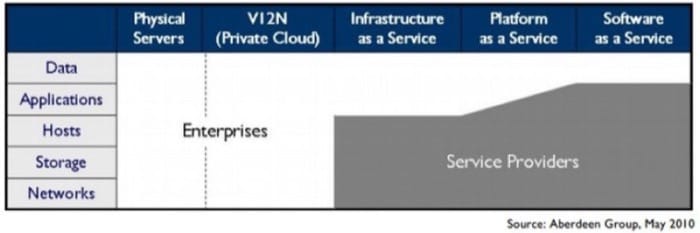 Figure 1.10 - Enterprises lose control as you move up the public cloud stack
In all three models, however, the enterprise has full ownership over all its data. Unfortunately, it does not have full control over this data, as it is stored outside the network perimeter. This lack of control over sensitive data storage and transfer is one of the leading inhibitors to large-scale cloud adoption. Two-thirds of potential adopters have placed “data security and privacy” as the biggest risk in cloud computing (Figure 1.11).
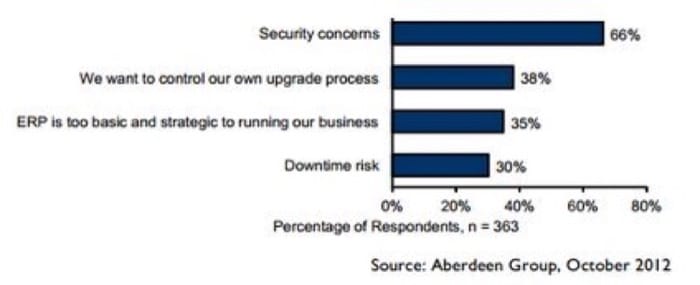 Figure 1.11 - Security concerns are the biggest barrier to large-scale cloud adoption
Threats
The biggest threats at a high-level are those caused due to vendor lock-in (since applications are not very portable between platforms), compliance risks (e.g. meeting most compliance standards is more complex on public clouds), and a loss of governance (most cloud service providers do not provide SLAs related to data security assurances).
At a lower level, the threats are due to shared infrastructure, lack of a hard perimeter, and limited control over physical data storage and deletion. It must be noted that attacks against hypervisors and shared hosting are significantly rarer and more difficult than attacks against OSes and networks that plague traditionally deployed applications.
The Cloud Security Alliance provides a taxonomy of threats, which are summarized here:
Threat ##1: Abuse and Nefarious Use of Cloud Computing(IaaS, PaaS)
Criminals can leverage the anonymity provided by public clouds to launch malicious attacks at low cost. Public clouds have been used for Command and Control Botnets, CAPTCHA cracking, rainbow table computation, launching dynamic attacks. Each of these is a malicious action that relies on brute force, which is provided by the data center.
Vendors have attempted to counter this threat by adding strict registration checks and comprehensively monitoring all network traffic. For instance, a cloud service provider may monitor metadata about all emails originating from it to find out if a customer is misusing it to send spam.
Threat ##2: Insecure Interfaces and APIs(IaaS, PaaS, SaaS)
As mentioned earlier, cloud vendors provide easy to use consoles, dashboards, interfaces and web services to interact with the cloud. However, this brings an additional threat to the entire network if any vulnerability exists in these interfaces. Thus, even if the entire cloud infrastructure is designed securely, a single vulnerability in the provider's website may allow an attacker to take over a customer's account.
Most vendors now use strong, multi-factor authentication, detailed logging, anomaly detection and secure defaults to counter this threat. Web interfaces are released to the public only after extremely strict checking for vulnerabilities in the code as well as in the implementation.
Threat ##3: Malicious Insiders(IaaS, PaaS, SaaS)
The threat of malicious insiders is expanded when using public clouds. Unlike an in-house IT deployment, Enterprise employees are now not the only ones with access to the datacenter. Since the service runs on an external machine and stores data on the provider’s resources, it is always possible that a disgruntled or motivated employee of the cloud service provider could do something that adversely impacts the provider's service.
To counter this threat, cloud service providers enforce strict standards for employees and conduct detailed audits and monitoring. They also contractually define HR and breach notification policies as a part of the service contract.
Threat ##4: Shared Technology Issues(IaaS)
This is one of the fundamental “new” threats due to the cloud paradigm. The cloud works by providing multiple tenants (for e.g., you and your classmates) with virtualized access to shared infrastructure. Isolation between co-tenants is provided by a sandbox known as a “hypervisor”, which mediates access between virtual machines and the underlying infrastructure.
Although co-tenants should be unable to access their neighbors’ details, several exploits over the years have allowed tenants to break out of their sandboxes and steal data from another tenant’s memory, network etc. An example of this could be that as you write code on AWS to solve class projects, a classmate manages to log in to a VM on the same physical machine as you, and then use some properties of the shared physical machine to steal your code. Isolating all users completely is a very hard problem, even with the hypervisors of today.
To mitigate this, cloud service providers add strong monitoring capabilities, using SLAs to ensure timely vulnerability and patch management, and conducting regular audits. Apart from that, hypervisors must be periodically hardened against any potential new attacks.
For e.g. the xen security advisory page shows security advisories against the Xen hypervisor. Each time an attack becomes known, AWS must patch all their servers so that an attacker cannot use these exploits.
Threat ##5: Data Loss or Leakage(IaaS, PaaS, SaaS)
This is another drawback of externally hosted clouds. Often, regulations mandate that an enterprise bear legal responsibility for any sensitive data that is used or stored by their applications.
Even if this data is encrypted and stored on the cloud, the key must also be on the cloud to decrypt this data.
New research in encryption technologies has led to the rise of homomorphic and split-key management. Homomorphic keys allow data processing to be carried out on encrypted data. Thus, the key itself does not need to be transferred to the cloud. Split-key solutions work by having a master key (stored securely off-cloud) and several per-application/module slave-keys. As the master is never on the cloud, the threat of data breach is reduced.
Unfortunately, these techniques are still limited and costly to implement. At a contractual level, it is important to define backup, data retention, data wiping, secure key management and storage processes and sufficient auditing privileges. This implies that a certain set of well-designed standards must be followed, such as the NIST Guidelines on Security and Privacy in Public Cloud Computing.
It is important to also deal with all jurisdictional issues in the contract. Even though data is stored with the cloud service provider, contracts are framed so that any liability in case of a breach is due to the application owner. Hence, most cloud service providers are required to complete ISO 27001, SAS-70 and other region-relevant audits, which indicate the process maturity and the presence of security controls.
References
- Anthes, Gary (2010). "Security in the Cloud ." Communications of the ACM. Number 53.11. 16-18 Pages.
- Nanavati, Mihir (2014). "Cloud Security: A Gathering Storm ." Communications of the ACM. Number 57.5. 70-79 Pages.
- Top Threats Working Group (2013). The Notorious Nine: Cloud Computing Top Threats in 2013 .
Cloud Security - Control & Auditing
When running an application on the cloud, different aspects of security must be controlled by different entities. For instance, Figure 1.12 (from AWS) shows the break up of security responsibilities between the provider and the customer.
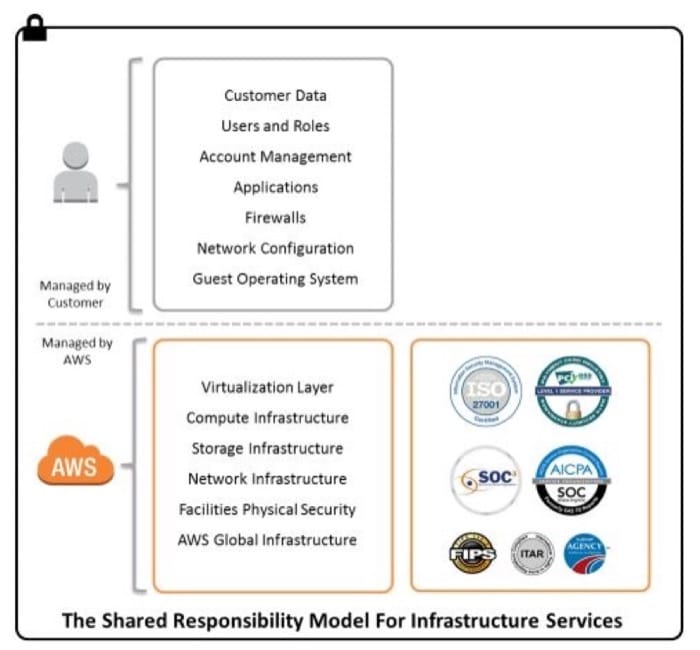 Figure 1.12 Security Responsibilites in AWS.
Many classes of applications require different infrastructure, process and security certifications. Most cloud service providers will comply with a majority of the popular certifications and audit requirements followed in the US and Europe. The following table from Putcher et. al. [3] compares the most popular providers (Figure 1.13):
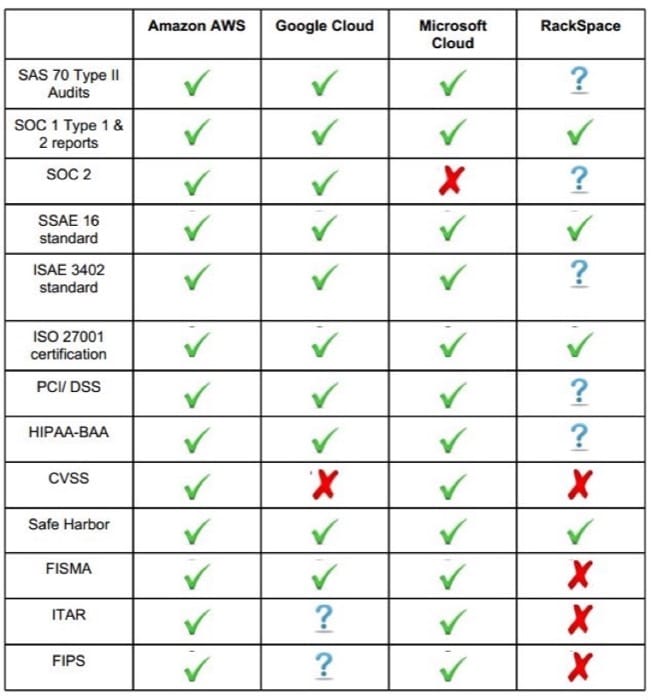 Figure 1.13 Security Responsibilites in AWS.
Understanding the details of these certifications is not a goal for this course, but Mather [1] provides a good reference for those interested in digging deeper into these aspects.
To develop an application that passes these compliance checks, both the cloud service providers as well as application developers must apply a minimal set of security controls, which we will explore below. As with the rest of this course, we look at controls from a predominantly IaaS perspective. Obviously, as we move up the stack, the cloud service provider has to ensure the security of the resources it is responsible for.
For an IaaS cloud, the following table gives an overview of the security controls to be implemented by both parties:
| Domain | Cloud Service Provider's Responsibility | Customer Responsibility |
|---|---|---|
| Identity and Access Management | A cloud service provider must provide information to customers about who is using the service. This requires that they: (1)Deliver and maintain an authentication service (so that users cannot access resources without explicit privileges) (2)Create a service that allows account management policy configuration (this means that customers can add/remove users, roles) (3)Adopt insider misuse protections (monitor employees, restrict access to sensitive server locations) | Using the authentication and access control service provided by the cloud provider, customers must: (1)Define roles, groups and permissions (2)Create and disseminate credentials (3)Use access control logging (this means that the customer will have a log of all sensitive user events) (4)Use Multifactor Authentication where appropriate |
| Availability and Fault-tolerance | To ensure that the cloud is resilient to failure, cloud service providers must have: (1)Tape backups and redundancy of storage, compute systems (2)Geo-distributed datacenters | The redundancy provided by the cloud service provider has to be leveraged by the customer, who should: (1)Add redundant options for connectivity to all endpoints (2)Use application-layer backups and snapshots of instances, storage state (a snapshot of a VM instance, or a database, stores its state at a fixed moment in time, allowing a recovery to be performed from that point) |
| Patching & Configuration Management | (1)Ensure sandboxing of tenants using hypervisors, overlay networks (this will be explained later) (2)Regular vulnerability assessments and penetration testing (when an internal or external team of “hackers” systematically attempts to break into a system) of bare metal, hypervisor and networks | (1)Patch OS, machine images with latest security updates (2)Use appropriate user roles with the least privilege for each application (for e.g. when you are running a web server on the cloud, ensure that it does not have access to any infrastructure keys, or even to local “root”. This way, if your website is breached, the rest of your application is isolated) (3)Restrict traffic to instances using firewalls, Virtual Private Clouds, and segment network into zones (block all network traffic from untrusted sources) |
| Monitoring & Detection | Verify that customer resources are not being used for nefarious activities (either intentionally or unintentionally), and take appropriate actions | (1)Install host-based Intrusion Detection and Anti-Malware systems (these detect any misuse of your cloud network or hosts) (2)Define alerts and response strategies for incidents and breaches (be prepared for attacks and automate a recovery and logging protocol) |
| Data Security | (1)Cross-tenant data access controls and privacy safeguards (as described on the previous page, ensure that customers on the same physical infrastructure are isolated) (2)Data integrity verification and repair from redundant data stores (when storing data in several replicas, ensure their consistency and accuracy) | (1)Use secure protocols (like SSL/TLS, IPSec) for data in transit (these ensure that your network traffic cannot be read) (2)Encrypt data-at-rest (encrypt all the data you store on the cloud, such that even a rogue employee of the cloud service provider cannot disclose this information) |
| Cryptographic Object Security | (1)Support data encryption in all provided storage/file systems/DBs (for e.g. Windows environments could allow Bitlocker implementations) (2)Securely manage customer’s account and access credentials | (1)Create and distribute access keys (for cloud service provider APIs) as well as remote connectivity (like SSH, VNC, RDP) (2)Do not store keys on cloud where possible, so that key will not be in the same place as the data. |
Most providers will often build in services simplifying the process for customers to implement security controls. For e.g. AWS provides Security Groups, which is simply an external network firewalls.
The process of verifying the presence of these controls is known as a security audit. These can be done internally (by hiring a technical consultant) or externally (by a certifying agency). To host sensitive information on the cloud, both the provider and the customer must pass these audits. However, the lack of demarcation of responsibilities in case of a breach have meant that in most cases, applications using sensitive information like bank records or medical data cannot be hosted “on-the-cloud”.
References
- Mather, Tim et. al. (2009). Cloud security and privacy: an enterprise perspective on risks and compliance.
- Winkler, Vic J.R. (2011). Securing the Cloud: Cloud Computer Security Techniques and Tactics . Elsevier.
- Pucher, Alex et. al. (2012). A Survey on Cloud Provider Security Measures .
Summary
Cloud Building Blocks Summary
- Cloud computing offers many benefits, including a pay-as-you-go economic model, simplified IT management for users, scalability, flexibility, improved utilization, and a decreased carbon footprint.
- Cloud computing also has many risks and challenges, including vendor lock-in, security risks, privacy-related concerns, developer training and reengineering, evolving tools, and movement of data.
- Cloud computing offers a compelling economic model for businesses through the pay-as-you-go model and can significantly lower management and overall costs of IT.
- Cloud service providers leverage economies of scale to provide services at low costs. They require large data centers and many clients in order to amortize the costs over the entire user base.
- Service-level objectives (SLOs) allow an organization to formally state its service requirements to a service provider
- A Service-level agreement (SLA) is a contract that is negotiated between a service provider and a client that defines the level of service expected from the service provider
- Auditing evaluates whether the cloud services comply with the SLA through monitoring. As with auditing in other fields, a mutually trusted third party is involved in the process to ensure compliance and fairness.
- The shared and public nature of cloud computing introduces new risks in terms of information security. The primary threats are abuse of clouds, insecure interfaces and APIs, malicious insiders, shared technology issues and data loss or leakage.
- The responsibility of securing applications on the cloud is split between the cloud service provider and the client. The provider must make available controls and systems that can be used to secure applications, resources and data on the cloud. The client must make sure that they make full use of the provided controls and systems and follow best security practices when using clouds.