云计算 阅读材料 1 Cloud Computing Overview
本页目录
Welcome to this online course on cloud computing. This domain is emerging and fast-evolving. Here, we will introduce the big picture of cloud computing, as well as explain how it has evolved to its current state. Learning these concepts will give you a better understanding about some of the motivating factors behind cloud computing services and why it is one of the fastest growing technology segments in the industry today.
In the first unit of the course, we will:
- introduce some of the fundamental ideas behind cloud computing,
- explore the evolution of computing and the emergence of the cloud,
- compare and contrast the different service models and types of clouds,
- discuss some cloud use cases and popular cloud stacks###
Cloud computing can be thought of as an evolved response to the computing needs of today. Our world is increasingly connected and data driven. Users, whether at home or work, generate and consume large amounts of data from various sources. A massive challenge has arisen in terms of managing and exploiting this data. Starting with this module, and throughout the course, you will see how cloud computing plays a central role in meeting this challenge.
Definition of Cloud Computing
Cloud Computing
Cloud computing offers the use of computing resources as a service over the network. A cloud computer is simply a large distributed computing infrastructure that users have access to over a network. Similar to some other domains, cloud computing came about through the maturity of enabling technologies while attempting to satisfy economic needs. In this course, we will provide an introduction to cloud computing and then cover relevant topics, in varying detail, including hardware and software infrastructure, resource management (virtualization), cloud storage, and programming models.
In the first unit of this course we will start with a simple overview of cloud computing, its definition, motivations, evolutions, building blocks, service models and use cases. We will also discuss economics, risks, benefits and security.
What is Cloud Computing?
Cloud Computing(definition) The delivery of computing as a service over a network, whereby distributed resources are provided to the end user as a utility.
Information technology (IT) has become an essential requirement for most organizations to function effectively. Typically, and depending on a specific organization’s needs, IT has three components associated with it (Figure 1.1) - application software, development platforms and the underlying infrastructure:
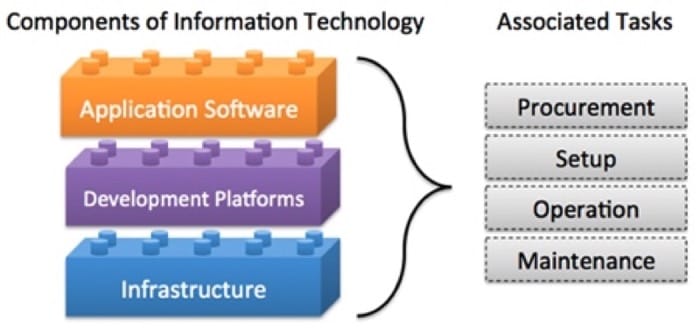 Figure 1.1: Typical Components of Information Technology.
Traditionally, an organization that needs to deploy a particular IT solution has to procure, setup and maintain the infrastructure and the application; certain organizations may decide to develop their own software, in which case they need to manage development platforms as well. The organization hence "owns" the solution, which allows full control over the solution, including, for example, access security and customization, however, it has some drawbacks:
- Organizations must pay upfront to buy a particular solution, which commits significant capital for long-lived IT resources.
- Organizations are solely responsible for the management of their IT solutions. Organizations must have hardware maintenance contracts for the acquired IT solutions. System administrators will have to be hired to monitor hardware and software which has to be updated and maintained. Organizations also have to pay for power and cooling to keep the hardware running. Therefore, in addition to upfront costs, organizations have to budget for recurring costs.
- The IT solution typically has a fixed size and will have to be modified to scale when the needs grow or shrink. (For example, as the number of employees grows, the organization will have to purchase additional hardware and/or software to keep up with increasing demands).
- Typically IT systems suffer from low average utilization. Utilization refers to the proportion of time (expressed usually as a percentage) that an IT system is being used to capacity. For example, email services in a large organization typically see the most amount of traffic at 8 am, when people sign in and check email. Utilization tapers off towards close of business and is practically nil after hours. Further, since IT systems consume energy, even at idle, they leave a prominent carbon footprint.
Many of the disadvantages listed above emanate from the ownership of IT. However, with the evolution of computing technology, it is no longer necessary for organizations to own IT systems. Many of the IT needs of organizations can be provided to them as services. Cloud computing is the transformation of owned IT products into services that can be availed from a cloud service provider.
The transformation of a certain technology from a product to a service is not new. A similar transformation evolved for electricity, which initially had to be produced near the device or service requiring it. The development of large power plants, electric transmission systems and grids has led to the rise of electric power as a utility, (a service that people can obtain and pay for as needed).
The following video (Video 1.1) discusses the transformation of IT from a product to a service:
Video 1.1: Introduction to Cloud Computing
In cloud computing, users or organizations use computing resources as a service and pay for them as a utility, in a pay-as-you-go model. When a request is made for computing resources, the cloud provider typically provisions these resources, in a rapid manner (minutes or hours). As the need for these resources changes, users or organizations can rapidly scale up or down their resources on demand.
The cloud model offers users and organizations several benefits, including: reduced upfront cost, as IT services can be obtained in a pay-as-you-go model; the convenience of fast resource provisioning, which significantly reduces the time to market for IT solutions; and rapid scalability of computing resources, as they can be scaled up and down on demand. Cloud providers' resources are shared by multiple users, thereby improving utilization and reducing carbon footprint.
In spite of all of its advantages, cloud computing is still an emerging and maturing technology and comes with many risks and challenges which will be later covered in this unit.
Pre-Cloud Computing Domains and Applications
Domains and Application Examples
Now that we have defined what cloud computing is, let us look at examples of how computing was utilized in different domains such as business computing, scientific computing and personal computing before the emergence of cloud computing.
Business computing: Examples of traditional management information systems include logistics and operations, enterprise resource planning (ERP), customer relation management (CRM), office productivity and business intelligence (BI). Such tools enabled more streamlined processes that led to improved productivity and reduced cost across a variety of enterprises.
As an example, CRM software allows companies to collect, store, manage and interpret a variety of data about past, current and potential future customers. CRM software offers an integrated view (in real-time or near real-time) of all organizational interactions with customers. For example, for a manufacturing company, CRM software could be used by a sales team to schedule meetings, tasks and follow-ups with clients. A marketing team could target clients with campaigns based on specific patterns. Billing teams can track quotes and invoices. As such, it is a centralized repository for storing this information. To enable this functionality, a variety of hardware and software technologies are utilized by the organization and sales teams in order to collect the data which needs to be stored and analyzed using various database and analytics systems.
Scientific computing: Scientific computing uses mathematical models and analysis techniques implemented on computers to attempt to solve scientific problems. A popular example is computer simulation of physical phenomena. This field has disrupted the traditional theoretical and laboratory experimental methods by enabling scientists and engineers to reconstruct known events or to predict future situations through developing programs to simulate and study different systems under different circumstances. Such simulations typically require a very large number of calculations which are often run on expensive supercomputers or distributed computing platforms.
Personal computing: In personal computing, a user runs various applications on a general-purpose computer. Examples of such applications include office productivity software such as word processing and spreadsheets, or communication such as email clients or entertainment such as video games or playing multimedia files. A personal computing user typically owns, installs and maintains the software and hardware utilized to carry out such tasks.
Addressing Scale
hich can provide the necessary upgrades to the service level. In many cases, vertical scaling consists of upgrading or replacing servers and storage systems with newer, faster servers or storage arrays with increased capacity. This process could take months to plan and execute, along with a window where the service might experience some downtime.
In certain types of systems, scaling is also done horizontally, by increasing the amount of resources dedicated to the system. An example of this is in high-performance computing, where additional servers and storage can be added to improve the performance of the system, thereby leading to a higher number of calculations that can be performed per second, or increasing the storage capacity of the system. Just like vertical scaling, this process can take months to plan and execute, with downtimes also a possibility.
Since companies owned and maintained their IT equipment, as the cost of addressing scale continued to rise, companies identified other methods to reduce cost. Large companies consolidated the computing needs of different departments into a single large data center whereby they consolidated real estate, power, cooling, and networking in order to reduce cost. On the other hand, small and medium size companies could lease real-estate, network, power, cooling and physical security by placing their IT equipment in a shared data center. This is typically referred to as a co-location service which was adopted by small to medium sized companies who did not want to build their own data centers in-house. Co-location services continues to be adopted in various domains as a cost-effective approach to reduce operational expenses.
Scale has impacted all aspects of business computing. For example, scale has impacted CRM systems through the increase of clients or through the amount of information that we store and analyse about clients. Business computing has addressed scale through vertical and horizontal scaling as well as consolidation of IT resources to data centers and co-location. In scientific computing, parallel and distributed systems have been adopted in order to scale up the size of the problems and the precision of their numerical simulations. One definition of parallel processing is the use of multiple homogenous computers that share state and function as a single large computer in order to run large scale or high precision calculations. Distributed computing is the use of multiple autonomous computing systems connected by a network in order to partition a large problem into subtasks that are run concurrently and communicate via messages over the network. The scientific community continued to innovate in these domains in order to address scale. In personal computing, scale has impacted it through increased user demands brought on by richer content and diverse applications. Users therefore scale up their owned personal computing device to keep up with these demands.
Rise of Internet Services
The late 90s marked a steady increase in the adoption of these computing applications and platforms across domains. Soon, software was expected to not only be functional, but also capable of producing value and insight for business and personal requirements. The use of these applications became collaborative; applications were mixed and matched to feed information to each other. IT was no longer just a cost center for a company, but a source of innovation and efficiency.
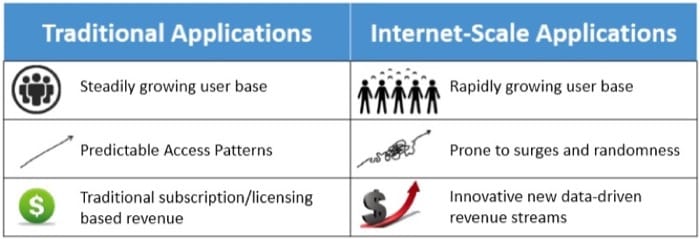 Figure 1.2: Comparing Traditional and Internet-Scale Computing.
The 21st century has been marked by an explosion in the volume and capacity of wireless communications, the World Wide Web, and the Internet. These changes have led to a network- and data-driven society, where producing, disseminating and accessing digitized information is simplified. The Internet is estimated to have created a global marketplace of billions of users, up from 25 million in 1994 (Figure 1.3 (a)) [1] . This rise in data and connections is valuable to businesses. Data creates value in several ways, including by enabling experimentation, segmenting populations and supporting decision-making with automation. [2] By embracing digital technologies, the world’s top 10 economies are expected to increase their output by over a trillion dollars by 2020. [3]
The increasing number of connections enabled by the Internet has also driven its value. Researchers have hypothesized that the value of a network varies superlinearly as a function of the number of users. Thus, at internet scale, gaining and retaining customers is a priority, and this is done by building reliable and responsive services, and making changes based on observed data patterns.
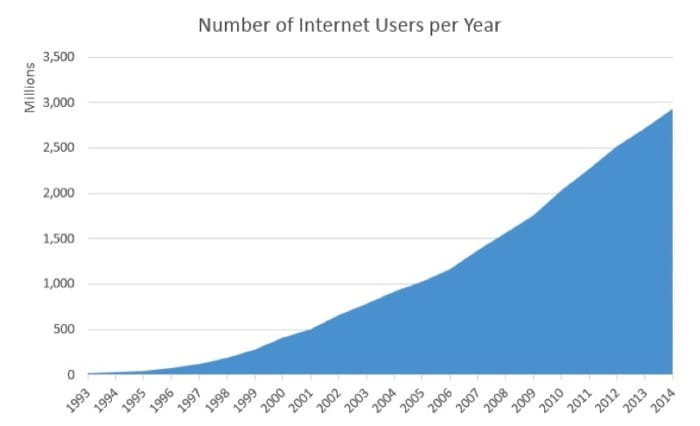 Figure 1.3 (a): Increasing number of Internet Users per year. [1]
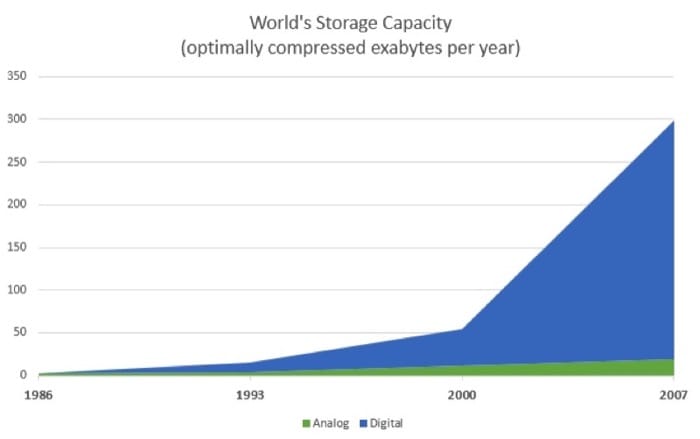 Figure 1.3 (b): Increasing number of data stored per year. [5]
Some examples of Internet-scale systems include:
- Search engines that crawl, store, index, and search (upto petabyte-sized) large data sets. For instance, Google started as a giant web index that crawled and analyzed web traffic, once every few days and matched these indices to keywords. Now, it updates its indices in near-real-time and is one of the most popular ways to access information on the Internet. Their index has trillions of pages with a size of thousands of terabytes. [4]
- Social networks like Facebook and LinkedIn that allow users to create personal and professional relationships and build communities based on similar interests. Facebook, for instance, now supports over a billion active users per month.
- Online retail services like Amazon maintain a global inventory of millions of products, which are sold to over 200 million customers, with net sale volumes of almost $90 billion annually.
- Rich, streaming multimedia applications allow people to watch and share videos and other forms of rich content. One such example, YouTube, handles uploads of 300 minutes of video per second.
- Real-time communications systems for audio, video and text chatting like Skype which clock more than 50 billion minutes of calls per month.
- Productivity and collaboration suites that serve millions of documents to many concurrent users allowing real-time, persistent updates. For e.g. Office 365 claims to support 50 million monthly active collaborators.
- CRM applications by providers like SalesForce are deployed at over a hundred thousand organizations. Large CRMs now provide intuitive dashboards to track status, analytics to find the customers that generate the most business and revenue forecasting to predict future growth.
- Data mining and business intelligence applications that analyze the usage of other services (like those above) to find inefficiencies and opportunities for monetization.
Clearly, these systems are expected to deal with a high volume of concurrent users. This requires an infrastructure with the capacity to handle large amounts of network traffic, generate and securely store data, all without any noticeable delays. These services derive their value by providing a constant and reliable standard of quality. They also provide rich user interfaces for mobile devices and web browsers, making them easy to use, but harder to build and maintain.
We summarize some of the requirements of Internet-scale systems here:
- Ubiquity—being accessible from anywhere at any time, from a multitude of devices. For instance, a salesperson will expect their CRM service to provide timely updates on a mobile device to make visits to clients shorter, faster and more effective. The service should function smoothly under a variety of network connections.
- High-availability—the service must be “always up”. Uptimes are measured in terms of number of nines. Three nines, or 99.9%, implies that a service will be unavailable for 9 hours a year. Five nines (about 6 minutes a year) is a typical threshold for a high-availability service. Even a few minutes of downtime in online retail applications can impact millions of dollars of sales.
- Low latency—fast and responsive access times. Even slightly slower page load times have been shown to significantly reduce the usage of that web page. For instance, increasing search latency from 100 ms to 400 ms decreases the number of searches per user from 0.8% to 0.6%, and the change persisted even after the latency was reduced to original levels.
- Scalability—the ability to deal with seasonality and virality, which causes peaks and troughs in the traffic over long and short periods of time. On days like “Black Friday” and “Cyber Monday”, retailers like Amazon must handle several times the network traffic than on average.
- Cost effectiveness—an Internet-scale service requires much more infrastructure than a traditional application as well as better management. One way to streamline costs is by making services easier to manage, and reducing the number of administrators handling a service. Smaller services can afford to have a low service-to-admin ratio (e.g. 2:1, meaning a single administrator must maintain two services); however, to maintain profitability, services like Microsoft Bing must have high service-to-admin ratio (e.g. 2500:1, meaning a single administrator maintains 2500 services) [6] .
- Interoperability—many of these services are often used together and hence must provide an easy interface for reuse and support standardized mechanisms for importing and exporting data. For example, many other services (like Uber) may integrate Google Maps within their products to provide simplified location and navigation information to users.
We will now explore some of the early solutions to the various problems above [7] . The first challenge to be tackled was the large round-trip time for early web services that were mostly located in the United States. The earliest mechanisms to deal with the problems of low latency (due to distant servers) and server failure simply relied on redundancy. One technique for achieving this was by “mirroring” content, whereby copies of popular web pages would be stored at different locations around the world. This minimized the amount of load on the central server, reduced the latency perceived by end-users, and allowed traffic to be switched over to another server in case of failures. The downside of this was an increase in complexity to deal with inconsistencies if even one copy of the data were to be modified. Thus, this technique is more useful for static, read-heavy workloads, such as serving images, videos or music. Due to the effectiveness of this technique, most Internet-scale services use content delivery networks (CDNs) to store distributed global caches of popular content. For example, Cable News Network (CNN) now maintains replicas of their videos on multiple “edge” servers at different locations worldwide, with personalized advertising per location.
Of course, it did not always make sense for individual companies to buy dozens of servers across the world. Cost efficiencies were often gained by using shared hosting services. Here, shares of a single web server would be leased out to multiple tenants, amortizing the cost of server maintenance. Shared hosting services could be highly resource-efficient, as the resources could be over-provisioned under the assumption that not all services would be operating at peak capacity at the same time (an over-provisioned physical server is one where the aggregate capacity of all the tenants is greater than the actual capacity of the server). The downside was that it was nearly impossible to isolate the tenants’ services from those of their neighbors. Thus, a single overloaded or error-prone service could adversely impact all its neighbors. Another problem arose because tenants could often be malicious and try to leverage their co-location advantage to steal data or deny service to other users.
To counter this, Virtual Private Servers were developed as variants of the shared hosting model. A tenant would be provided with a virtual machine (VM) on a shared physical server (we talk more about virtual machines and their properties later). These VMs were often statically allocated and linked to a single physical machine, thus they were difficult to scale and often needed manual recovery from any failures. Though they could no longer be overprovisioned, they had better performance and security isolation between co-located services than simple resource sharing.
Another problem of sharing public resources was that it required storing private data on third-party infrastructure. Some of the Internet-scale services we described above could not afford to lose control over data storage, since any disclosure of their customers private data would have disastrous consequences. Hence, these companies needed to build their own global infrastructure. Before the advent of the public cloud, such services could only be deployed by large corporations like Google and Amazon. Each of these companies would build large, homogeneous data centers across the globe using commodity off-the-shelf components, where a data center could be thought of as a single, massive warehouse-scale computer (WSC). A WSC provided an easy abstraction to globally distribute applications and data, while still maintaining ownership.
Due to the economies of scale, the utilization of a data center could be optimized to reduce costs. This was still not as efficient as publicly sharing resources, these warehouse-scale computers had many desirable properties that served as foundations for building Internet-scale services. The scale of computing applications progressed from serving a fixed user base to serving a dynamic global population. Standardized WSCs allowed large companies to serve such large audiences. An ideal infrastructure would combine the performance and reliability of a WSC, with the sharing hosting model. This would enable even a small corporation to develop and launch a globally competitive application, without the high overhead of building large datacenters.
Another approach to share resources was Grid Computing, which enabled the sharing of autonomous computing systems across institutions and geographical locations. Several academic and scientific institutions would collaborate and pool together their resources towards a common goal. Each institution would then join a “virtual organization” by dedicating a specific set resources via well-defined sharing rules. Resources would often be heterogeneous and loosely coupled requiring complex programming constructs to stitch together. Grids were geared towards supporting non-commercial research and academic projects and relied on existing open source technologies.
The cloud was a logical successor that combined many of the features of the solutions above. For example, instead of universities contributing and sharing access to a pool of resources using a Grid, the cloud allows them to lease computing infrastructure that was centrally administered by a Cloud Service Provider (CSP). As the central provider maintained a large resource pool to satisfy all clients, the cloud made it easier to dynamically scale up and down demand within a short period of time. Instead of open standards like the grid, however, cloud computing relies on proprietary protocols and needs the user to place a certain level of trust in the CSP.
The rest of this unit covers how the cloud evolved to make computing a public utility that could be metered and used.
References
- Real Time Statistics Project (2015). Internet Live Stats. www.internetlivestats.com/.
- IBM (2015). What is Big Data?. www-01.ibm.com/software/data/bigdata/what-is-big-data.html.
- Accenture (2015). Increased Use of Digital Technologies Could Add $1.36 Trillion to World’s Top 10 Economies in 2020. newsroom.accenture.com/subjects/strategy/increased-use-of-digital-technologies-could-add-over-1-trillion-dollars-to-worlds-top-10-economies-in-2020-according-to-new-study-from-accenture.htm.
- Google Inc. (2015). How Search Works. https://www.google.com/insidesearch/howsearchworks/thestory/.
- Hilbert, Martin and Lopez, Priscila (2011). The world’s technological capacity to store, communicate, and compute information.
- Hamilton, James R and others (2007). On Designing and Deploying Internet-Scale Services.
- Brewer, Eric and others (2001). Lessons from giant-scale services.
Evolution of Cloud Computing
Events and Innovations
The cloud-computing concept first appeared during the early 1950s, when several academics, including Herb Grosch, John McCarthy, and Douglas Parkhill, [1] [2] envisioned computing as a utility similar to electric power. Over the next few decades, several emerging technologies laid the foundations for cloud computing (Figure 1.4). More recently, rapid growth of the World Wide Web and the advent of large Internet giants, such as Google and Amazon, finally led to the creation of an economic and business environment that allowed the cloud-computing model to flourish.
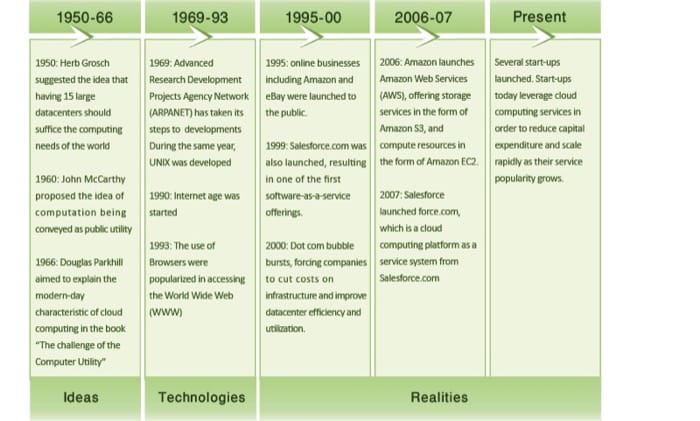 Figure 1.4: Evolution of cloud computing.
Evolution of Computing
Since the 1960s, some of the earliest forms of computers that were used by organizations were mainframe computers. Multiple users could share and connect to mainframes over basic serial connections using terminals. The mainframe was responsible for all the logic, storage, and processing of data, and the terminals connected to them had limited computational power, if any. These systems continued in widespread use for more than 30 years and, to some degree, continue to exist today.
With the birth of personal computing, cheaper, smaller, more powerful processors and memory led to a swing in the opposite direction, in which users ran their own software and stored data locally. This situation, in turn, led to issues of ineffective data sharing and rules to maintain order within an organization's IT environment.
Gradually, through the development of high-speed network technologies, local area networks (LANs) were born that allowed computers to connect and communicate with each other. Thus, vendors designed systems that could encapsulate the benefits of both personal computers and mainframes, resulting in client-server applications that became popular over LANs. Clients would typically run client software (and process some data) or a terminal (for legacy applications) that connected to a server. The server, in the client-server model, possessed the application, storage, and data logic.
Eventually, in 1990s, the global information age emerged, with the Internet rapidly being adopted. Network bandwidth improved by many orders of magnitude, from ordinary dial-up access to dedicated fiber connectivity today. In addition, cheaper and more powerful hardware emerged. Furthermore, the evolution of the World Wide Web and dynamic websites necessitated multitier architectures.
Multitier architectures enabled the modularization of software by separating the application presentation, application logic, and storage as individual entities. With this modularization and decoupling, it was not long before these individual software entities were running on distinct physical servers (typically due to differences in hardware and software requirements). This led to an increase of individual servers in organizations; however, it also led to poor average utilization of server hardware. In 2009, the International Data Corporation (IDC) estimates that the average x86 server has a utilization rate of approximately 5 to 10%. [3]
Virtual machine technology matured well enough in the 2000s to become available as commercial software. Virtualization enables an entire server to be encapsulated as an image, which can be run seamlessly on hardware and enable multiple virtual servers to run simultaneously and share hardware resources. Virtualization thus enables servers to be consolidated, which accordingly improves system utilization.
Simultaneously, grid computing gained traction in the scientific community in an effort to solve large-scale problems in a distributed fashion. With grid computing, computer resources from multiple administrative domains work in unison for a common goal. Grid computing brought forth many resource-management tools (e.g., schedulers and load balancers) to manage large-scale computing resources.
As the various computing technologies evolved, so did the economics of computing. Even during the early days of mainframe-based computing, companies such as IBM offered to host and run computers and software for various organizations, such as banks and airlines. In the Internet Age, third-party Web hosting also become popular. With virtualization, however, providers have unparalleled flexibility in accommodating multiple clients on a single server, sharing hardware and resources between them.
The development of these technologies, coupled with the economic model of utility computing, is what eventually evolved into cloud computing.
Enabling Technologies
Cloud computing has various enabling technologies (Figure 1.5), which include networking, virtualization and resource management, utility computing, programming models, parallel and distributed computing, and storage technologies.
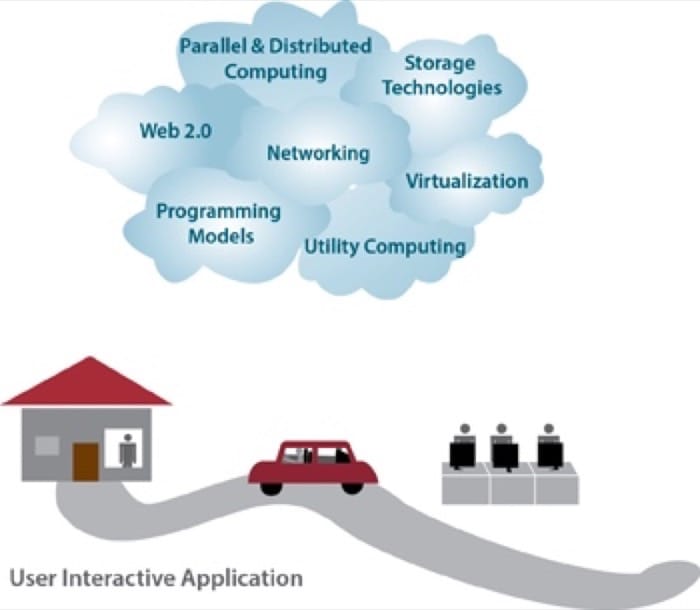 Figure 1.5: The enabling technologies in cloud computing.
The emergence of high-speed and ubiquitous networking technologies have greatly contributed to cloud computing as a viable paradigm. Modern networks make it possible for computers to communicate in a fast and reliable manner, which is important if we are to use services from a cloud provider. This enabled the user experience with software running in a remote data center to be comparable to the experience of software running on a personal computer. Webmail is a popular example, as is office productivity software. In addition, virtualization is key to enabling cloud computing. As mentioned above, virtualization allows managing the complexity of the cloud via abstracting and sharing its resources across users through multiple virtual machines. Each virtual machine can execute its own operating system and associated application programs. Virtualization for cloud computing is covered in Unit 3.
Technologies such as large-scale storage systems, distributed file systems, as well as novel database architectures are crucial for managing and storing data in the cloud. Cloud storage technologies are covered in Unit 4.
Utility computing offers numerous charging structures for the leasing of compute resources. Examples include pay-per-resource-hour, pay-per-guaranteed-throughput, and pay-per-data stored per month etc.
Parallel and distributed computing allow distributed entities located at networked computers to communicate and coordinate their actions in order to solve certain problems, represented as parallel programs. Writing parallel programs for distributed clusters is inherently difficult. To achieve high programming efficiency and flexibility in the cloud, a programming model is required.
Programming models for clouds give users the flexibility to express parallel programs as sequential computation units (e.g., functions as in MapReduce and vertices as in GraphLab). Such programming models' runtime systems typically parallelize, distribute, and schedule computational units, manage inter-unit communication, and tolerate failures. Cloud programming models are covered in Unit 5.
RReferences
- Simson L. Garfinkel (1999). Architects of the Information Society: Thirty-Five Years of the Laboratory for Computer Science at MIT. MIT Press.
- Douglas J. Parkhill (1966). The Challenge of the Computer Utility. Addison-Wesley Publishing Company, Reading, MA.
- Michelle Bailey (2009). "The Economics of Virtualization: Moving Toward an Application-Based Cost Model." VMware Sponsored IDC Whitepaper.
Cloud Building Blocks and Service Models
Cloud Building Blocks
Remember, cloud computing offers the use of computing resources as a service over the network. Before we discuss the service models offered on a cloud, we ought to think about the different layers of hardware and software the are required to build cloud services. Of course, not all service requirements are identical; some cloud users may only desire access to raw infrastructure to build applications on. Others may wish to not deal with the infrastructure at all, but rather, simply develop and deploy applications using an easy-to-use platform. To meet these varied requirements, cloud service providers divide their offerings into various abstract layers.
Here, we introduce a stacked abstraction of the cloud through presenting typical building blocks and discuss their association with three service models in cloud computing. We present four main building blocks in cloud computing: application software, development platforms, resource sharing, and infrastructure, as shown in Figure 1.6. The infrastructure includes the physical resources in a data center. The resource sharing layer typically entails software and hardware techniques that allow the sharing of the physical resources while offering a certain level of isolation. The development platforms are utilized to develop cloud applications.
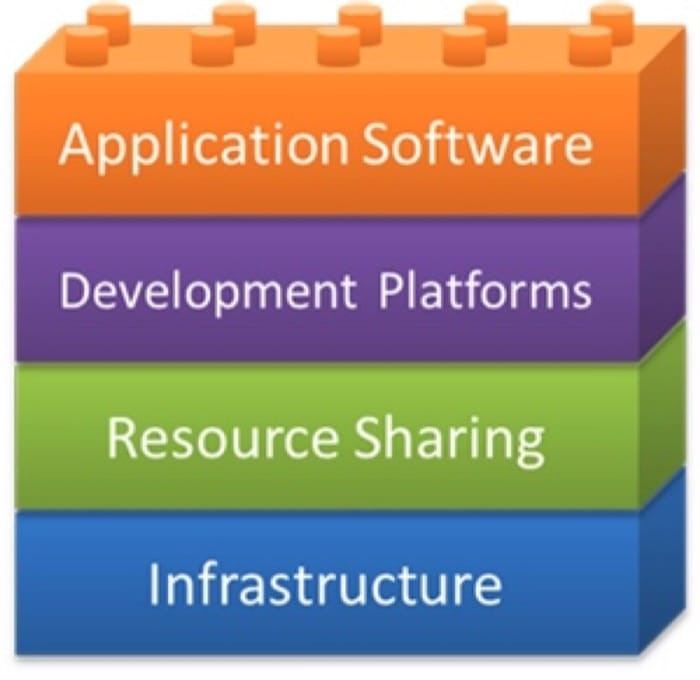 Figure 1.6: Cloud computing building blocks.
Cloud Building Blocks
Application software: The top layer in the stack is the application software, which normally is the system component that the end user utilizes.
Development platforms: The next layer, development platforms, allows application developers to write application software in terms of a cloud's application programming interface (API). Development platforms typically provide specifications that developers can use for routines, data structures, object classes, libraries and variables.
Resource sharing: Resource sharing mechanisms, the third layer, embody some key cloud ideas:
- Provide software, computation, network and storage services.
- Allow a shared environment whereby multiple hardware images (e.g., virtual machines) and system images (e.g., general-purpose OSs) can run side by side on a single infrastructure along with security, resource, and failure isolations. These isolation properties are provided by a combination of hardware and software techniques that are covered in detail in Unit 3.
- Consolidate physical servers into virtual servers that run on fewer physical servers.
- Deliver agility and elasticity to rapidly respond to users' resource and service demands.
These ideas usually are addressed through virtualization, a technology discussed in detail in Unit 3.
Infrastructure: Physical resources comprise the bottom layer and, in cloud computing, are primarily deployed on the cloud provider's side. The broad resource classes, detailed in Unit 2, include the following:
- Compute resources, typically servers, which are computers designed for enterprise computing (as opposed to user workstations). They usually are rack mounted to utilize space efficiently.
- Storage resources maintain the cloud's data, and application storage use usually is charged in terms of capacity usage (e.g., per gigabyte or terabyte usage).
- Network resources enable communication between servers as well as servers and clients.
- Software that manages the compute, network and storage infrastructure.
Next we will discuss which of these abstractions can be provided as a leased service over a network. For example the services and resources required by a software developer will be different compared to someone who would like to have access to a WebMail application running on the cloud.
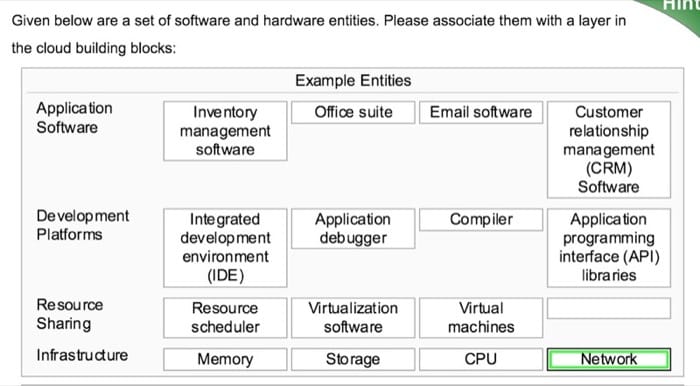
Cloud Computing Services
In a broad sense, cloud services differ based on the needs of different users. This section reviews three popular types of cloud services:
- Software as a service (SaaS)
- Platform as a service (PaaS)
- Infrastructure as a service (IaaS)
SaaS is any application in which the end user has access to a software application over the network and pays based on a variety of business models some of which are free. PaaS is the offering of software development platforms as a service which are utilized to develop SaaS applications. Finally, IaaS, is the leasing of virtualized infrastructure over the network. In this last model, the end user has the flexibility to install and use any software they please on the leased infrastructure.
The following video (Video 1.2) reviews these services:
Video 1.2: Service Models in Cloud Computing
The Software-as-a-Service Model
Software as a Service(definition) Software as a service (SaaS) is a software delivery model in which software and associated data are hosted on a cloud. SaaS applications typically are accessed by users using a thin client via a Web browser.
SaaS is one of the most common cloud service models in which the cloud provider delivers software as an Internet service (as discussed in Video 1.3). SaaS users simply use their browsers to access the software, thus eliminating the need to install, run, and maintain (update, patch, reconfigure etc.) the application on the user's computer. The Web browser loads the SaaS application service dynamically and transparently.
Video 1.3: Software as a Service
SaaS has become a common software delivery model for many business applications, including accounting, collaboration, customer relationship management (CRM), management information systems (MIS), enterprise resource planning (ERP), invoicing, human resource management (HRM), content management (CM) as well as service desk management.
With SaaS, the provider maintains the software and required infrastructure to run it. The provider routinely develops the software, and enhancements are automatically made available to all users the next time a user logs on to the service. In addition, any application data that results from the use of the service resides on the cloud and is available to the user from any location.
Characteristics of SaaS
A vast majority of SaaS solutions are based on what is referred to as multitenant architecture. In this architecture, a single version of the application, with a single configuration, is used for every customer (referred to as a tenant). To enable the service to scale well, it might be installed on several servers at the provider's side. Dynamic scaling is utilized to allow more users to use the service as it becomes more popular.
Typical characteristics of SaaS include:
- Web-based access to the software service.
- Software is managed from a central location by the cloud provider.
- Software is delivered in a one-to-many model in which "one" is the cloud provider and "many" are the cloud users.
- The cloud provider handles software upgrades and patches.
Pricing Models
Unlike traditional software, which is sold under the software licensing model (with an upfront license cost and an optional ongoing support fee), SaaS providers generally price applications using a monthly or annual subscription fee. This model enables SaaS to fulfill one of the main purported advantages of cloud computing - reducing the capital expenditure or the upfront cost of software. SaaS providers typically charge based on usage parameters, such as the number of users using the application.
Use Cases for SaaS
SaaS is a good model for certain types of applications, such as:
- Applications that are fairly standardized and do not require custom solutions. E-mail is a good example of a fairly standardized application.
- Applications that have a significant need for remote/web/mobile access, such as mobile sales management software.
- Applications that have a short-term need, such as collaborative software for a particular project.
- Applications in which demand spikes significantly, such as tax or billing software that is used once a month.
However, there are situations where SaaS may not be the right choice, such as:
- Applications that require offline access to data.
- Applications that require significant customization.
- Applications in which policies or regulations disallow data from being hosted externally.
- Applications in which existing in-house solutions satisfy all of the organization's needs.
Examples of SaaS
Web mail is one of the early examples of SaaS. Webmail enabled users with a browser and an Internet connection to access their e-mail anywhere at anytime. Offerings from Hotmail, Yahoo!, and Gmail are extremely popular. These services are based on the "freemium" model, wherein basic services are free, and more advanced features are available with a subscription. Furthermore, providers earn revenue mainly from advertisements that are displayed to the users as they use the service.
Another popular example of SaaS is online office suites, such as Google Drive and Microsoft Office 365, which allow users to create, edit, and share documents online. Google utilizes the freemium model for individual users. Microsoft has a charge model based on the features required and the number of users per month.
The Platform-as-a-Service Model
Platform as a Service(definition) Platform as a service (PaaS) is a computing platform that allows for the creation of Web applications in a simplified manner without the complexity of purchasing and maintaining any of the underlying software and infrastructure.
PaaS-based offerings allow users to develop, deploy, and scale applications on platforms that are offered by cloud providers (Video 1.4). PaaS is analogous to SaaS, except that, rather than software delivered over the Web, it is a platform for the creation of software that is delivered over the Web.
Video 1.4: Platform-as-a-Service
Characteristics of PaaS
PaaS offerings vary among providers but usually feature some basic functionality, which includes:
- Services to develop, test, deploy, host, and maintain applications in the same integrated development environment (IDE).
- Web-based user interface (UI) creation tools to help create, modify, and test various UI scenarios.
- Multitenant architecture in which multiple concurrent users utilize the same development tools.
- Built-in scaling mechanisms of deployed software that can be handled automatically by the cloud provider by load-balancing and failover mechanisms.
Pricing Models
Unlike the SaaS pricing model (which is a subscription or advertisement based model), PaaS usually is priced in terms of usage of the platform. For example, Google App Engine's charge model accounts for an application's inbound and outbound bandwidth as well as certain API requests. Consequently, the more an application developed using PaaS gets used, the more the PaaS developer gets charged.
Use Cases for PaaS
PaaS is a good model for certain types of applications, such as:
- Rapid application development scenarios.
- Applications that require Web-based infrastructure to handle varying loads from users.
- Applications that may not need redeployment or migration to other platforms in the future.
There are certain scenarios in which PaaS may not be ideal, such as:
- When the application needs to be highly portable in terms of where it is hosted because PaaS APIs can vary from one PaaS provider to another.
- When proprietary languages or APIs could impact the development process or cause trouble in the future due to vendor lock-in.
- When application performance requires customization of the underlying hardware and software.
Examples of PaaS
Google App Engine is an example of a PaaS. Using Google's APIs, developers can create Web and mobile applications that run on Google's infrastructure.
The Infrastructure-as-a-Service Model
Infrastructure as a service(definition) Infrastructure as a service (IaaS) is a cloud computing model in which cloud providers make computing resources available to clients, usually in the form of instances or virtual machines.
In the IaaS model, providers rent out compute resources in the form of instances or virtual machines, which have some form of configurable CPU, memory, disk, and network bandwidth attached to them (Video 1.5). Once provisioned, IaaS users can remotely connect to these instances and configure their choice of platforms and applications. This model offers the most amount of flexibility to the IaaS users in terms of software development and deployment. Rather than purchasing servers, software, data center space, or network equipment, users rent those resources as a fully outsourced service on demand.
Video 1.5: Infrastructure-as-a-Service
Characteristics of IaaS
IaaS has the following characteristics:
- Computing resources are provided to IaaS users as a service.
- IaaS providers provide tools that enable IaaS users to configure the dynamic scaling of resources.
- IaaS providers usually have different resource offerings at different costs and follow a utility pricing model (typically calculated hourly).
- The same physical resources are shared among multiple users.
Pricing Models
Unlike the SaaS pricing model (which is a subscription- or advertisement-based model) or the PaaS model (which usually is priced in terms of number of transactions or bandwidth or storage used), IaaS usually is priced on an hourly basis, per instance. For example, Amazon Elastic Compute Cloud (EC2) offers a spectrum of compute resources as virtualized OS instances, which vary in compute, memory, storage, and bandwidth. At the time of writing, the Amazon EC2 t2.micro instance costs about 1.3 cents an hour when provisioned at Amazon's Northern Virginia data center.
Cloud providers can also choose to bill on a prorated or non-prorated basis. On a prorated basis, each partial hour is billed partially, while on a non-prorated basis, each partial hour is billed as a full hour. This difference becomes significant when IaaS users need a large number of instances for a short period of time for burst processing. Amazon EC2 instances are billed on a non-prorated basis.
Use Cases for IaaS
IaaS makes sense in a number of situations:
- When demand for computing resources is volatile. For example, e-commerce sites experience the most demand during holiday seasons.
- For new organizations that do not have the capital to invest in infrastructure on site.
- When organizations need to grow their IT resources rapidly, such as Internet startup companies.
- For temporary projects or temporary infrastructural needs (when organizations require a large amount of compute power for a limited amount of time).
IaaS may not be the best option when:
- Regulatory compliance does not allow data to be offshored or outsourced.
- When applications have strict quality-of-service (QoS) requirements.
- When organizations have existing in-house customized infrastructure to meet their IT needs.
Examples of IaaS
Amazon Web Services (AWS), Microsoft Azure and Rackspace are cloud service providers that offer IaaS products. Specifically, AWS's Elastic Compute Cloud (EC2) is one of the first commercially successful IaaS products. AWS EC2 rents out instances from various data center locations scattered around the world. Users can choose from various instance types, from a low-memory, single CPU (which costs about several cents an hour), all the way up to multicore, high-performance, GPU-accelerated instances (which can cost upto several US dollars an hour).
Cloud Deployment Models
Types of Clouds
There are three well-known deployment models for cloud computing: public, private, and hybrid clouds. A public cloud is owned by a cloud provider but is made available to the public. A private cloud is typically owned by an organization, which also controls the access to the cloud. A hybrid cloud is a combination of public and private clouds. We discuss the different types in terms of ownership, infrastructure, end-user availability, cost, security, and data location.
Public Cloud
In a public cloud, the cloud infrastructure is owned by a cloud provider and is accessible to the public over the Internet (Figure 1.7). The cloud provider hosts the cloud infrastructure, and end users can access it remotely without the need to buy and setup a working environment (i.e., buying hardware and software). Public cloud resources are shared among different end users. Public cloud users are typically charged for the duration for which these services are used. However, public cloud charge models vary across providers. The security and terms of use are defined by the provider, and hence, end users must work within the constraints of the provider when using their services.
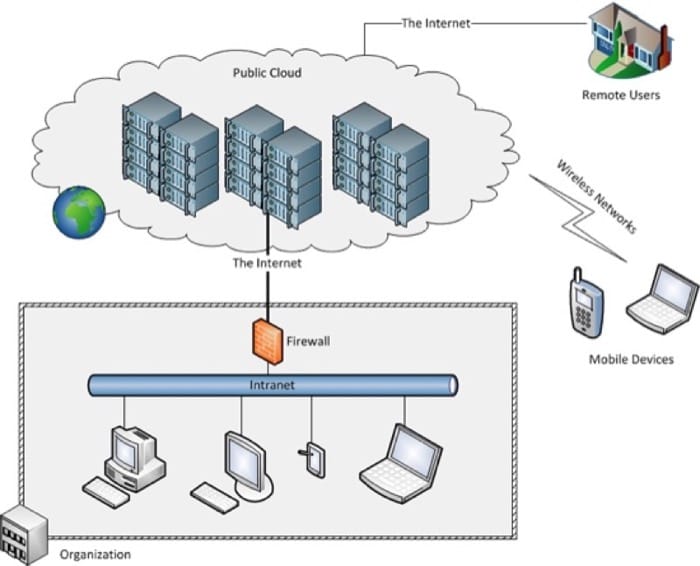 Figure 1.7: Public cloud.
Private Cloud
In this second type of cloud, the cloud infrastructure is owned by an organization (Figure 1.8). The infrastructure is accessible to specific users via the organization's intranet. The cloud environment needs to be procured, set up, operated, and maintained by the organization itself. The private cloud resources are typically shared amongst an organizations end users. Unlike the public cloud, security and terms of use of a private cloud are defined by the organization. The entire infrastructure is located in the organization, hence, security can be compliant with the organization's policies.
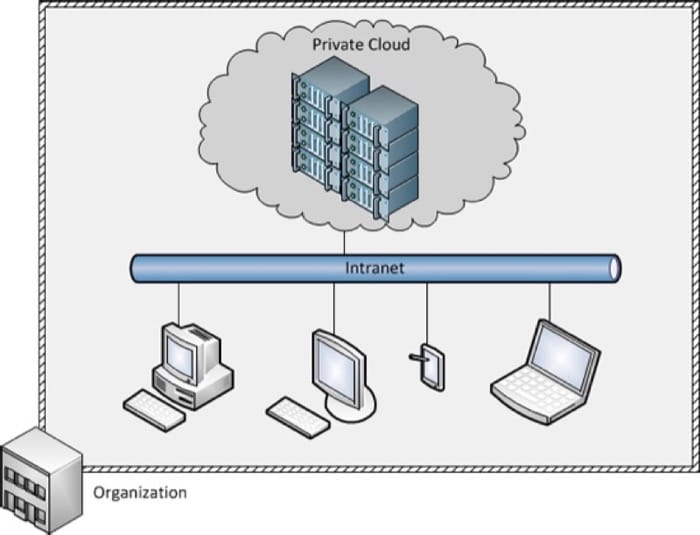 Figure 1.8: Private cloud.
Hybrid Cloud
In a hybrid cloud, the infrastructure includes an owned private cloud and a leased public cloud (Figure 1.9). Hybrid clouds enable the idea of "cloud bursting," in which an organization uses its private cloud for most of its needs and dynamically provisions resources in the public cloud when utilization exceeds the capacity of its private cloud.
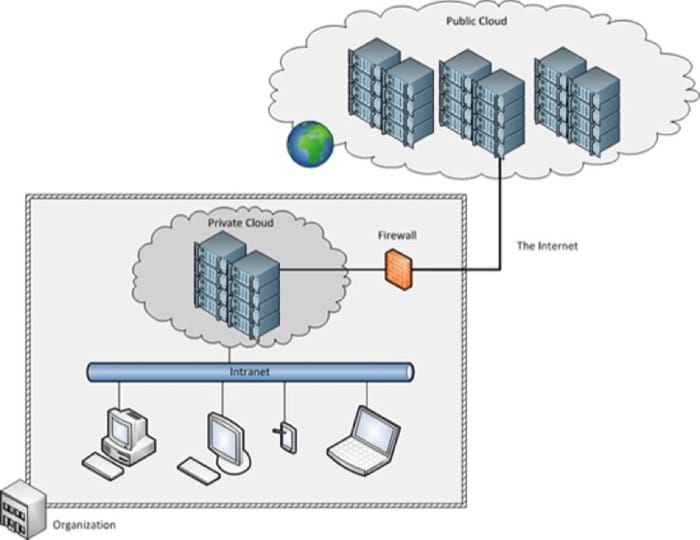 Figure 1.9: Hybrid cloud.
Other types of clouds continue to emerge, for example, Community Clouds which share infrastructure among different organizations that have common security or other concerns. For example, various non-profit organizations that work closely with government might build and share a community cloud. Another type is Distributed Cloud which provides cloud computing using a set of distributed machines located at different geographical locations. An example is Cloud@Home which leverages volunteered resources as a shared resource.
Popular Cloud Stacks
We will now do a quick run-down of cloud stacks that are currently popular in the market. We will quickly glance over the services offered by the major cloud providers, viz. Amazon Web Services, Microsoft, Google as well as OpenStack, the open cloud computing platform.
Amazon Web Services (AWS)
As of 2015, AWS is a market leader in several cloud computing segments, particularly in the IaaS space. Amazon Web Services started by commoditizing and leasing out several services that were developed in-house by Amazon’s engineering team to the wider public. AWS started by offering S3, the object storage service, and then went on to provide EC2, the elastic compute cloud. AWS is currently one of the largest cloud computing companies.
AWS’s stack primarily consists of the following components:
Compute: Amazon’s primary compute solution is Elastic Compute Cloud (EC2), which provides users with virtual machines, or instances of various capacities for hourly or longer term rentals. EC2 forms the backbone of the AWS cloud stack in terms of compute infrastructure. EC2 instances can be managed directly through the AWS EC2 APIs, or through other services such as AutoScaling.
Storage: AWS offers multiple products in this space. Block storage is provided by Elastic Block Storage (EBS) volumes, which can be attached and detached from EC2 instances. Object storage is provided by the simple storage service (S3), which allows for binary large objects (BLOBs) to be stored and retrieved using a simple HTTP service. AWS also offers a varied suite of database services, including RDS which offers a managed SQL service, DyanmoDB, which offers a highly scalable, low-latency key-value store, and ElastiCache, an in-memory database store.
Networking: Amazon’s Virtual Private Cloud (VPC), Elastic Load Balancer (ELB) and Route 53 are networking services that can be used to manage the connectivity between your instances and services deployed in AWS and the outside world.
PaaS Products: AWS’s platforms are large and varied to cater to different application needs. AWS provides a suite of analytics platforms such as Elastic MapReduce (EMR), Amazon Kinesis and Redshift. Rapid web application development is possible through AWS Elastic Beanstalk. Amazon also offers many products to manage and control cloud deployments such as CloudFormation, OpsWorks and CodeDeploy.
Microsoft Azure
Microsoft Azure is one of the fastest growing cloud services in the market, with impressive growth and an increasingly expanding portfolio of cloud services. Azure also leverages Microsoft’s large data center presence worldwide, as well as CDN sites that are spread across 24 countries. Subsets of Microsoft’s Cloud Platform are available as the Windows Azure Pack, which allows an organization to build a private cloud which can seamlessly connect and interact with the Azure public cloud.
Compute: Microsoft offers Azure Virtual Machines, which can be configured to run Windows or various flavors of Linux. The virtual machines are managed by Azure Cloud Services, which provides a multi-language cloud management platform. A unique aspect of Azure is the staging environment and simulator, which allows developers to test out a cloud deployment before putting it into production.
Storage: Azure offers several storage solutions, including: Azure Blobs to store binary large objects; Azure Tables, to store NoSQL tables; and Azure Files, which offer SMB-based storage endpoints (Windows-compatible file servers) to mount and store files in the cloud. Azure also offers managed Relational Database services through the Azure SQL Database; a managed NoSQL document database service, DocumentDB; and high-performance key-value cache through Azure Redis Cache. Microsoft also offers a unique storage appliance called StorSimple, which is an SSD/HDD hybrid storage array deployed at the clients side, and also connects to Azure for backup, analytics and/or cloud deployment.
Networking: Microsoft also offers virtual private networking services through Azure Virtual Network. Another unique feature of Microsoft’s Azure cloud is the ability to purchase dedicated fiber connectivity to Microsoft’s data centers through ExpressRoute. Azure Traffic Manager can be used to load balance traffic to Azure Virtual Machines.
PaaS Products: Azure offers several PaaS products: Azure Websites is the primary PaaS platform, which enables developers to deploy scalable web applications on the Azure platform. Azure Mobile Services allow developers to create the infrastructure required to support mobile applications. In the analytics space, Azure offers several products including HDInsight, which is a managed Hadoop cluster service similar to Amazon’s EMR. Microsoft also offers managed Machine Learning and Stream Analytics services to developers.
Google Cloud Platform
Google’s Cloud Platform initially offered only PaaS products and APIs into Google’s most powerful products such as the Translate API. The Google Cloud Platform has now diversified into multiple services in response to the offerings of its competitors.
Compute: Google’s primary compute platform is the Google Compute Engine (GCE), which offers Linux virtual machines of various sizes depending on the application requirements. A unique differentiator of Google’s platform is that instances are billed by the minute, with a minimum charge of 10 minutes.
Storage: Google offers three primary storage services, namely Cloud Storage, which is an object storage service similar to S3 and Azure Blobs. Google’s Cloud Datastore is the managed NoSQL datastore service that allows users to store non-relational data with high scalability, but optionally supports transactions and SQL queries on your data. In addition, Google offers a traditional managed SQL database service called Cloud SQL.
Networking: Google offers several networking products to manage the connections between Google’s cloud services and the outside world, namely Load Balancing, Interconnect and DNS services.
PaaS Products: Google’s primary PaaS offering is Google App Engine (GAE), which allows developers to deploy an application using Google’s SDK. In addition, Google offers data analytics platforms such as BigQuery, which allows users to run SQL-like queries against multi-terabyte datasets. Cloud Endpoints allows developers to create RESTful services accessible from Mobile and browser clients. In addition, Google’s established products such as Prediction and Translate are available as APIs for access to developers to integrate into their own application.
OpenStack
All of the stacks we have looked at so far are proprietary stacks hosted by the companies on their public clouds. The OpenStack model is markedly different as it’s an open-source cloud stack that is available for both public and private clouds. OpenStack defines itself as a “cloud operating system that controls large pools of compute, storage, and networking resources throughout a datacenter, all managed through a dashboard that gives administrators control while empowering their users to provision resources through a web interface”. OpenStack can be deployed on anywhere from a bunch of machines to an entire datacenter. Public clouds that offer OpenStack include Rackspace and HP Helion.
Compute: OpenStack’s compute offering offers similar services as the public cloud counterparts, with the ability to manage virtualized and commodity server resources, with API-based access. A unique aspect of OpenStack’s compute system (called Nova) is support for a wide range of Hypervisors such as XenServer and KVM, as well as a wide range of hardware support, which includes ARM-based systems.
Storage: OpenStack offers two types of storage services: an object storage service (called Swift), as well as block storage services (called Cinder). These can be deployed and scaled according to environment and the application needs. Database systems can be deployed on top of virtual machines and storage services, if required, but OpenStack does not use or promote any particular type of database solution. Public clouds that use OpenStack, like Rackspace, offer MySQL, Percona or MariaDB deployed on top of OpenStack VMs as a service.
Networking: OpenStack offers a pluggable, scalable and API-driven system called Neutron to manage networks, VLANs and IP address pools for virtual machines. A novel feature of OpenStack networking is support for Software Defined Networks such as OpenFlow, which enable fine-grained configuration of networking hardware in response to provisioning or traffic requirements. More information on Software Defined Networks will be covered later.
PaaS Products: OpenStack itself does not have any PaaS services, but public cloud providers that are built on top of OpenStack have a few. For example, Rackspace provides several platforms for website hosting and managed Hadoop clusters.
References
- Li Ang, et. al. (2010). CloudCmp: Shopping for a Cloud Made Easy . Proceedings of the 2nd USENIX conference on Hot topics in cloud computing .
Cloud Use Cases
Use Cases for the Cloud
With the rapid evolution of cloud technologies, there are new use cases emerging every day. In this section, we discuss some of the common cloud use cases.
Web/Mobile Applications
A main driver for cloud computing comes from Web hosting. Websites and Web applications typically are hosted on a server with a dedicated internet connection. Older Web hosting services either provided dedicated servers to clients or gave a fraction of a larger UNIX system to multiple clients. Now, with the advent of cloud computing, Web/mobile applications can be built on top of existing IaaS/PaaS or even SaaS services.
- SaaS based: Using the SaaS model, organizations can deploy one-size-fits-all applications on the Web. Common examples include WebMail, social networking sites, and utility websites, such as personal organizers, calendars, and planners.
- PaaS based: Application developers can use a range of online platforms and tools to create SaaS and mobile applications. Platforms such as Google App Engine, Parse, and AppScale are popular platforms on which Web and mobile applications can be built.
- IaaS based: Applications that need even more customization and flexibility can adopt the IaaS model by renting out virtual machines from providers such as EC2 and Rackspace and deploy a fully customized software stack to run the Web application.
Consider the following scenarios:
- Animoto, an online video slideshow creator, decided to deploy a Facebook application. Traffic to the service surged, which resulted in Animoto scaling up from 50 servers to 3,500 servers in 3 days. Such elastic scalability is made possible through cloud computing.
- Online retail stores that use cloud computing, such as Amazon and Target.com, have been able to size up infrastructure for peak activity (such as the day after Thanksgiving, or Black Friday). Salesforce.com hosts customers ranging from 2 seat to more than 20,000 seat customers, all using the same Web platform.
Big Data Analytics
Many organizations have to deal with large amounts of data. This data may emanate from such areas as sensors, experiments, transactional data, and Web page activity. Big data processing usually requires a lot of computational and storage resources but, depending on an organization's needs, may be periodic or seasonal. For example, Amazon may have business intelligence and analytics jobs setup for the end of the day, which may require a few hours of time from a few hundred servers. In these scenarios, cloud computing makes sense because these resources can be acquired on demand. Many firms even have fully automated analytics pipelines that automatically collect, analyze, and store data, with resources being provisioned on demand. Examples of big data scenarios include the following:
- The Union Pacific Railroad mounts infrared thermometers, microphones, and ultrasound scanners alongside its tracks. These sensors scan every train as it passes and send readings to the railroad's data centers, in which pattern-matching software identifies equipment at risk of failure.
- Traditional retailers, such as Walmart, Sears, and Kmart, are following in the footsteps of online retailers, such as Amazon, by analyzing consumer spending habits to offer personalized marketing campaigns and offers to individual customers.
- Companies such as Time Warner and Comcast are using big data to track media consumption habits of their subscribers and provide value-added information to advertisers and customers. The video games industry tracks the gameplay habits of millions of console owners. Companies such as Riot Games sift through 500GB of structured data and over 4TB of operational logs every day.
On-Demand, High-Performance Computing
Modern science is impossible without high-performance computing (HPC). In addition to physical experimentation, computer-based simulation has become popular in fields ranging from astrophysics, quantum mechanics, and oceanography to biochemistry. Such workloads are computationally demanding and typically are run on dedicated clusters or at supercomputing facilities.
Scientists are now increasingly looking toward the cloud for HPC resource demands. Amazon EC2 offers extremely powerful instances with more CPU and even GPU-acceleration for HPC use. Scientists find the availability of vast amounts of computational power appealing, particularly for small projects or time-sensitive, bursty analytics, such as experimental runs before submitting research paper deadlines. Examples of HPC on the cloud include the following:
- A 3,809-instance EC2 cluster was set up by Cycle Computing, Inc. for a pharmaceutical company to run molecular modeling jobs. The cluster has a total of 30,472 cores, 26.7TB of RAM, and 2PB of disk storage.
- Companies such as Pfizer, Unilever, Spiral Genetics, Integrated Proteomics Applications, and Bioproximity run bioinformatics and genomics workloads on Amazon EC2 instances.
- NASA JPL uses high-performance Amazon EC2 instances to process high-resolution satellite images.
Online Storage and Archival
One of the important resources that is available through cloud computing is storage. From personal storage solutions, such as Dropbox, to large-scale Internet storage systems, such as Amazon S3, online storage is a major cloud computing use case. The online storage options include:
- Web-based object storage: Services such as Amazon S3 allow users to store terabytes of data as simple objects that can be accessed over HTTP. Many websites use Amazon S3 to store static content, such as images.
- Backup and recovery: Services such as CrashPlan and Carbonite provide online backup of customer data, which is a great option as a secure, off-site backup solution.
- Media streaming and content distribution: Services such as Amazon CloudFront not only store large amounts of data but assist in content delivery. Requests to pull data from CloudFront are automatically routed to the nearest server, thereby decreasing latency for time-sensitive media, such as video.
- Personal storage: Services such as Dropbox and Google Drive are popular among users to store personal documents online for anytime, anywhere access.
Rapid Application Development and Testing
One of the major advantages of the cloud is the ability to rapidly deploy and test applications. An entire computing environment can be deployed in minutes and then torn down and discarded just as easily after the testing is complete. For many companies, the value is in allowing developers to quickly create enhancements and features and test them without any risk. Specialized hardware and servers do not need to be ordered and installed. Within mere minutes, a virtual server can be spun up on EC2. Applications can also be easily stress/load tested. Existing servers can be cloned to perform scalability studies as well.
Summary
Introduction to Cloud Computing Summary
- Cloud computing is the delivery of computing as a service over a network, whereby distributed resources are provided to the end user as a utility.
- The idea of utility computing originated in the 1950s and 1960s, but the enabling technologies evolved decades later and have finally matured to a state in which cloud computing is a viable option for organizations to invest in.
- The enabling technologies of cloud computing are networks, virtualization and resource management, utility computing, programming models, parallel distributed computing, and storage technologies.
- Cloud computing consists of four building blocks: application software, development platforms, resource sharing, and infrastructure.
- Cloud service models exist at various levels in the building blocks.
- Software as a service (SaaS) is at the application software layer and is the delivery of SaaS over the Internet (typically through a Web browser).
- Platform as a service (PaaS) is at the development platform layer and can be defined as a computing platform that allows for the creation of Web applications in a simplified manner without the complexity of purchasing and maintaining any of the underlying software and infrastructure.
- In the Infrastructure as a service (IaaS) model, providers rent out compute resources in the form of instances or virtual machines, which have some form of CPU, memory, disk, and network bandwidth attached to them.
- There are three well-known deployment models for cloud computing: public, private, and hybrid.
- Popular cloud providers include Amazon Web Services, Microsoft Azure, Google Cloud Platform and OpenStack. Each provider typically offers a stack consisting of compute, storage and networking services, among others.
- Some of the most popular use cases for the cloud include: web and mobile applications, big data analytics, on-demand high performance computing, online storage and archival, and rapid application development and testing.