云计算 阅读材料 12 Virtualization Case Study
本页目录
Now that we have covered some of the theory behind virtualization, we can look at a few case studies. Specifically, we start out with an overview of current virtualization suites in the market, which includes a feature-wise comparison of VMWare, XenServer, HyperV and RHEV. Next, we will take a closer look at Amazon EC2 as a public IaaS provider and some of the design decisions made with respect to providing a general, broad-based public IaaS cloud service.
A Taxonomy of Virtualization Suites
Virtualization Suites
We briefly survey some of the current and common virtualization software suites and distinguish between virtualization suites and hypervisors. Many vendors often use hypervisor and virtualization suite interchangeably. As discussed throughout this chapter, a hypervisor is primarily responsible for running multiple virtual machines (VMs) on a single physical host. A virtualization suite comprises various software components and individual hypervisors that enable the management of many physical hosts and VMs. A management component typically issues commands to the hypervisor to create, destroy, manage, and migrate VMs across multiple physical hosts.
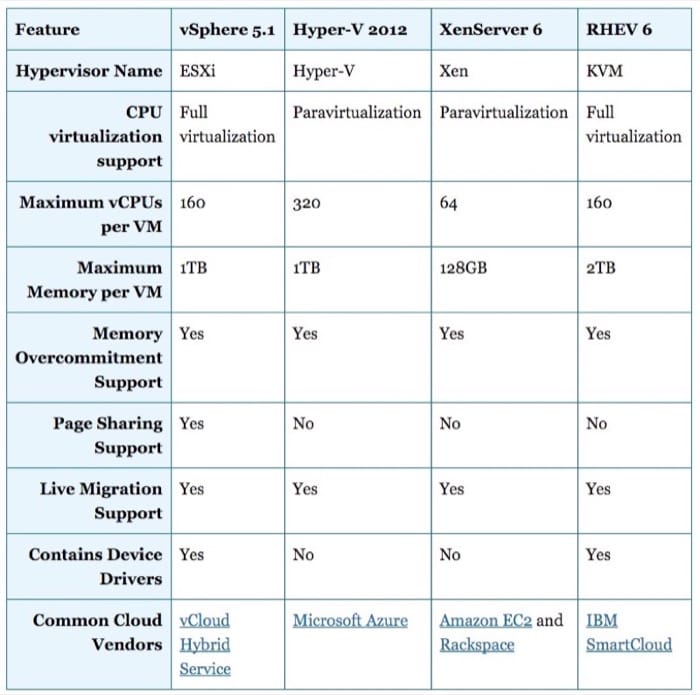
The table below shows our taxonomy of four virtualization suites, vSphere 5.1, Hyper-V , XenServer 6, and RHEV 3. We compare the suites in terms of multiple features, including the involved hypervisor, the virtualization type, the allowable maximum number of vCPUs per VM, the allowable maximum memory size per VM, and whether memory overcommitment, page sharing, and live migration are supported. In addition, we indicate whether the involved hypervisors contain device drivers, and we list some of the popular cloud vendors that utilize such hypervisors.
To elaborate on some of the features, live migration allows running VMs to be seamlessly shifted from one physical machine to another. It enables many management features, such as maintenance, power-efficient dynamic server consolidation, and workload balancing, among others. Page Sharing refers to sharing identical memory pages across VMs. This renders effective when VMs use similar OS instances. Finally, some hypervisors eliminate device drivers entirely at guest OSs and provide direct communications between guest OSs and host OSs collocated with hypervisors (similar to what we discussed in the Section "Xen's Approach to I/O Virtualization").
Amazon's Elastic Compute Cloud
Amazon EC2
Amazon Elastic Compute Cloud (Amazon EC2) is a vital part of Amazon's cloud computing platform, Amazon Web Services (AWS). On August 25, 2006, Amazon launched EC2, which together with Amazon Simple Storage Service (Amazon S3) marked a change in the way IT was done. Amazon EC2 is a highly reliable and scalable infrastructure as a service (IaaS) with a utility payment model. It allows users to rent virtual machines (VMs) and pay for the resources that they actually consume. Users can set up and configure everything in their VMs, ranging from the operating system to any application. Specifically, a user can boot an Amazon Machine Image (AMI) to create a VM, referred to in Amazon's parlance as an instance. AMI is a virtual appliance (or a VM image) that contains the user's operating system, applications, libraries, data, and associated configuration settings.
Users can create EC2 instances either by using default AMIs prepackaged by Amazon or by developing their own AMIs using Amazon's bundling tools. Default AMIs are preconfigured with an ever-growing list of operating systems, including Red Hat Enterprise Linux, Windows Server, and Ubuntu. A wide selection of free software provided by Amazon can also be directly incorporated into AMIs and executed over EC2 instances. For example, Amazon provides software for databases (e.g., Microsoft SQL), application servers (e.g., Tomcat Java Web Application), content management (e.g., MediaWiki), and business intelligence (e.g., Jasper Reports). Added to the wide assortment of free software, Amazon services (e.g., Amazon Relational Database Service, which supports MySQL, Oracle, and Microsoft SQL databases) can be further employed in conjunction with EC2 instances. Finally, users can always configure, install and run at any time any compatible software on EC2 instances, exactly as is the case with regular physical machines.
Amazon EC2 Virtualization Technology
Amazon EC2 demonstrates the power of cloud computing. Under the hood, it is a marvel of technology. As of March 2012, it was hosting around 7,100 server racks with a total of 454,400 blade servers, assuming 64 blade servers per rack. [1] Above its data centers, Amazon EC2 presents a true virtualization environment using the Xen hypervisor. Xen is a leading example of system virtualization, initially developed as part of the Xenoserver project at the Computer Laboratory, Cambridge University. [2] Currently, Xen is maintained by an open source community. [3] The goal of Xen is to provide IaaS with full isolation and minimal performance overhead on conventional hardware. As discussed previously in this unit, Xen is a native hypervisor that runs on bare metal at the most privileged CPU state. Amazon EC2 uses a highly customized version of Xen [4] to provision and isolate user instances rapidly, consolidate instances to improve system utilization, tolerate software and hardware failures by saving and migrating instances, apply system load balancing through live and seamless migration of instances, and more.
Amazon EC2 instances can be created, launched, suspended, resumed, and terminated as needed. The instances are system VMs composed of virtualized (or paravirtualized) sets of physical resources, including CPU, memory, and I/O components. To create instances, Xen starts a highly privileged instance (domain 0) at a host OS out of which other user instances (domain U) can be instantiated with guest OSs (see Fig. 1.25). As host OSs, Novell's SUSE Linux Enterprise Server, Solaris and Open-Solaris, NetBSD, Debian, and Ubuntu, among others, can be used. It is not known, however, which among these host OSs Amazon EC2 supports, but Linux, Solaris and OpenSolaris, FreeBSD, NetBSD, and others can be employed as guest OSs. Among the guest OSs that Amazon EC2 supports are Linux, OpenSolaris, and Windows Server 2003, [5] Amazon EC2’s guest OSs are run at a lesser privileged ring than the host OS and the hypervisor. Clearly, this helps isolate the hypervisor from guest OSs and guest OSs from each other, a key requirement on Amazon AWS’s cloud platform. Nonetheless, running guest OSs in unprivileged mode violates the usual assumption that OSs must run in system mode. To circumvent consequent ramifications, Xen applies a paravirtualized approach whereby guest OSs are modified to run at a downgraded privileged level. As a result, sensitive instructions are enforced to trap to the hypervisor for verification and execution. Linux instances (and most likely OpenSolaris) on Amazon EC2 use Xen’s paravirtualized mode, and it is conjectured also that Windows instances do so. [5] [6] Upon provisioning instances, Xen provides each instance with its own vCPU(s) and associated ISA. The complexity of this step depends entirely on the architecture of the underlying pCPU(s). To this end, it is not clear what vCPU scheduler Amazon EC2 applies, but Xen’s default scheduler is the Credit Scheduler (as discussed in the Resource Virtualization: CPU module). Amazon EC2 is thought to have a modified version of the Credit Scheduler. [5]
Memory and I/O resources are virtualized in Xen in a way similar to that described in the Resource Virtualization: Memory module. First, Xen uses a two-level page mapping method. Second, the hardware page tables are allocated and managed by guest OSs, with a minimal involvement from the hypervisor. [5] Specifically, guest OSs can read directly from hardware page tables, but writes are intercepted and validated by the Xen hypervisor to ensure safety and isolation. For performance reasons, however, the guest OSs can batch write requests to amortize the overhead of passing by the hypervisor per every write request. Finally, with Xen, existing hardware I/O devices are not emulated as is typically done in fully virtualized environments. In contrast, I/O requests are always transferred from user instances to domain 0, and vice versa, using a shared memory communication paradigm as demonstrated in Fig. 1.25. At domain 0, device drivers of the host OS are borrowed to handle the I/O requests.
References
- H. Liu (2012). "Amazon Data Center Size." http://huanliu.wordpress.com/2012/03/13/amazon-data-center-size/ March 2012.
- G. Coulouris, J. Dollimore, T. Kindberg, and G. Blair (May 2011). "Distributed Systems: Concepts and Design." Addison-Wesley, 5 Edition.
- Xen Open Source Community. http://www.xen.org.
- Amazon Elastic Compute Cloud. http://aws.amazon.com/ec2/.
- F. Zhou, M. Goel, P. Desnoyers, and R. Sundaram (March 2011). "Scheduler Vulnerabilities and Attacks in Cloud Computing." arXiv:1103.0759v1 [cs.DC].
- C. Boulton (Serverwatch, 2007). "Novell." Microsoft Outline Virtual Collaboration.
Amazon EC2 Properties
Amazon EC2 is designed using virutalization technology in order to meet certain performance, scalability, flexibility, security, and reliability criteria.
Elasticity
In leveraging a major benefit offered by virtualization, Amazon EC2 allows users to statically and dynamically scale up and down their EC2 clusters. In particular, users can always provision and deprovision virtual EC2 instances by manually starting and stopping any number of them using the AWS management console, the Amazon command line tools and/or the Amazon EC2 API. In addition, users can employ Amazon's CloudWatch to monitor EC2 instances in realtime and automatically respond to changes in computing requirements. CloudWatch is an Amazon service that allows users to collect statistics about their cluster resource utilization, operational performance, and overall resource demand patterns. Metrics, such as CPU utilization, disk operations, and network traffic, can be aggregated and fed to the Amazon's Auto Scaling process enabled by CloudWatch. The Auto Scaling process can subsequently add or remove instances so that performance is maintained and costs are saved. In essence, Auto Scaling allows users to closely follow the demand curve of their applications and synergistically alter their EC2 clusters according to conditions they define (e.g., add three more instances to the cluster when the average CPU utilization exceeds 80%).
Scalability and Performance
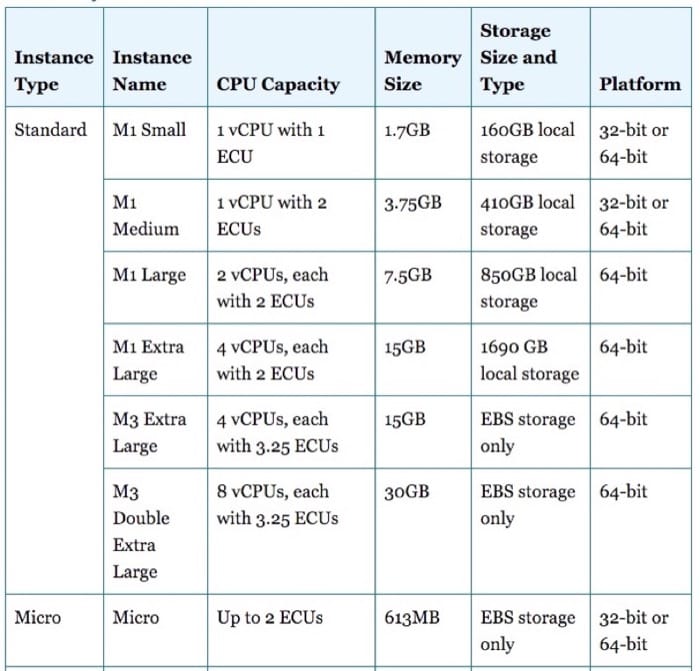
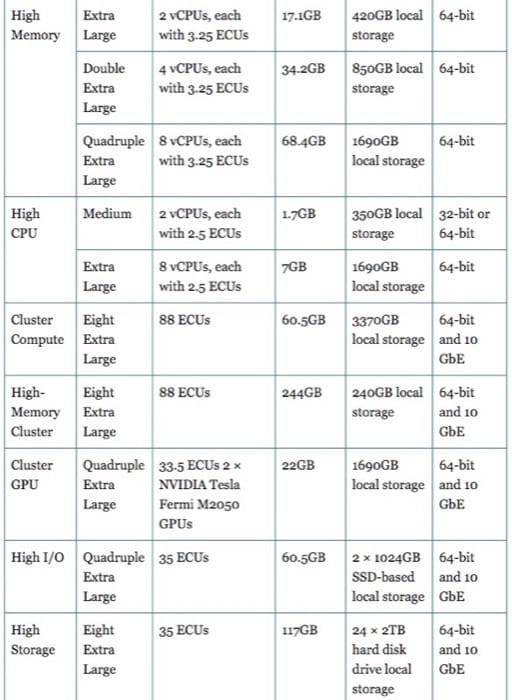
Amazon EC2 instances can scale to more than 255 pCPUs per host, [1] 128 vCPUs per guest, 1TB of RAM per host, up to 1TB of RAM per unmodified guest, and 512GB of RAM per paravirtualized guest. [2] In addition, Amazon EC2 reduces the time needed to boot a fresh instance to seconds, thus expediting scalability as the needs for computing varies. To optimize performance, Amazon EC2 instances are provided in various resource capacities that can suit different application types, including CPU-intensive, memory-intensive, and I/O-intensive applications (see Table 1.2). The vCPU capacity of an instance is expressed in terms of elastic compute units (ECU). Amazon EC2 uses ECU as an abstraction of vCPU capacity, whereby one ECU provides the equivalence of a 1.0-1.2 GHz 2007 Opteron or 2007 Xeon processor. [3] Different instances with different ECUs provide different application runtimes. The performances of instances with identical type and ECUs may also vary as a result of what is called performance variation [4] [8] in cloud computing.
Flexibility
Amazon EC2 users are provided with complete control over EC2 instances, with a root access to each instance. They can create AMIs with software of their choice and apply many of Amazon services, including Amazon Simple Storage Service (Amazon S3), Amazon Relational Database Service (Amazon RDS), Amazon SimpleDB, and Amazon Simple Queue Service (Amazon SQS). These services and the various available Amazon EC2 instance types can jointly deliver effective solutions for computing, query processing, and provide storage across a wide range of applications. For example, users running I/O-intensive applications, such as data warehousing and Hadoop MapReduce, can exploit high-storage instances. On the other hand, for tightly coupled, network-intensive applications, users can utilize high-performance computing (HPC) clusters.
In addition, users have the flexibility to choose among multiple storage types that can be associated with their EC2 instances. First, users can rent EC2 instances with local instance-store disks as root devices. Instance-store volumes are volatile storage and cannot survive stops and terminations. Second, elastic block storage (EBS) volumes can be attached to EC2 instances, which provide the instances with raw block devices. The block devices can then be formatted and mounted with any file system at EC2 instances. EBS volumes are persistent storage and can survive any EC2 instance state, including stops and terminations. EBS volumes of sizes from 1GB to 1TB can be defined, and RAID arrays can be created by combining two or more volumes. EBS volumes can even be attached or detached from instances while they are running. They can also be moved from one instance to another, thus remaining independent of any instance. Finally, applications running on EC2 instances can access Amazon S3 through a defined API. Amazon S3 is a storage that makes Web-scale computing easier for developers, whereby any amount of data can be stored and retrieved at any time and from anywhere on the Web. [5] [6]
To this end, Amazon EC2 users do not only have the flexibility of choosing among many instance and storage types but have the capability of mapping elastic IP addresses to EC2 instances without a network administrator's help or the need to wait for DNS to propagate new bindings. Elastic IP addresses are static IP addresses but tailored for the dynamicity of the cloud. For example, unlike a traditional static IP address, an elastic IP address enables tolerating an instance failure by programmatically remapping the address to any other healthy instance under the same user account. Thus, elastic IP addresses are associated with user accounts and not EC2 instances. Elastic IP addresses exist until explicitly removed and persist even when accounts have no current running instances.
Fault Tolerance
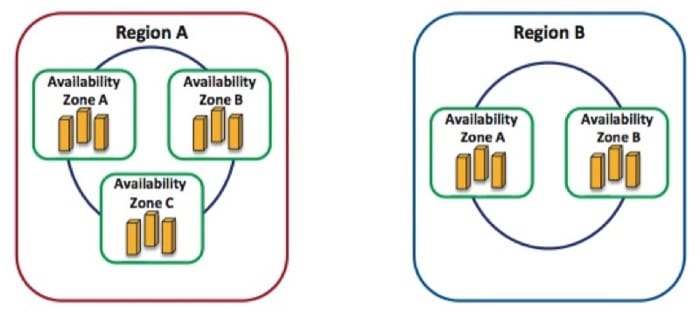
Amazon EC2 users are capable of placing instances and storing data at multiple locations represented as regions and availability zones. As shown in Figure 1.27, a region can consist of one or many availability zones, and an availability zone can consist of many blade servers. Regions are independent collections of AWS resources that are dispersed geographically to avoid catastrophic disasters. An availability zone is a distinct location in a region designed to act as an autonomous failure zone. Specifically, an availability zone does not share a physical infrastructure with other availability zones, thus limiting failures from transcending its own boundaries. Furthermore, when a failure occurs, automated AWS processes start moving customer traffic away from the affected zone. Consequently, applications that run in more than one availability zone across regions can inherently achieve higher availability and minimize downtime. Amazon EC2 guarantees 99.95% availability per each Region. [3]
Last, EC2 instances that are attached to Amazon EBS volumes can attain improved durability over EC2 instances with local stores (or the so-called "ephemeral storage"). Amazon EBS volumes are replicated automatically in the backend of a single availability zone. Moreover, with Amazon EBS, point-in-time consistent snapshots of EBS volumes can be created and reserved in Amazon S3. Amazon S3 storage is automatically replicated across multiple availability zones, not only in a single availability zone. Amazon S3 helps maintain the durability of users' data by quickly detecting and repairing losses. Amazon S3 is designed to provide 99.999999999% durability and 99.99% availability of data over a given year. [3] A snapshot of an EBS volume can also serve as the starting point for a new EBS volume in case the current one fails. Therefore, with the availability of regions and availability zones, the virtualized environment provided by Xen, and Amazon's EBS and S3 services, Amazon EC2 users can achieve long-term protection, failure isolation, and reliability.
Security
Security in Amazon EC2 is provided at multiple levels. First, as pointed out earlier, EC2 instances are controlled completely by users. Users have full root access, or administrative control, over their instances, accounts, services, and applications. AWS does not have any access rights to user instances and cannot log into their guest OSs. [9] Second, Amazon EC2 provides a complete firewall solution, whereby the default state is to deny all incoming traffic to any user instance. Users must explicitly open ports for specific inbound traffic. Third, API calls to start/stop/terminate instances, alter firewall configurations, and perform other related functions are all signed by the user's Amazon Secret Access Key. Without the Amazon Secret Access Key, API calls on Amazon EC2 instances cannot be made. Fourth, the virtualized environment provided by Xen provides a clear security separation between EC2 instances and the hypervisor as they run at different privileged modes. Fifth, the AWS firewall is placed in the hypervisor between the physical network interface and the virtual interfaces of instances. Hence, because packet requests are all privileged, they must trap to the hypervisor and accordingly pass through the AWS firewall. Consequently, any two communicating instances are treated as separate virtual machines on the Internet, even if they are placed on the same physical machine. Finally, because Amazon EBS volumes can be associated with EC2 instances, their accesses are restricted to the AWS accounts that created the volumes. This indirectly denies all other AWS accounts (and corresponding users) from viewing and accessing the volumes. We note, however, that this does not impact the flexibility of sharing data on the AWS cloud platform. In particular, users can still create Amazon S3 snapshots of their Amazon EBS volumes and share them with other AWS accounts/users. Nevertheless, only the users who own the volumes are allowed to delete or alter EBS snapshots.
References
- Xen 4.1 Release Notes. http://wiki.xen.org/wiki/Xen 4.1 Release Notes.
- Xen 4.0 Release Notes. http://wiki.xen.org/wiki/Xen 4.0 Release Notes.
- Amazon Elastic Compute Cloud. http://aws.amazon.com/ec2/.
- B. Farley, V. Varadarajan, K. Bowers, A. Juels, T. Ristenpart, and M. Swift (2012). "More for Your Money: Exploiting Performance Heterogeneity in Public Clouds." Heterogeneity in Public Clouds.
- S. Ghemawat, H. Gobioff, and S. T. Leung (Oct. 2003). "The Google File System." SOSP.
- Hadoop. http://hadoop.apache.org/.
- J. Dean and S. Ghemawat (Dec. 2004). "MapReduce: Simplified Data Processing On Large Clusters." OSDI.
- M. S. Rehman and M. F. Sakr (Nov. 2010). "Initial Findings for Provisioning Variation in Cloud Computing." CloudCom.
- Amazon (May 2011). "Amazon Web Services: Overview of Security Processes." Amazon Whitepaper.
Summary
- Many virtualization suites are available from multiple cloud vendors. They have differing architectures and features. Most suites support memory over commitment (which enhances server consolidation) as well as live migration (which allows VMs to be seamlessly moved across physical machines).
- Amazon's Elastic Compute Cloud (EC2) is Amazon Web Services' primary IaaS offering.
- Amazon Machine Images (AMIs) can be used to create a VM (or instance) in EC2. Dozens of AMIs are available for various environments and prebuilt software stacks.
- EC2 instances can be created, launched, stopped, resumed, and terminated as needed. EC2 is believed to be using Xen as the hypervisor. Amazon's software completely automates the process of creating instances, configuring their network and storage, and making them accessible to the user.
- Amazon EC2 offers over 17 different instance types, each of which are configured with differing CPU, memory, local storage, and I/O specifications. EC2 instances typically boot in a minute to a few seconds, depending on the instance type, allowing for elastic scaling of compute resources on demand.
- EC2 instances are flexible to be configured in any way the user requires because the user has full administrator privileges to the OS running in the instance. Amazon's Elastic Block Store (EBS) service allows for raw block devices to be provisioned and attached or detached to any instance. Amazon also allows for elastic IPs (fixed IP addresses) that can be attached to any instance. All of Amazon's services can be programmatically accessed using APIs, which allows for automated resource control and management.
- EC2 instances can be launched in one of many regions and availability zones, allowing users to improve the fault tolerance and redundancy of their applications, if they wish to do so.
- EC2 instances are secured through Amazon's own configurable firewall, called security groups. The OS running in an instance is exclusively under the user's domain and cannot be accessed by Amazon. Furthermore, Amazon employs strict security practices with public-key authentication to provide access to instances as well as API interfaces to various AWS services.