云计算 第 19 课 用 MapReduce 进行批处理
本页目录
从这节课开始我们进入了一个新的阶段,开始具体来应用 MapReduce 编程模型,这次主要是计算文本的 N-Gram 及语言模型并连接到 web 服务中。
学习目标
- 列举不同的并行和分布式编程模型
- 解释 MapReduce 编程的执行流程
- 使用 MapReduce 处理文本数据集
- 使用 MapReduce 计算 n-gram 已经构造语言模型
- 直接把 MapReduce 的结果载入到后端存储
- 搭建前端用来连接后端并显示结果
一般来说我们根据运行时的延迟以及执行的频率会把分布式编程模型分为以下三种:
- 批量数据处理系统 Batch Data Processing Systems
- 用于批量处理历史数据
- MapReduce
- 内存中迭代批量数据处理系统 In-Memory Iterative Batch Data Processing Systems
- MapReduce 需要在每次迭代后保存当前计算结果
- 对于需要多次迭代直到收敛的问题,不够高效
- 这种处理方式会把数据保存在内存中来解决这个问题
- Spark
- 流/实时处理系统 Streaming or Real-time processing systems
- 前两种都是处理历史数据的
- 这种处理方式则能够实时处理数据
- Spark Streaming, Apache Storm, Apache Samza
背景知识
MapReduce 介绍
更加详细的介绍可以看我的Hadoop 指南
Hadoop 是 Google MapReduce 的开源实现。在 MapReduce 程序中,数据以键值对形式存储,然后通过 Mapper 和 Reducer 进行处理:
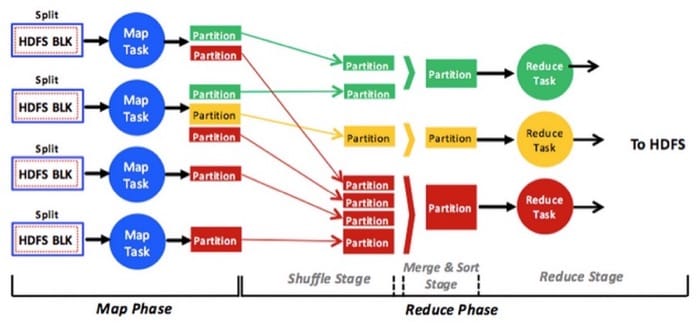
InputFormat 定义了 Mapper 如何从文件读入数据,并写入为 Writable 类型
Mapper: Map(k1, v1) --> list(k2, v2)
然后会进行 Shuffle 和 Sort(按照 key 的值),接着就到 Reducer,会针对同一个 key 的所有 value 进行处理
Reducer: Reduce(k2, list (v2)) --> list(v3)
具体的单词统计的例子可以参考以下资料,这里不赘述
在这个例子中,打包代码的时候不建议使用 maven 或者 eclipse,因为可能会弄错 Hadoop 包的版本,使用下面的命令(代码文件名为 WordCount.java)
cd ~
mkdir wordcount_classes
cp /usr/share/aws/emr/hadoop-state-pusher/lib/hadoop-common-2.4.0-amzn-3.jar .
cp /usr/share/aws/emr/hadoop-state-pusher/lib/hadoop-mapreduce-client-core-2.4.0-amzn-3.jar .
cp /usr/share/aws/emr/hadoop-state-pusher/lib/hadoop-mapreduce-client-common-2.4.0-amzn-3.jar .
javac -classpath hadoop-common-2.4.0-amzn-3.jar:hadoop-mapreduce-client-core-2.4.0-amzn-3.jar:hadoop-mapreduce-client-common-2.4.0-amzn-3.jar -d wordcount_classes WordCount.java
jar -cvf wordcount.jar -C wordcount_classes/ .- 然后需要把输入数据放入到 HDFS 中,如
hadoop fs -put /input - 然后执行
hadoop jar wordcount.jar WordCount /input /output来进行 MapReduce 工作 - 查看结果
hadoop fs -ls /output
上面的部分是用命令行来进行执行,实际我们可以直接在 web 界面操作
- 创建 EMR 的时候选择 Advanced Opitons
- 在 Steps 中选择 Custom JAR,然后 Configure and Add 具体的 JAR 包以及参数(比如 JAR 在 S3 中的位置)
- 然后执行即可
N-Grams 介绍
N-Grams 的定义在这里,不过直接看下图也就很清晰了
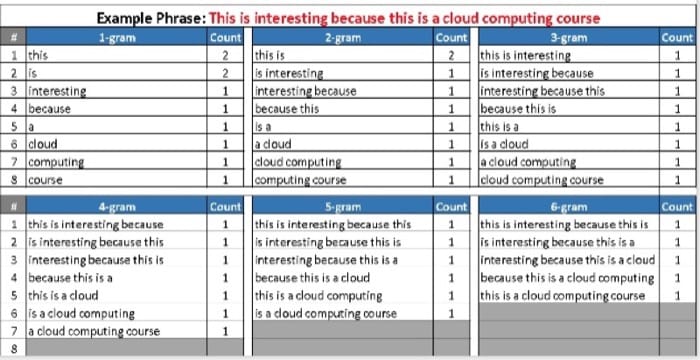
我们这次的任务只需要计算从 1-gram 到 5-gram(虽然图中也写了 6-gram)
任务目标
这里我们需要构建一个输入文本预测器,通过 n-gram 及对应的语言模型,预测用户之后可能会输入的内容,具体步骤如下:
- [40%] 在 Wiki 数据上计算 ngram
- [40%] 构造语言模型
- [20%] 代码质量
- [10%(bonus)] 词语自动完成
环境要求
- 打上标签:
Project:4.1 - AWS Elastic MapReducer(EMR),用
m3开头的机器 - 预算
$20 - MapReduce 的 java 程序需要用 JRE 1.7 编译(因为 Amazon EMR 只支持这个)
任务 1 构造 n-gram 模型
- 数据集
s3://cmucc-datasets/enwiki-20160204-pages - n-gram 格式
<phrase><\t><count>
格式的一个例子
this        1000
this is     500
this is a   250
算出所有的 n-gram 之后,需要选出出现次数最多的 100 个 n-gram,如果次数一样就按照字母序排列,完成之后保存到文件中,之后会用来评分。这里最好使用 Hive 的 SQL 语法来选择,不过其他任何方法都行。
具体步骤:
- 因为原始数据(总大小 6.2 GB)是 XML 格式,所以需要进行数据清洗
- 移除
<ref>和</ref>(如果有具体的属性,也要过滤掉,比如<ref name="iaf-ifa.org"/>整个都要过滤掉 - 考虑用正则撸掉) - 移除所有的 URL,也就是以 HTTP/HTTPS/FTP 开头的内容(这里千万要注意)
- 保留单词中的
'号,比如it's合法,但是在单词外的,比如students'就要过滤掉,但除了'之外其他都必须是字母 [A-Za-z],其他的标点符号(包括下划线_)和数字都可以截取掉,需要去掉的字符都可以用空格代替,但是不要把换行符弄掉 - 单词之间不要有连续两个以上的空格
- 所有的字母都应该是小写字母(
toLower) - 以行作为计算 n-gram 的最小单位,跨行的都不需要考虑
- 移除
- 使用清洗后的数据,在同一个 MapReduce job 中生成 1-gram, 2-gram, 3-gram, 4-gram, 5-gram(尽量使用竞价实例,不能用 EMR streaming)
- 不要输出空字符
- 先在小数据上测试,没有问题才继续做
- EMR 每个小时不要超过
$2(使用on-demand 价格)
- 可以把处理完成的数据保存在到 S3 中,在 MapReduce 程序中可以直接是用
s3cmd进行 S3 写入- 如果要在 S3 和 HDFS 间传输数据,可以使用
hadoop distcp命令 - 如果本地存储不够的话,可以把结果拷贝到
/mnt中(外置存储)
- 如果要在 S3 和 HDFS 间传输数据,可以使用
输入数据中的一行:
'''Anarchism''' is a [[political philosophy]] that advocates [[self-governance|self-governed]] societies with voluntary institutions. These are often described as [[stateless society|stateless societies]],<ref>"ANARCHISM, a social philosophy that rejects authoritarian government and maintains that voluntary institutions are best suited to express man's natural social tendencies." George Woodcock. "Anarchism" at The Encyclopedia of Philosophy</ref><ref name="iaf-ifa.org"/>"In a society developed on these lines, the voluntary associations which already now begin to cover all the fields of human activity would take a still greater extension so as to substitute themselves for the state in all its functions." [http://www.theanarchistlibrary.org/HTML/Petr_Kropotkin___Anarchism__from_the_Encyclopaedia_Britannica.html Peter Kropotkin. "Anarchism" from the Encyclopædia Britannica]</ref><ref>"Anarchism." The Shorter Routledge Encyclopedia of Philosophy. 2005. p. 14 "Anarchism is the view that a society without the state, or government, is both possible and desirable."</ref> <ref>"anarchists are opposed to irrational (e.g., illegitimate) authority, in other words, hierarchy — hierarchy being the institutionalisation of authority within a society." [http://www.theanarchistlibrary.org/HTML/The_Anarchist_FAQ_Editorial_Collective__An_Anarchist_FAQ__03_17_.html#toc2 "B.1 Why are anarchists against authority and hierarchy?"] in [[An Anarchist FAQ]]</ref>
清洗之后应该是
anarchism is a political philosophy that advocates self governance self governed societies with voluntary institutions these are often described as stateless society stateless societies anarchism a social philosophy that rejects authoritarian government and maintains that voluntary institutions are best suited to express man's natural social tendencies george woodcock anarchism at the encyclopedia of philosophy in a society developed on these lines the voluntary associations which already now begin to cover all the fields of human activity would take a still greater extension so as to substitute themselves for the state in all its functions peter kropotkin anarchism from the encyclop dia britannica anarchism the shorter routledge encyclopedia of philosophy p anarchism is the view that a society without the state or government is both possible and desirable anarchists are opposed to irrational e g illegitimate authority in other words hierarchy hierarchy being the institutionalisation of authority within a society b why are anarchists against authority and hierarchy in an anarchist faq
操作步骤
- 开启一个 EMR 集群,确保 Hive, HBase 和 Hadoop 都要安装,使用 AMI version 3.10.0
- 连接
ssh -i ../demo.pem hadoop@ec2-54-86-122-167.compute-1.amazonaws.com - 安装 tmux
sudo yum install tmux - 复制代码到服务器
scp -i ../demo.pem ./WordCount.java hadoop@ec2-54-86-122-167.compute-1.amazonaws.com:~/ngram/
- 连接
- 计算完成后,把前 100 个次数最多的 ngram 结果保存在名为
ngrams的文件中
所用命令
# 创建文件夹
$ cd ~; mkdir ngram; cd ngram
# 拷贝相关 jar 包
cp /usr/share/aws/emr/hadoop-state-pusher/lib/hadoop-common-2.4.0-amzn-3.jar .
cp /usr/share/aws/emr/hadoop-state-pusher/lib/hadoop-mapreduce-client-core-2.4.0-amzn-3.jar .
cp /usr/share/aws/emr/hadoop-state-pusher/lib/hadoop-mapreduce-client-common-2.4.0-amzn-3.jar .
# 这里需要多拷贝一个文件,不然会有警告(虽然不知道会不会有影响,但是没有警告总是好的)
cp /usr/share/aws/emr/hadoop-state-pusher/lib/hadoop-annotations-2.4.0-amzn-3.jar .
# 浏览 jar 包
ls /usr/share/aws/emr/hadoop-state-pusher/lib/
# 编译
mkdir class
javac -classpath hadoop-common-2.4.0-amzn-3.jar:hadoop-mapreduce-client-core-2.4.0-amzn-3.jar:hadoop-mapreduce-client-common-2.4.0-amzn-3.jar:hadoop-annotations-2.4.0-amzn-3.jar -d class WordCount.java
# 生成 jar 包
jar -cvf wordcount.jar -C ./class .

# 重新编译系列脚本
rm -r class/*
rm wordcount.jar
javac -classpath hadoop-common-2.4.0-amzn-3.jar:hadoop-mapreduce-client-core-2.4.0-amzn-3.jar:hadoop-mapreduce-client-common-2.4.0-amzn-3.jar:hadoop-annotations-2.4.0-amzn-3.jar -d class WordCount.java
jar -cvf wordcount.jar -C ./class .

# 拷贝数据到 hdfs
cd /mnt
# 这里我还是用原来的方法,因为本地有一个备份,也可以直接用 hadoop distcp 命令
hadoop fs -mkdir /ngram
# 注意空间可能不够,去 /mnt 比较好
aws s3 cp s3://cmucc-datasets/enwiki-20160204-pages ./
# S3 上的大小为 6663676215
wget http://s3.amazonaws.com/cmucc-datasets/enwiki-20160204-pages
head -n 1000 enwiki-20160204-pages > testset
hadoop fs -put ./testset /ngramtest
hadoop fs -put ./enwiki-20160204-pages /ngram
# 查看文件
hadoop fs -ls /ngram
# 在 jar 包所在的文件夹
# 测试数据集,注意 output 文件夹不能存在
hadoop jar wordcount.jar WordCount /ngramtest /output
# 完整数据集
# [1st period 1+4] 21:29-22:00
# [2nd period 1+3] 10:46-11:30
# [3rd period 1+4] 17:23-17:55
hadoop jar wordcount.jar WordCount /ngram /ngramresult
# 查看测试结果
hadoop fs -ls /output
hadoop fs -cat /output/part-r-00000
# 查看完整数据集结果
hadoop fs -ls /ngramresult
# 复制到本地
hadoop fs -get /output ./
# 这个命令我直接空间不够了
hadoop fs -get /ngramresult ./
# 直接从 hdfs 导入到 s3
hadoop distcp /ngramresult/ s3://project4dawang/ngram
用 Hive 进行统计要比自己手动排序方便很多,这里直接上命令,解释在注释中
# 进入 hive shell
hive
# 这里之后的命令都是在 hive  shell 中操作,创建一个 EXTERNAL 表
# 好处是导入数据只需要把 mapreduce 得到的结果复制到 /data/ngram 文件夹
CREATE EXTERNAL TABLE ngram(gram string, num bigint)
ROW FORMAT DELIMITED
FIELDS TERMINATED BY '\t'
STORED AS TEXTFILE
LOCATION '/data/ngram';
# 测试表
CREATE EXTERNAL TABLE test(gram string, num bigint)
ROW FORMAT DELIMITED
FIELDS TERMINATED BY '\t'
STORED AS TEXTFILE
LOCATION '/data/test';
# 查看所有表
show tables;
# 查看表结构
desc ngram;
desc test
# 删除某个表
drop table ngram;
drop table test;

# 这里是在 terminal 中执行
# 复制文件并删掉没用的 _SUCCESS 文件,只要复制过去就算是导入完成了
hadoop fs -mv /ngramresult/part-* /data/ngram
hadoop fs -rm /data/ngram/_SUCCESS
# 复制测试表的文件
hadoop fs -mv /output/part-* /data/test
# 从本地复制过去
cd /mnt; mkdir data
aws s3 cp s3://project4dawang/ngram/ngramresult/ ./data --recursive
cd data
hadoop fs -put ./ /data/ngram
hadoop fs -mv /data/ngram/data/* /data/ngram
hadoop fs -rm -r /data/ngram/data

# 查看文件
hadoop fs -ls /data/ngram
hadoop fs -ls /data/test

# hive sql 语句
# ORDER BY 全局排序,只有一个Reduce任务
# SORT BY 只在本机做排序
select * from ngram order by num desc limit 200;
# 测试语句
select * from test order by num desc limit 100;
# 把查询写入到本地文件,这里使用 200 保证不出问题(因为后面还要按字母排序)
# 大概一次要 25 分钟的样子
# 这个命令中的输出文件夹必须不存在(因为会递归删除该文件夹所有内容),保险做法直接显示在命令行里复制粘贴
INSERT OVERWRITE LOCAL DIRECTORY '/mnt/ngram' select * from ngram order by num desc limit 200;
# 测试导出
INSERT OVERWRITE LOCAL DIRECTORY '/mnt/test' select * from test order by num desc limit 100;

# 复制回本地进行处理
# 默认的分隔符是 ^A,需要后期处理一下
scp -i ../demo.pem -r hadoop@ec2-54-86-122-167.compute-1.amazonaws.com:/mnt/ngram/* ./
把 ngrams 文件和 MapReduce 代码(以及排序的代码)放到一个文件夹中(这里就是命令中的 submit),用下面的命令来提交
mkdir ~/submit
cd ~/submit
wget https://s3.amazonaws.com/15-319-s16/ngram_submitter
chmod +x ngram_submitter
cp ~/ngram/WordCount.java ./
./ngram_submitter
根据 TPZ 上的提示,我是 cite web 这里出问题了,只好把数据集下载下来,看看到底出了啥问题
# 过滤出带有 cite web 的行
grep 'cite' test > greprs; grep 'web' greprs > result
# 大概知道问题所在,是过滤 url 的时候没处理好,找测试用例试验一下
任务 2 构造语言模型
直接上公式

举个例子
this                   1000
this is                 500
this is a               125
this is a blue           60
this is a blue house     20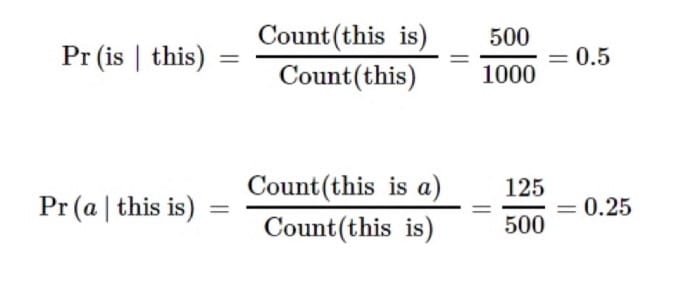
根据上面的要求,我们需要使用 MapReduce job,从 HDFS 读取前一个阶段生成的 ngram,计算所有单词和短语的语言模型,然后直接写入到 HBase 中。
- 需要自己设计 HBase 的 schema,也就是在某个短语后面出现某个单词的概率,也需要考虑界面展示,用户会输入一个短语,然后要显示一个预测下一个次的列表
- 集群可以直接使用上一步中开启的 EMR(如果没有关掉的话)
- 作为短语,出现次数必须大于 2 次才进行计算,不然就跳过
- 对于每个短语,保存 n 个最可能的输入,如果有概率相同的,按字母排序,n 的具体的数值由命令行参数指定,下面有一个排序的例子可以参考
- 使用
apache.commons.cli包中的GenericOptionsParser类来解析命令行参数 - 先在小数据上测试,没有问题才继续做
- EMR 每个小时不要超过
$2(使用on-demand 价格),也不要超过 5 个实例
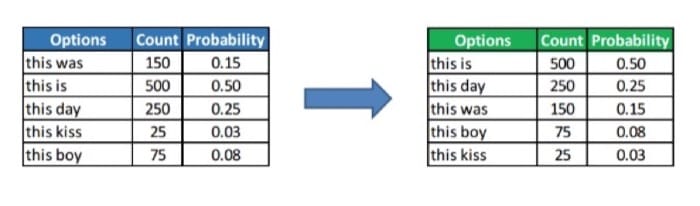
这一部分的 Mapper 和 Reducer 没有第一步这么直观,所以这里简要介绍一下我的思路。
Mapper
同样用上面的例子:
this                   1000
that is                   1
this is                 500
this is a               125
我们要做的实际上就是把目前的键值对,拆成 phrase 和 word 的形式,但是这里有两个地方要注意:
- 如果 key 拆分之后只有一个单词,需要过滤掉
- 如果 value 为 1,需要过滤掉
然后我们要做的就比较简单了,假设 key 拆分之后有 n 个词,那么把前 n-1 词拼成 phrase,最后一个词作为 word,不过需要注意的是,还要把之前的计数加上去(不然就丢失信息了)
分别过一遍上面的四个例子
这里为了方便看,在 \t 两边各加了一个空格,实际上是不需要的
this \t 1000 -> 扔掉,key 只有 1 个单词
that is \t 1 -> 扔掉,value 为 1
this is \t 500 -> this \t is 500
this is a \t 125 -> this is \t a 125
Reducer
Reducer 这里主要需要进行的工作就是排序,另外因为需要直接写入到 HBase 中,建议使用 TableReducer。具体的步骤如下:
- 遍历一个 key 的 value,计算出出现的总次数
- 给 value 中的各个不同的 word 进行排序(虽然后面的 PHP 代码也有排序,但是这里需要选取前 n 个,所以还是得排序)
- 计算概率(需要除以总数),然后写入到记录中,包括单词和具体的概率
- 具体组织代码的形式要参考下一个任务中 PHP 代码的访问形式(我觉得尽量别改,面得增加复杂度)
工作日志
所用的命令参考
# HBase 建表
hbase shell
> create 'wp','data'
> list
> describe 'wp'
> exit
# 删除表
> disable 'wp'
> drop 'wp'
# 查询
> get 'wp', 'the'

# 创建文件夹
cd ~; mkdir lmodel; cd lmodel
# 这句在本地执行,复制代码
scp -i ../demo.pem ./LanguageModel.java hadoop@ec2-54-86-122-167.compute-1.amazonaws.com:~/lmodel/
# 拷贝相关 jar 包
cp /usr/share/aws/emr/hadoop-state-pusher/lib/hadoop-common-2.4.0-amzn-3.jar .
cp /usr/share/aws/emr/hadoop-state-pusher/lib/hadoop-mapreduce-client-core-2.4.0-amzn-3.jar .
cp /usr/share/aws/emr/hadoop-state-pusher/lib/hadoop-mapreduce-client-common-2.4.0-amzn-3.jar .
cp /usr/share/aws/emr/hadoop-state-pusher/lib/hadoop-annotations-2.4.0-amzn-3.jar .
cp /usr/share/aws/emr/hadoop-state-pusher/lib/commons-cli-1.2.jar .
cp /home/hadoop/hbase/hbase-0.94.18.jar .
# 浏览 jar 包
ls /usr/share/aws/emr/hadoop-state-pusher/lib/
# 编译
mkdir class
javac -classpath hadoop-common-2.4.0-amzn-3.jar:hadoop-mapreduce-client-core-2.4.0-amzn-3.jar:hadoop-mapreduce-client-common-2.4.0-amzn-3.jar:hadoop-annotations-2.4.0-amzn-3.jar:hbase-0.94.18.jar:commons-cli-1.2.jar -d class LanguageModel.java
# 生成 jar 包
jar -cvf languagemodel.jar -C ./class .

# 重新编译系列脚本
rm -r class/*
rm languagemodel.jar
javac -classpath hadoop-common-2.4.0-amzn-3.jar:hadoop-mapreduce-client-core-2.4.0-amzn-3.jar:hadoop-mapreduce-client-common-2.4.0-amzn-3.jar:hadoop-annotations-2.4.0-amzn-3.jar:hbase-0.94.18.jar:commons-cli-1.2.jar -d class LanguageModel.java
jar -cvf languagemodel.jar -C ./class .

# 在 jar 包所在的文件夹
# 测试数据集,注意是根据前面的文件夹来设置参数的
# 没有 output 文件夹,因为直接写入到 hbase
hadoop jar languagemodel.jar LanguageModel /data/test
# 完整数据集
# [1st period 1+4] 19:42-20:00
# [2nd period 1+4] 20:18-20:40
# [3rd period 1+4] 20:58-21:22
# [4th period 1+4] 20:40-21:02
# [5th period 1+4] 21:12-21:34
# [6th period 1+4] 23:37-23:59
# [7th period 1+4] 00:10-00:32
# [8th period 1+4] 00:36-00:48
# [9th period 1+4] 00:55-01:07
hadoop jar languagemodel.jar LanguageModel /data/ngram
任务 3 用 web 展示语言模型
总体的架构为
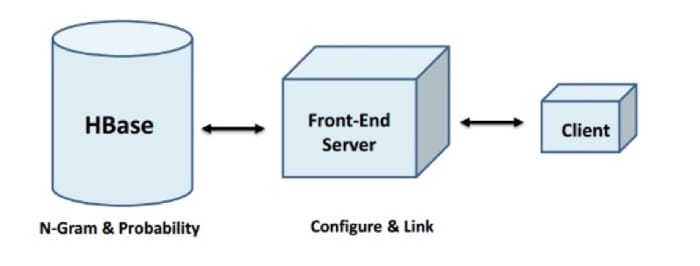
SSH 到 master 节点,开启 HBase 的 RESTful API 服务 hbase-daemon.sh start rest,开启/重启 Apache 服务 sudo service httpd restart。
用下面的命令下载样例代码并启动对应服务
sudo su
cd /home/hadoop/hbase/bin
./hbase-daemon.sh start rest
cd /var/www/html
wget https://s3.amazonaws.com/15-319-s16/proj4_web.tgz
# 解压文件,这里包含 样例代码和submitter
sudo tar xzf proj4_web.tgz
# 如果遇到权限问题,执行
sudo chmod -R 777 /var/www/html/
sudo chmod -R 777 /var/www/html/proj4_web
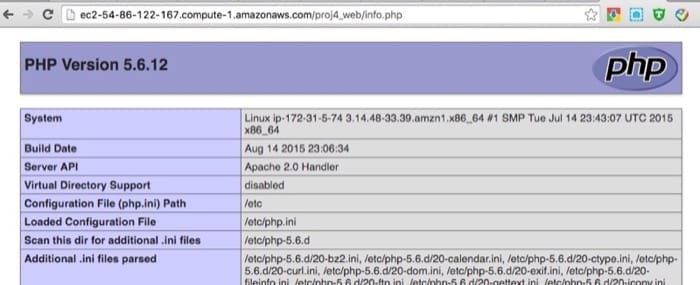
开启服务之后,可以访问 http://masterdns/proj4_web/info.php 来测试(注意安全组允许所有流量)。如果不能见到正常的页面,重启 apache 服务器并查看 /var/log/httpd/error_log 中的错误日志。
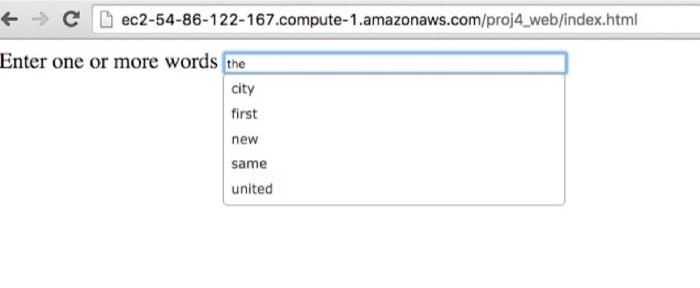
需要修改的代码是 request.php,输入测试的页面是 http://masterdns/proj4_web/index.html
我们把代码下载下来
scp -i ../demo.pem hadoop@ec2-54-86-122-167.compute-1.amazonaws.com:/var/www/html/proj4_web/request.php ./scp -i ../demo.pem hadoop@ec2-54-86-122-167.compute-1.amazonaws.com:/var/www/html/proj4_web/index.html ./
需要修改的部分有:
- 表名(和生成语言模型中的一样)
- 列族名(和生成语言模型中的一样)
- EMR Master 的 DNS
上传回去 scp -i ../demo.pem ./request.php hadoop@ec2-54-86-122-167.compute-1.amazonaws.com:/var/www/html/proj4_web/index.html
我们只需要在 PHP 代码中根据自己设计的 schema 来进行修改对应接口即可(master 的 dns,表名,列名)。默认的设计中,短语是 rowkey,所有可能出现的单词是对应的列(这句话我还是不懂到底 schema 是什么)
完成之后应该可以看到一些推荐结果:
需要把文件复制过来,命令为
# 在 submitter 所在文件夹
cp /home/hadoop/lmodel/LanguageModel.java .
cp /home/hadoop/ngram/WordCount.java .
# 创建一个文件存命令
vim command
# 提交
./submitter
特别提醒
这次的作业有两个评分组件
- 任务 1 中 ngram 使用
ngram_submitter - 任务 2 与 3 中使用
submitter
需要把所有的 MapReduce 代码放到与 submitter 同一个文件夹统一进行提交
额外任务 单词自动完成
这一部分是额外任务,用户输入单词的一部分,给出最可能的完整单词
- 使用 Wiki 数据集来统计每个单词出现的次数,确保完成了数据清洗工作(和前面一样)
- 用 HBase 来保存模型(类似前面的语言模型)
- 输入是一部分的单词,展示的结果是自动完成的建议(给出 5 个单词建议),界面和之前 ngram 的类似
- 使用
wget https://s3.amazonaws.com/15-319-s16/bonus_submitter下载,并用bonus_submitter来提交(注意各种代码也要一并附上)
一个例子,如果输入是 carne,那么建议可能是 carnegie, carney, carnes, carneiro and carnell
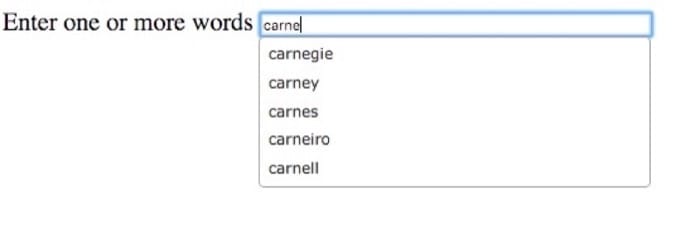
具体需要完成的有
- 用之前 WordCount.java 的代码生成 1-gram,并保存到结果中
- 计算模型
- Mapper 部分:假设一个键值对是
abcd \t 1,那么需要变成a \t abcd 1,ab \t abcd 1,abc \t abcd 1(这里在\t两边加了空格,实际不需要) - Reducer 部分:针对每个 key,的所有 value,进行排列,并保存到数据库中
- Mapper 部分:假设一个键值对是
- 具体怎么测试还没弄清楚,得研究一下 PHP 代码,但感觉应该是和前面的两步无关的
# 这句在本地执行,复制代码
scp -i ../demo.pem ./BonusWordCount.java hadoop@ec2-54-86-122-167.compute-1.amazonaws.com:~/bonus/
scp -i ../demo.pem ./BonusWordModel.java hadoop@ec2-54-86-122-167.compute-1.amazonaws.com:~/bonus/

# 编译 bonuswordcount
mkdir class
javac -classpath hadoop-common-2.4.0-amzn-3.jar:hadoop-mapreduce-client-core-2.4.0-amzn-3.jar:hadoop-mapreduce-client-common-2.4.0-amzn-3.jar:hadoop-annotations-2.4.0-amzn-3.jar -d class BonusWordCount.java
# 生成 jar 包
jar -cvf bonuswordcount.jar -C ./class .
# 测试数据集
hadoop jar bonuswordcount.jar BonusWordCount /ngramtest /bonusoutput
hadoop fs -cat /bonusoutput/part-r-00000

# 完整数据集
# [1st period 1+4] 10:48-10:54
hadoop jar bonuswordcount.jar BonusWordCount /ngram /bonusresult

# 编译 bonuswordmodel
cp /usr/share/aws/emr/hadoop-state-pusher/lib/commons-cli-1.2.jar .
cp /home/hadoop/hbase/hbase-0.94.18.jar .
rm -r class/*
rm bonuswordcount.jar
rm bonuswordmodel.jar
javac -classpath hadoop-common-2.4.0-amzn-3.jar:hadoop-mapreduce-client-core-2.4.0-amzn-3.jar:hadoop-mapreduce-client-common-2.4.0-amzn-3.jar:hadoop-annotations-2.4.0-amzn-3.jar:hbase-0.94.18.jar:commons-cli-1.2.jar -d class BonusWordModel.java
jar -cvf bonuswordmodel.jar -C ./class .

# 测试数据集
hadoop jar bonuswordmodel.jar BonusWordModel /bonusoutput
# 完整数据集
# [1st period 1+4] 11:00-11:02
hadoop jar bonuswordmodel.jar BonusWordModel /bonusresult

# 在 submitter 文件夹
wget https://s3.amazonaws.com/15-319-s16/bonus_submitter
cp /home/hadoop/bonus/BonusWordModel.java .
cp /home/hadoop/bonus/BonusWordCount.java .
chmod 777 bonus_submitter
./bonus_submitter
参考资料
相关文章
- 【不周山之云计算】壹 云平台初探2017-05-26
- 云计算 阅读材料 22 Message Queues and Stream Processing2016-04-22
- 云计算 第 21 课 Kafka / Samza 动手玩2016-04-18
- 云计算 第 20 课 Spark / GraphLab 动手玩2016-04-11